Desktop and document folders missing from home folder

I have recently updated to MacOS Sequoia on my M2 Ultra MacStudio. I want to backup my Desktop folder and Documents folder using “drag and drop” onto an external ssd. However when I open my Home folder on the internal SSD (Macintosh HD > user > name > ) the two folders are not there. Only downloads, Movies, Music, Public, and a couple of others are there. What am I doing wrong?


Mac Studio, macOS 15.3

Posted on Mar 28, 2025 9:24 AM

Reply
Question marked as Top-ranking reply

Posted on Mar 28, 2025 9:33 AM

choonhtan wrote:

I have recently updated to MacOS Sequoia on my M2 Ultra MacStudio. I want to backup my Desktop folder and Documents folder using “drag and drop” onto an external ssd. However when I open my Home folder on the internal SSD (Macintosh HD > user > name > ) the two folders are not there. Only downloads, Movies, Music, Public, and a couple of others are there. What am I doing wrong?


https://discussions.apple.com/content/attachment/0c52d683-0ccd-4c56-be30-0d6ac2ab8488


Sounds like iCloud Drive got turned on...


Spin open the caret iCloud. Make changes in Finder>Settings if you do not see it(?)
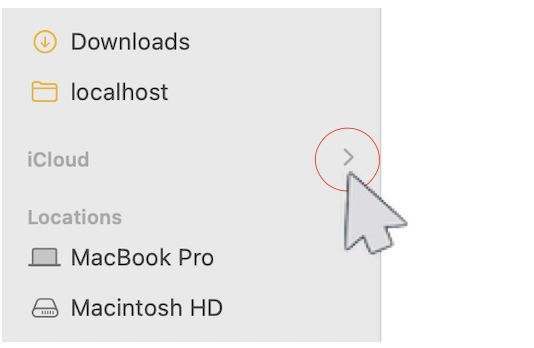


look for your files there.

Set up iCloud Drive - Apple Support

Set up iCloud Drive - Apple Support


Add your Desktop and Documents files to iCloud Drive - Apple ...

Add your Desktop and Documents files to iCloud Drive - Apple Support


iCloud drive missing desktop and documents


What happens when you turn off iCloud Drive or sign out of iCloud

Add your Desktop and Documents files to iCloud Drive - Apple Support


Recover deleted files on iCloud.com

Recover deleted files on iCloud.com - Apple Support


How to Restore Your Desktop and Documents After Disabling ...

https://www.howtogeek.com/273629/how-to-restore-your-desktop-and-documents-after-disabling-icloud-sync-in-macos-sierra/


How to find your Documents and Desktop folder contents after disabling ...

https://www.macworld.com/article/3396119/how-to-find-your-documents-and-desktop-folder-contents-after-disabling-icloud-sync.html

Finder>Go>Go to Folder>copy & paste:

~/iCloud Drive (Archive)


iCloud Drive (Archive) - here you should find all your files


4 replies
Question marked as Top-ranking reply

Mar 28, 2025 9:33 AM in response to choonhtan

choonhtan wrote:

I have recently updated to MacOS Sequoia on my M2 Ultra MacStudio. I want to backup my Desktop folder and Documents folder using “drag and drop” onto an external ssd. However when I open my Home folder on the internal SSD (Macintosh HD > user > name > ) the two folders are not there. Only downloads, Movies, Music, Public, and a couple of others are there. What am I doing wrong?


https://discussions.apple.com/content/attachment/0c52d683-0ccd-4c56-be30-0d6ac2ab8488


Sounds like iCloud Drive got turned on...


Spin open the caret iCloud. Make changes in Finder>Settings if you do not see it(?)


look for your files there.

Set up iCloud Drive - Apple Support

Set up iCloud Drive - Apple Support


Add your Desktop and Documents files to iCloud Drive - Apple ...

Add your Desktop and Documents files to iCloud Drive - Apple Support


iCloud drive missing desktop and documents


What happens when you turn off iCloud Drive or sign out of iCloud

Add your Desktop and Documents files to iCloud Drive - Apple Support


Recover deleted files on iCloud.com

Recover deleted files on iCloud.com - Apple Support


How to Restore Your Desktop and Documents After Disabling ...

https://www.howtogeek.com/273629/how-to-restore-your-desktop-and-documents-after-disabling-icloud-sync-in-macos-sierra/


How to find your Documents and Desktop folder contents after disabling ...

https://www.macworld.com/article/3396119/how-to-find-your-documents-and-desktop-folder-contents-after-disabling-icloud-sync.html

Finder>Go>Go to Folder>copy & paste:

~/iCloud Drive (Archive)


iCloud Drive (Archive) - here you should find all your files


Mar 30, 2025 3:53 AM in response to FoxFifth

@ FoxFifth

Thank you for your quick response. Yes, I'm on iCloud. I have considered turning off iCloud temporarily to get the Desktop folder visible in the home folder, but the last time I did that, the icons are rearranged neatly on a grid on the right half of the screen when I turned on iCloud Drive again. This doesn't work for me as I like the scattered "order in madness" way I arrange the icons on the screen. Perhaps due to working in the creative services for too long I have developed woolliness in my neural network. I shall wait and see. Cheers.

This thread has been closed by the system or the community team. You may vote for any posts you find helpful, or search the Community for additional answers.

Desktop and document folders missing from home folder

Welcome to Apple Support Community
A forum where Apple customers help each other with their products. Get started with your Apple Account.