A Tale of 3 MBAs and a Printer

The MBAs

• M2 MBA 15"

• M3 MBA 15"

​• M4 MBA 13" (brand new this week)


All three are running Tahoe and have the latest printer drivers installed


The printer

• Epson L360 Series (USB inkjet)


The M2 and M3 MBAs can print to the Epson printer.

The M4 MBA cannot print to the Epson printer.


All three MBAs can print to Canon and Brother Wireless printers


The M4 seems to start to print to the Epson, but gets stuck forever on "Sending data to printer"


What we've tried:


• Reset the printing system

• Remove and reinstall the printer

• Reboot the M4

• Turn off and unplug the printer, wait a bit, start up again


Nothing has worked. Any ideas?

MacBook Air (M4, 2025)

Posted on Oct 21, 2025 2:25 PM

Reply
Question marked as Top-ranking reply

Posted on Oct 22, 2025 5:13 PM

This is an old printer and no longer supported by Epson. It was introduced in 2015, ten years ago. Epson’s drivers for the L360 only support up to macOS 12 Monterey. It’s no surprise that it has finally become incompatible with macOS.


“Nothing has worked, Any ideas? Yes, buy a new printer. Sorry

67 replies

Nov 14, 2025 4:31 AM in response to Buadhai

Good news first: the beers are an attractive alternative.


If I try to print directly from the Pi it just prints garbage which indicates to me that I have the wrong driver.


Yes. Printing directly from the Pi would be the first and most fundamental step before adding it as a shared printer. The show-stopper is not the fact it is not shared; that's getting ahead of yourself. Put that aside for now, but I believe the reason it is not shared is that it's a global setting in CUPS, under Server Settings:
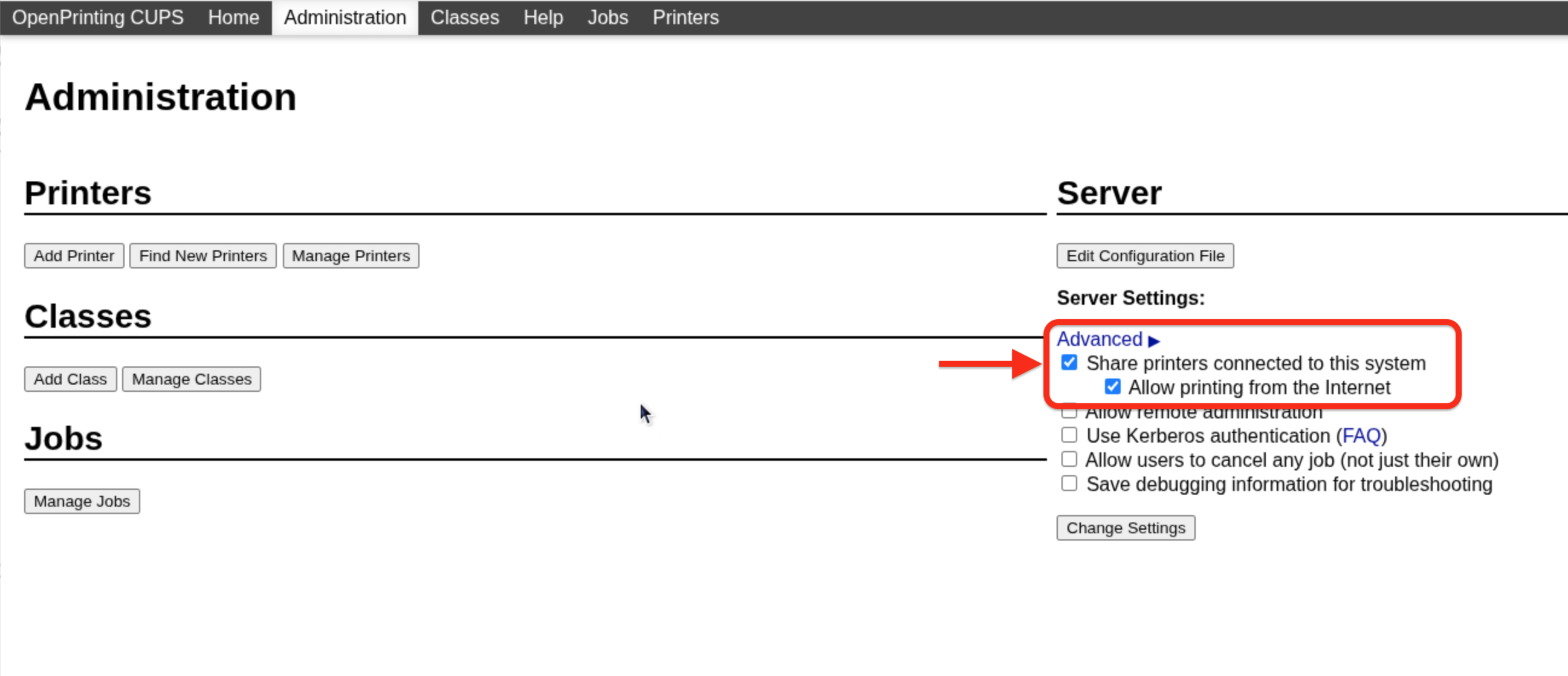

Select that first, and the Sharing concern should be fixed. "Allow printing from the Internet" is probably a bad idea but not important right now either.


A caveat applies to the rest of these screenshots: I do not have any USB-only printers to test, having seen the light back when Brother did in 2007. Everything since then has been required to be AirPrint-compatible, and I am certainly not one the the elite few on the planet with a USB-only L360. I only have USB to serial adapters, so ignore the "Connection" entries in the following. The point is that once you add the printer (inoperative driver notwithstanding) having it appear as "Shared" should not be a concern.


Oddly enough I have an a selection for an Epson L310 which yours doesn't.
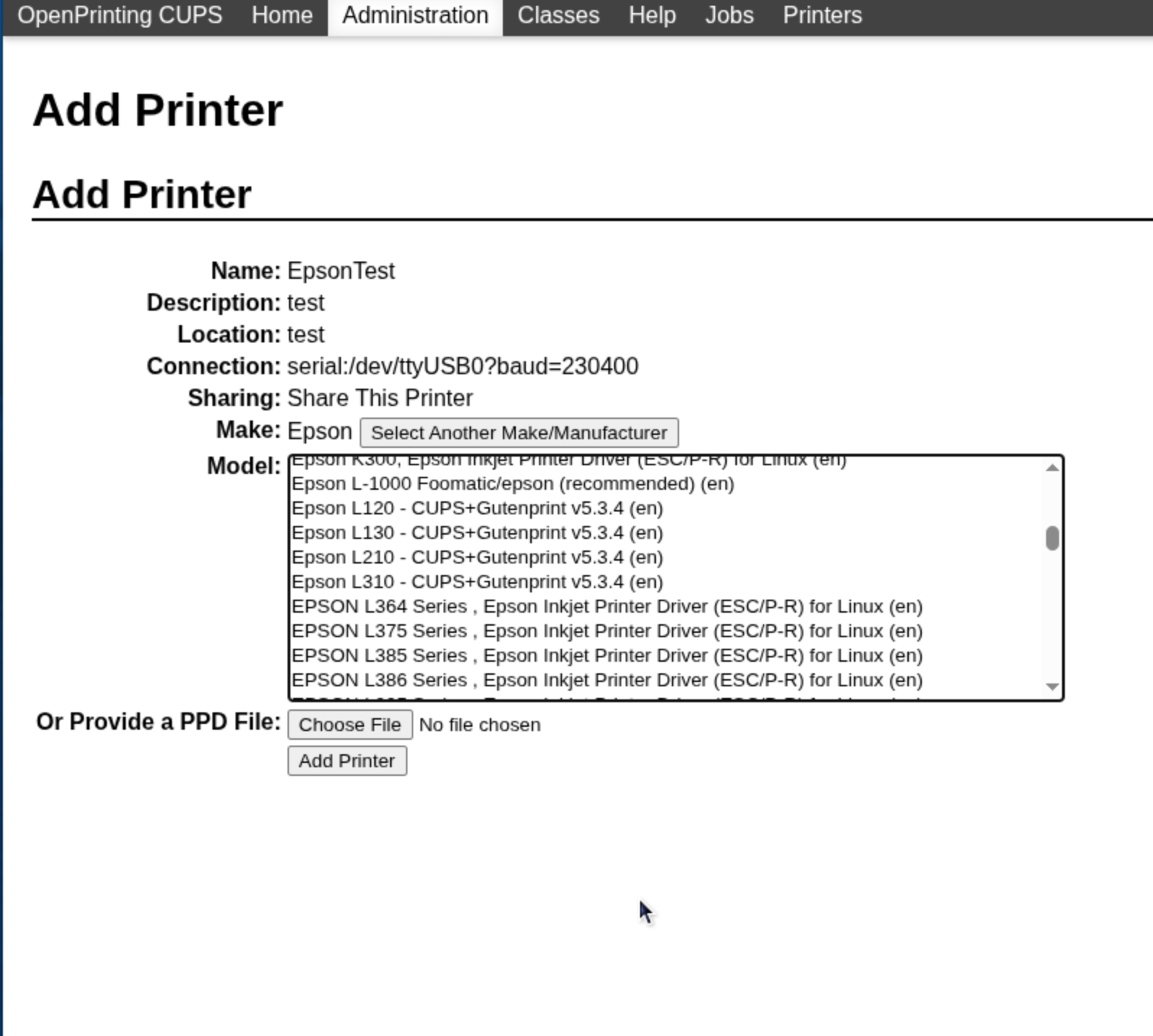


So close. I think that's the crux of the problem. The list is alphabetized and goes directly from the L310 to the L364. L360 notably absent. More about that later.
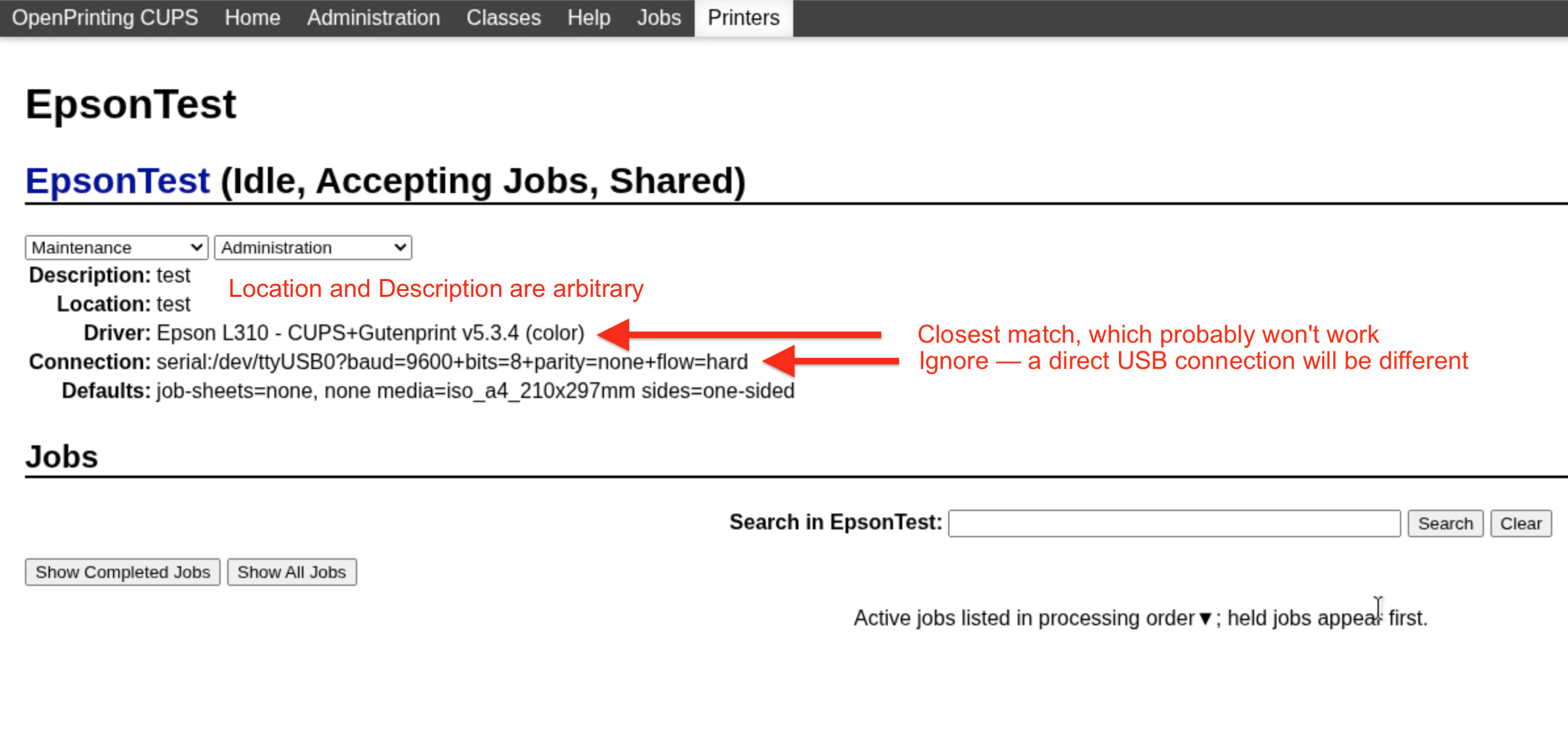

So there you have a successful printer addition on the Pi, but not the right driver. After adding a driver that works, the Pi will print to the L360, and the rest (adding that shared printer to Printers & Scanners) will work.


Unfortunately this brings us to the bottom of my limited well of knowledge. The limit is I do not know how printer drivers get added to Ghostscript. I do know some drivers are incorporated within it, while others are somehow brought into it through user contributions. l can tell you is that Artifex owns Ghostscript and has sole control of how things get added to it.


To proceed, your marching orders are as follows. Contact Artifex and find out where to go from there. Specifically, find out how to add the Epson L360 to that list of printers, because I don't know exactly how that gets done any more. Chris Liddell is the guy who helped me in the past, but I don't know if he is still involved with that organization (I seriously doubt it). I wish I could get you started in that direction with additional contact names and suggestions but Ghostscript has become big business. What started off as a small community has become a behemoth, and in so doing sort of lost its way and original vision of bringing open source printing to the masses.


Maybe others interested can come up with some suggestions, but I believe that is the exigent task before you will be able to proceed.


Nov 14, 2025 6:56 PM in response to John Galt

Took us a while to get there, though, didn't it?


Here's my wife's final solution.


She will keep the Epson at her office and use it mainly for its superb color copies and for the scanner. Both the copier and scanner functions work fine.


If she needs to print in color she will take her 15" MBA to the office. It prints fine with the Epson.


I am instructed to spend no more time on this matter as it seems to have a foul effect on my mood.

Oct 24, 2025 6:31 PM in response to John Galt

How attached are we to the printer? Apparently not much. When my wife saw the time and agony I've spent on this she said, "just watch football". On the other hand, not knowing why is hard for me to accept.


I've never used the printer. My wife is an attorney and, as you might imagine, prints a lot. The need for color printing is somewhat limited. But, I have to admit that the thing makes beautiful color copies of documents. The other day I saw one she had made of a document with an embossed gold seal. The seal on the copy was stunningly real looking.


Oct 25, 2025 6:21 PM in response to John Galt

when the M4 wouldn't print we upgraded it and the M3 to Thahoe and installed Epsons MacOS26 diver.
Installed the driver on both the M3 and M4? Not that it matters, it's also completely reasonable. Yet the M3 continues to print whereas the M4 won't.

Yes, upgraded both to Tahoe and installed the MacOS 26 Epson driver on each.


The problem I'm about to run in to is time. The printer is at home and we won't get there until late Wednesday. That just gives me a few days to tinker until my wife recalls both the M4 and the printer so that she can continue to engage in remunerative activity. Oddly, she doesn't much care as to why something doesn't work. Now that she has the M4 as a travel machine she'll probably leave the 15" M3 at the office where it can print to the Epson. That's all the solution she appears to need.

Oct 29, 2025 3:46 PM in response to Buadhai

Some gems from the cups error log. Note that the Canon printer has been removed and is no longer installed. According to Google, cnipzd refers to Canon printers.


D [30/Oct/2025:05:24:37 +0700] [Client 2] No authentication data provided.

E [22/Oct/2025:14:44:23 +0700] [Job 21] Unable to queue job for destination 
"ipp://Things.local:631/printers/CanonMF4400w".

E [23/Oct/2025:06:40:38 +0700] [cups-deviced] PID 3068 (cnipzd) stopped with status 86!
E [23/Oct/2025:06:58:39 +0700] [Job 41] Job held for authentication.
E [23/Oct/2025:06:59:11 +0700] [Job 41] Job held for authentication.
E [23/Oct/2025:07:02:26 +0700] [Job 42] Job held for authentication.

Nov 1, 2025 8:09 PM in response to Buadhai

I know it's not helpful in this case, but the first thing I pictured when I saw the title of the post, and the only thing that jumps into my mind is 3 middle managers standing around a printer trying to figure out how to make it work...


After almost 40 years working in IT, I have am of the opinion that no-one with any kind of business degree should be allowed within 10 feet of any piece of technology more advanced than an abacus.

Nov 3, 2025 7:51 PM in response to Buadhai

More printer drama. Today was my wife's first day back in her office since last week. She took her new M4MBA with her. She wanted to print with her Canon MF270. We had already downloaded and installed the Tahoe driver from Canon. When she tried to add the printer:


We have to travel today so no chance to figure this out.


Yuck.

Nov 12, 2025 8:50 AM in response to MrHoffman

"Epson Workforce WF-2860 has AirPrint support:"


And I don’t use AirPrint with it, UBS only. Again, when added the print system had two options, AirPrint or USB. The Epson shows up as two printers to select from, wireless or USB. I didn’t go to Epson to download a driver kit. My old HP 1022 LaserJet was added the same way years ago and both continue to work.


So when Apple replied to @Buahdai saying Epson had not provided drivers to them what does that mean then? Boilerplate nonsense?


I constantly read contradicting information and claims about printers and printer drivers and I don't know what to think. All I know is that over many years every printer I bought had no issues being added to macOS and function properly.


Maybe I’m just one lucky dude but I don’t think so.


And FWIW my HP 1022 (USB, no network) works wirelessly even though it has no such capability. I’ve been using a software printer server called Printopia for years on the HP.

A Tale of 3 MBAs and a Printer

Welcome to Apple Support Community
A forum where Apple customers help each other with their products. Get started with your Apple Account.
