Tahoe OS on MacAir 2025 with M3 chip Lags, Lags, Lags, and track pad freezes

I have tried re-installing Tahoe OS as per the posted instructions and this has NOT cured the problem.


The system constantly lags. The cursor disappears. The track pad freezes.


I feel like I'm back in the old days, using a dial up modem and with no hard-drive or something.


I am working mostly just with my email open and Pages.


I cannot work on my computer like this.


Please Apple, fix Tahoe!


[Edited by Moderator]

MacBook Air 13″, macOS 14.6

Posted on Nov 9, 2025 4:48 AM

Reply
Question marked as Top-ranking reply

Posted on Nov 9, 2025 5:00 AM

Apple is not here to read your request


These are User to User Forums


Part 1 of 2


Restart in Safe Mode. This will perform a Disk Repair, clear cache files and only load Apple Software, extensions and fonts. The boot up will be slow and can take some time - Normal.


Safe Mode will also eliminate Third Party Software, extensions and drivers from loading. It will only load the Minimum amount of Core Apple Processes to allow the the computer to function at a reduced Level of Performance 


Does the issue present in this mode ?


Sometimes a Safe Boot followed by a Normal Boot will just put things right.


If not - there could be something in the main User Account playing up. To further isolate this - Set up users, guests, and groups on Mac. Then log out of the Main User account and log into the dummy account and test again if the issue persists.


If the issue is present in the dummy account - then, this appears to be a System Wide issue on the computer.


Part 2 of 2


To Drill Down further and to avoid a session of Q&A, Q&A  and Q&A  


Download the Application Etrecheck  ( External Link ) directly from the Developer.


The Application is Not a " Silver Bullet "  and is  only a tool to examine the Hardware / Software used on this computer 


This is a Diagnostic Tool that makes no changes to the computer Hardware / Software used on this computer 


The application is free or paid from added features. 


The Report will Not Reveal Any Personal Information. 


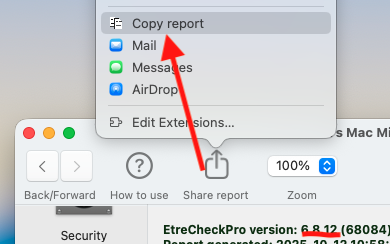
Post back the Full Report - copy and paste - >>>> using the Additional Text Icon ( 3rd Icon to last ) <<<<




15 replies
Question marked as Top-ranking reply

Nov 9, 2025 5:00 AM in response to alicefromwash

Apple is not here to read your request


These are User to User Forums


Part 1 of 2


Restart in Safe Mode. This will perform a Disk Repair, clear cache files and only load Apple Software, extensions and fonts. The boot up will be slow and can take some time - Normal.


Safe Mode will also eliminate Third Party Software, extensions and drivers from loading. It will only load the Minimum amount of Core Apple Processes to allow the the computer to function at a reduced Level of Performance 


Does the issue present in this mode ?


Sometimes a Safe Boot followed by a Normal Boot will just put things right.


If not - there could be something in the main User Account playing up. To further isolate this - Set up users, guests, and groups on Mac. Then log out of the Main User account and log into the dummy account and test again if the issue persists.


If the issue is present in the dummy account - then, this appears to be a System Wide issue on the computer.


Part 2 of 2


To Drill Down further and to avoid a session of Q&A, Q&A  and Q&A  


Download the Application Etrecheck  ( External Link ) directly from the Developer.


The Application is Not a " Silver Bullet "  and is  only a tool to examine the Hardware / Software used on this computer 


This is a Diagnostic Tool that makes no changes to the computer Hardware / Software used on this computer 


The application is free or paid from added features. 


The Report will Not Reveal Any Personal Information. 


Post back the Full Report - copy and paste - >>>> using the Additional Text Icon ( 3rd Icon to last ) <<<<



Nov 9, 2025 4:54 AM in response to alicefromwash

It is possible there are processes running in the background that are using significant resources. Check Activity Monitor, CPU tab, sort by % CPU to see what's running hard.


Activity Monitor User Guide for Mac - Apple Support


Most likely there is something running on your Mac that isn’t completely compatible with Tahoe. See if the problem is present when you boot in safe mode, which disables 3rd party extensions and performs some system cleanup.


Start up your Mac in safe mode - Apple Support


Nov 9, 2025 8:09 AM in response to alicefromwash

Applications -> Utilities -> Activity Monitor -> View (menu) -> All Processes -> CPU (tab)


Applications -> Utilities -> Activity Monitor -> View (menu) -> All Processes -> Memory (tab)


Keep Activity Monitor running. When the issue occurs, check the Activity Monitor CPU and Memory tabs. See if there is a process or processes using excessive amounts of CPU or Memory.


What you describe has me leaning towards excessive Memory usage, but it could be CPU and or both.

Nov 10, 2025 4:56 AM in response to alicefromwash

alicefromwash wrote:

seriously?
try reading the whole thread of my comments instead of just casting shadow.

As long as we are comparing Apples to Apples


Using a 15" M4 MBA with 16 GB Unified RAM and 500 GB SSD drive


It arrived , July 21, 2025, as Brand New with macOS Sequoia 15.5


Since that time it has undergone several Sequoia updates and upGraded to macOS 26.0, to 26.0.1 to current Tahoe 26.1


None of the issues you have described have occurred


We deal with Computer Issue only - full stop


Should the user ( you ) decide to follow some of the advises already supplied - good


If you what to Drill Down even further on this computer issue


Download the Application Etrecheck  ( External Link ) directly from the Developer.


The Application is Not a " Silver Bullet "  and is  only a tool to examine the Hardware / Software used on this computer 


This is a Diagnostic Tool that makes no changes to the computer Hardware / Software used on this computer 


The application is free or paid from added features. 


The Report will Not Reveal Any Personal Information. 


Post back the Full Report - copy and paste - >>>> using the Additional Text Icon ( 3rd Icon to last ) <<<<


This is purely optional though is would give use some real and tangible evidence where some issues maybe coming from


Nov 9, 2025 7:19 AM in response to alicefromwash

alicefromwash wrote:

thank-you.
The default makes it impossible to follow conversations.

Yes you are very right 👍 that the Default Sort Order in these Forums are jumbled and not in a logical sequence


On this issue, we all agree


Unfortunately, we mere morals do not have control over the Default Order of questions


Though, as a user like yourself


If I exercise my privileges that we ALL possess


We >> you << can change the Sort Order to something else


Those instructions have been provided IF you choose to use them


We digress from the Computer issue which it is suggested we focus bacK ON


Tahoe OS on MacAir 2025 with M3 chip Lags, Lags, Lags, and track pad freezes

Welcome to Apple Support Community
A forum where Apple customers help each other with their products. Get started with your Apple Account.