Malware Blocked pop up

I can't seem to get rid of this Malware Blocked sign, which comes up every time I download anything.

Have taken screen grabs of the LaunchDaemons and LaunchAgent stuff which I was instructed to do online.


MacBook Pro 13″, macOS 15.6

Posted on Nov 25, 2025 11:05 AM

Reply
Question marked as Top-ranking reply

Posted on Nov 25, 2025 11:22 AM

asburyf1 wrote:

I can't seem to get rid of this Malware Blocked sign, which comes up every time I download anything.


What is "mulkey" ?


I see < sophos >


I see < com.trusteer.rapport.rapportd.plist > Trusteer Rapport a free security software


Uninstall all third party apps that are Cleaners/Optimizers/VPN/Anti-Virus

all known to cause issues on the macOS


Third party AntiVirus is not recommended— it typically does nothing but add issues to the macOS and competes directly with Apple’s own built in security:


macOS antivirus - Protecting against malware in macOS - Apple Support

Security and your Apple Account Security and your Apple Account - Apple Support

Apple Platform Security - Apple Apple Platform Security - Apple Support


Protecting against malware in macOS

Protecting against malware in macOS - Apple Support


5 replies
Question marked as Top-ranking reply

Nov 25, 2025 11:22 AM in response to asburyf1

asburyf1 wrote:

I can't seem to get rid of this Malware Blocked sign, which comes up every time I download anything.


What is "mulkey" ?


I see < sophos >


I see < com.trusteer.rapport.rapportd.plist > Trusteer Rapport a free security software


Uninstall all third party apps that are Cleaners/Optimizers/VPN/Anti-Virus

all known to cause issues on the macOS


Third party AntiVirus is not recommended— it typically does nothing but add issues to the macOS and competes directly with Apple’s own built in security:


macOS antivirus - Protecting against malware in macOS - Apple Support

Security and your Apple Account Security and your Apple Account - Apple Support

Apple Platform Security - Apple Apple Platform Security - Apple Support


Protecting against malware in macOS

Protecting against malware in macOS - Apple Support


Nov 25, 2025 1:03 PM in response to asburyf1

asburyf1 wrote:

Many thanks for your help. I've followed the steps below and it seems to have resolved the issue. Sometimes I think I'm not even aware that I am installing any of these things! But somehow they end up buried away. Appreciate your help and advice.


Good computing asburyf1 —


Appreciate your feedback. Others searching for the same issue will benefit in kind, recognizing the value.


Nov 25, 2025 11:27 AM in response to asburyf1

First start up in Safe Mode:

Start up your Mac in safe mode - Apple Support


Then remove all files in the red boxes. Yes, I agree with leroydouglas that all of those so called security apps should also be uninstalled. As you can see they did not help you at all. Anyways performing this step should resolve this initial problem for you and after deleting, restart again to exit safe mode and the pop up should not come back. If it does, then you will need to post those locations again.

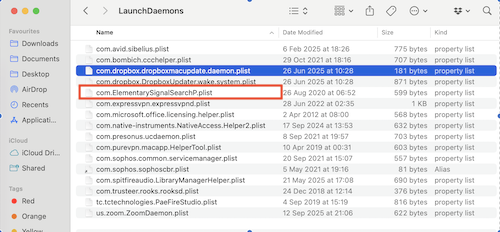

I know the pics are a bit small, and can repost if needed.


Malware Blocked pop up

Welcome to Apple Support Community
A forum where Apple customers help each other with their products. Get started with your Apple Account.

