Do not like OS 26.1 No ability to customize for my needs. Can anyone help?

I just got the IPhone 17 which I love but I do not love the OS 26.1 It is all show and no function. When I want to search safari or google the search bar is at the bottom of the screen forcing me to look at all the stuff Apple wants me to see. Same when searching my contacts. How can I change this to a search bar at the top of the screen????

Really annoying. Seems Apple cares more about looks than substance.

iPhone 17 Pro, iOS 26

Posted on Dec 1, 2025 3:12 PM

Reply
Question marked as Top-ranking reply

Posted on Dec 8, 2025 5:55 PM

DBesq wrote:

No. My issue is the search bar location is unable to be changed so that when I’m searching my contacts I have to enter a name on a search bar at the bottom of the screen but when searching Gmail I’m forced to search from a top search bar. No consistency and lots of info before I can even search . This all should be customizable.
but with Apple leadership abandoning the ship I guess we can’t expect any improvements despite the ridiculous cost of an IPhone today. The 16 pro max was the worst phone I have ever owned and I hear that all the time from friends. That’s why I got the 17 pro. Not much of an improvement

So your issues are more with just not liking the changes to iOS (which unfortunately there will always be changes to major iOS updates that some or many won’t like because it’s different than used to) based on your dislike of the location of the search bar for example. The difference in Gmail is going to be related to their App and is not something Apple would address (Google is the developer of the Gmail app) unless you are referring to using gmail via the Safari browser (again though, the settings for their website would be something Google would be responsible for, not Apple). You can submit feedback to Apple but the example you gave wouldn’t really be something anyone on here can assist with.


One place you can change the location of the search bar is by going to Settings, Safari, and change the option under Tabs from Compact or Bottom to Top. This is not going to do it universally for all other areas but it’s an example of where you can do it.


But if you are referring to searching inside the Contacts app I don’t know if changing it there is an option (just a quick look under settings for Contacts does not give an option for that). Even if Apple let you customize the location in more areas that would not apply to 3rd party apps (the app developer would be the one to submit feedback about issues or complaints when it comes to the way their apps behave).


As far as your opinion on the iPhone 16 Pro Max being the worst you have ever owned…that’s subjective. You may have friends that agree but there are millions of users that wouldn’t agree so that’s not a metric anyone can really address. Especially since you would have to clarify if it’s the worse for you due to actual hardware issues or if you just didn’t like the iOS (which wouldn’t have much to do with the device since for the most part it would be the same on all models that could have the same iOS version you may not like versus if the iOS version had not been updated to the one that you started to dislike things). You did say you loved the 17 you currently have so it seems to contradict that it isn’t much of an improvement to the 16 Pro Max unless you are really referring to the iOS and not the actual phone. So yeah…on that topic you’re either saying you had issues with the iOS version you had (assuming you felt this way prior to updated the 16 Pro Max to iOS 26…meaning you also didn’t like iOS 18) or you had actual hardware issues that were independent of the major changes that iOS 18 provided compared to iOS 17.

11 replies
Question marked as Top-ranking reply

Dec 8, 2025 5:55 PM in response to DBesq

DBesq wrote:

No. My issue is the search bar location is unable to be changed so that when I’m searching my contacts I have to enter a name on a search bar at the bottom of the screen but when searching Gmail I’m forced to search from a top search bar. No consistency and lots of info before I can even search . This all should be customizable.
but with Apple leadership abandoning the ship I guess we can’t expect any improvements despite the ridiculous cost of an IPhone today. The 16 pro max was the worst phone I have ever owned and I hear that all the time from friends. That’s why I got the 17 pro. Not much of an improvement

So your issues are more with just not liking the changes to iOS (which unfortunately there will always be changes to major iOS updates that some or many won’t like because it’s different than used to) based on your dislike of the location of the search bar for example. The difference in Gmail is going to be related to their App and is not something Apple would address (Google is the developer of the Gmail app) unless you are referring to using gmail via the Safari browser (again though, the settings for their website would be something Google would be responsible for, not Apple). You can submit feedback to Apple but the example you gave wouldn’t really be something anyone on here can assist with.


One place you can change the location of the search bar is by going to Settings, Safari, and change the option under Tabs from Compact or Bottom to Top. This is not going to do it universally for all other areas but it’s an example of where you can do it.


But if you are referring to searching inside the Contacts app I don’t know if changing it there is an option (just a quick look under settings for Contacts does not give an option for that). Even if Apple let you customize the location in more areas that would not apply to 3rd party apps (the app developer would be the one to submit feedback about issues or complaints when it comes to the way their apps behave).


As far as your opinion on the iPhone 16 Pro Max being the worst you have ever owned…that’s subjective. You may have friends that agree but there are millions of users that wouldn’t agree so that’s not a metric anyone can really address. Especially since you would have to clarify if it’s the worse for you due to actual hardware issues or if you just didn’t like the iOS (which wouldn’t have much to do with the device since for the most part it would be the same on all models that could have the same iOS version you may not like versus if the iOS version had not been updated to the one that you started to dislike things). You did say you loved the 17 you currently have so it seems to contradict that it isn’t much of an improvement to the 16 Pro Max unless you are really referring to the iOS and not the actual phone. So yeah…on that topic you’re either saying you had issues with the iOS version you had (assuming you felt this way prior to updated the 16 Pro Max to iOS 26…meaning you also didn’t like iOS 18) or you had actual hardware issues that were independent of the major changes that iOS 18 provided compared to iOS 17.

Dec 8, 2025 2:58 PM in response to SravanKrA

I agree with DBesq. I have been attempting to add custom labels to phone numbers I have just added after updating to iOS 26.1, and cannot find any way to do so. There is a fixed list of generic labels, but none of them allow me to add more specific labels. Old phone numbers prior to the update still retain their custom labels, but none of the suggestions I have tried in my online search allow me to create custom labels for new numbers. Is there a SPECIFIC setting I should check on my iPhone 16 Pro to get around this problem? Any other suggestions from the community?

Dec 8, 2025 3:20 PM in response to MrGentleMane4

MrGentleMane4 wrote:

I agree with DBesq. I have been attempting to add custom labels to phone numbers I have just added after updating to iOS 26.1, and cannot find any way to do so. There is a fixed list of generic labels, but none of them allow me to add more specific labels. Old phone numbers prior to the update still retain their custom labels, but none of the suggestions I have tried in my online search allow me to create custom labels for new numbers. Is there a SPECIFIC setting I should check on my iPhone 16 Pro to get around this problem? Any other suggestions from the community?

I just went and made a dummy contact listing and then went back to create a custom label for it as usual (by selecting the label as is, selecting Add Custom Label and typing one in). Are you saying you don’t have that option at all?


Dec 8, 2025 3:26 PM in response to MrGentleMane4

Each label you add in the Contacts app can be edited to display whatever you want. For example if you want to create a custom label for a phone number, first tap edit, then add a phone number. Tap on the label used for that number and on the bottom of the screen there is a button that says Add Custom Label. When add the name of that custom label, then you can choose that one for any other contact.


That works for all of the labels. The one you want to change depends on what kind of data you want to enter such as a Phone Number, Email Address, Related Name, URL, Date, etc.

Dec 8, 2025 4:45 PM in response to Mac Jim ID

No. My issue is the search bar location is unable to be changed so that when I’m searching my contacts I have to enter a name on a search bar at the bottom of the screen but when searching Gmail I’m forced to search from a top search bar. No consistency and lots of info before I can even search . This all should be customizable.

but with Apple leadership abandoning the ship I guess we can’t expect any improvements despite the ridiculous cost of an IPhone today. The 16 pro max was the worst phone I have ever owned and I hear that all the time from friends. That’s why I got the 17 pro. Not much of an improvement

Dec 9, 2025 6:52 AM in response to MrGentleMane4

MrGentleMane4 wrote:

I followed your pictures and instructions exactly, and with the new OS 26 I have no custom label choice at the bottom of the labels when attempting to change. It is not there. Here is a picture:
https://discussions.apple.com/content/attachment/58cb132e-7ebb-4eac-8e70-cb0d1249c75d

If you want to create a custom label for a phone number, then choose any one of the options you see there. Then when it is added, tap on it (which is blue) and on the bottom of that screen you will see the option to add a Custom Label for that new number you just added. The next time you add a phone number, you will be able to choose the Custom Label you just created.

Dec 1, 2025 8:53 PM in response to DBesq

Was your device Jailbroken? If that's the situation, please be informed that attributing the issues to iOS updates may not be accurate.


I have been updating my devices ever since I bought my first device in 2009. iPhone 3Gs, 4S, 5, 6, SE (1st Gen), 7, 8 and iPhone 12 Pro, iPad Pro, iPhone 13, Macbook Air 2019, MacBook Pro 16"
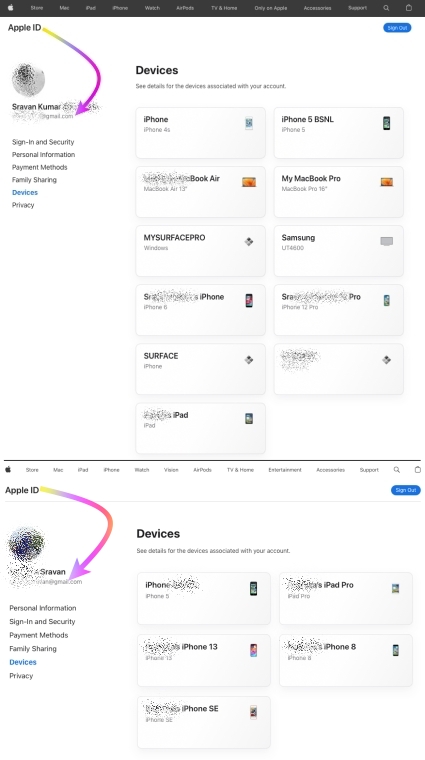


I never had any issues with any iOS, iPadOS, or macOS updates to date.


I would personally recommend everyone update their devices instead of listening to rumors from people who may not have kept their devices free from any spurious software.


iOS / iPadOS devices cannot be hacked or infected with Virus / Malware / Spyware if it is updated to the latest iOS/iPadOS unless you have intentionally downloaded spurious software or unauthorized apps directly from the internet and installed them on your device or/and have Jailbroken


iOS updates generally aim to enhance user experience, boost security, and fix bugs rather than disrupt core features. Issues after updates might stem from underlying, unmentioned factors. Updates won't typically alter personal data but may refine settings or features. Backup before major updates for safety. Review Apple's update details and backup advice for a smooth process.


This seems purely coincidental so please check the Setting on your device.


See what each update does: OS — iOS 26, About iOS 18 Updates, About iOS 17 Updates, About iOS 16 Updates, About iOS 15 Updates, About iOS 14 Updates, About iOS 13 Updates, About iOS 12 Updates, and so on...



Dec 8, 2025 6:06 PM in response to DBesq

You may have missed that my reply was to MrGentleMane4 who was looking for a way to customize the Contacts label and that solution was provided.


As far as the search bar, it is at the bottom, with the exception of Safari where you can change the tab type to place it at the top. Any third party app can place a search bar wherever they want, even in the middle of the screen if they choose. I haven't seen where a third party app lets you change the location of their search bar, and don't believe the Gmail app has that functionality either.


Previously the Search Bar was on the top, and there was also no way to change the location of the Search Bar in any of the previous iOS versions, so as far as customization there has been no change. You may be looking for a way to send Feedback to Apple, and you can do that here. To me it makes more sense to have it at the bottom where it is closer to the keyboard for typing.

Product Feedback - Apple


As for leadership change, I think it is a great improvement. With all the complaints about Siri functionality and the misstep last year incorporating user data with Siri for additional features, it is a brilliant move to retire the current person in charge in bring in Amar Subramanya who has impeccable credentials and previously the VP for AI at Microsoft and head of engineering for Gemini AI at Google. Kudos to Apple for making that change.


Do not like OS 26.1 No ability to customize for my needs. Can anyone help?

Welcome to Apple Support Community
A forum where Apple customers help each other with their products. Get started with your Apple Account.

