Image Capture on Tahoe cannot find my scanners

I have long used Image Capture to access and scan from either of two flatbed scanners attached to my local wireless network. After upgrading to Tahoe on a Mac Studio, the new Image Capture cannot discover either scanner. Both flatbed scanners are part of a multifunction printer and both printers are discovered and properly print. However, neither scanner is detected and when I open Image Capture the screen is empty and it just sits there (no devices, no shared). I thought maybe this was a security issue but I cannot find a way to authorize Image Capture to my local network. Is there something else I'm missing?

Mac Studio (2022)

Posted on Dec 16, 2025 7:56 AM

Reply
7 replies

Dec 16, 2025 8:07 AM in response to kmc60

You do not mention the scanner brand or models. Some multi-function device vendors have printer drivers and separate ICA (Image capture specific) drivers. The printer/scanner vendor must provide ICA drivers that are compatible with Tahoe or what you are experiencing may result where Image Capture does not see the scanner. Check the vendor site for ICA drivers released in Fall 2025. Failing that, you might want to check if the optional third-party VueScan Professional (free trial) supports your scanner function without any vendor drivers.


If your networked scanners are Apple AirPrint¹ compatible, then Image Capture will see them and you would no longer need any vendor driver support.


¹ For the new AirPrint site usage, first enter the Brand of the device, and when that produces screenfuls of results, use the secondary search window to enter the device model to narrow the search to determine if the device is AirPrint supported.

Dec 16, 2025 9:48 AM in response to VikingOSX

Thanks for the comments--interesting point on Airprint. First, the main scanner is part of a Brother multifunction and it does do Airprint, which I use regularly to print. Downloading a Brother app on my phone, it does work to scan. I downloaded the same app from the Mac appstore and it allows my Mac to scan. This is all despite Brother saying this printer is no longer supported post-Catalina (I assume that's due to lack of traditional driver). The other scanner is an Epson which does not do Airprint. Although I can print to it via Printers and Scanners, I have not yet found a way to scan from it.


So, I do appear to have a workaround for one using a Brother app. What's interesting is your comment above that Image Capture should be able to see it if it is AirPrint compatible. It does not work for me. Image Capture shows nothing in the case of either printer/scanner. I was hoping I could make that work and use it for both as prior. Is there no way to make this work?

Dec 16, 2025 10:11 AM in response to kmc60

We have but one scanner device (Epson Eco-Tank) but it shows in Image Capture on my M4 Pro Macbook Pro running 26.2 and on my and on my wife's iMac M4 running 26.1. We only buy printers and MFDs that have ethernet ports so they can be hardwired into our home network. Very fast and reliable.


However, my semi-retired 2012 Macbook Pro running 10.14 Mojave also "sees" the Epson wirelessly from another room.


Did this start with the initial release of Tahoe, or after one of the updates?


I wondered if this were an interference issue but, if so, should have shown up before Tahoe. Still, you might cast an eye on this Apple article: Resolve Wi-Fi and Bluetooth issues caused by wireless interference - Apple Support


I'd try restarting the computer. Seems like a lot of issue with Tahoe get resolved with a second restart after initial installation.


Dec 16, 2025 11:02 AM in response to kmc60

For that Epson scanner not being supported by AirPrint, your options to scan with it are 1) compatible Epson ICA driver, a Fall 2025 Epson Scan Utility, or VueScan Professional — if the latter supports your Epson scanner. If you scanner is supported in that link, click on its entry and scroll down to see if VueScan supports it without any vendor drivers, or a vendor scanning driver is required.

Dec 17, 2025 6:27 AM in response to Allan Jones

Allan Jones wrote:


However, my semi-retired 2012 Macbook Pro running 10.14 Mojave also "sees" the Epson wirelessly from another room.


Did this start with the initial release of Tahoe, or after one of the updates?


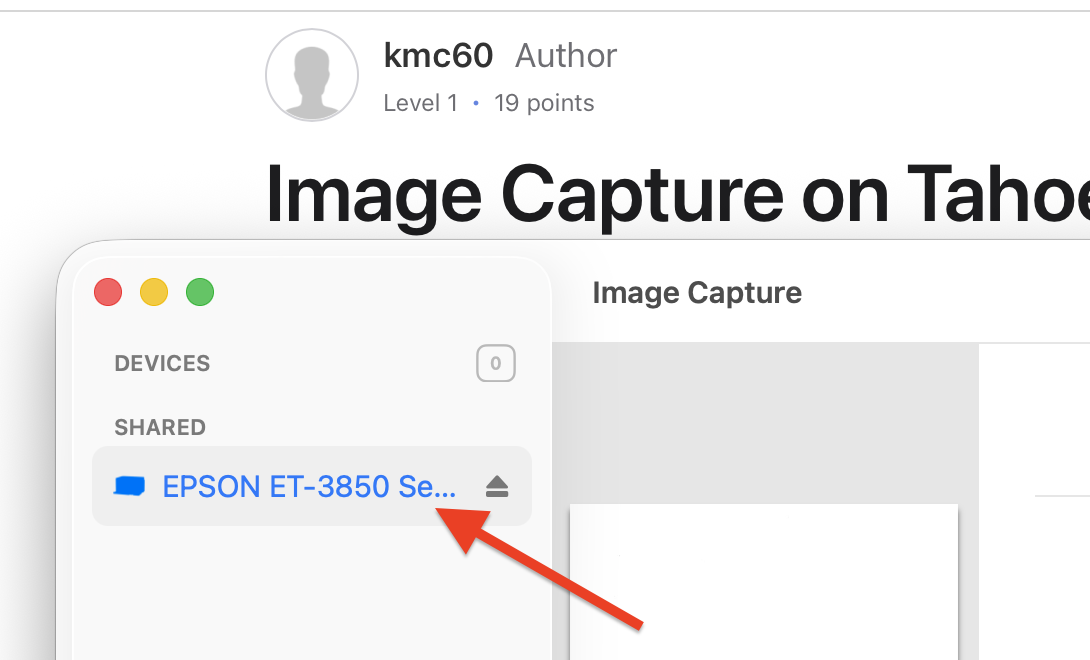
The above^ is a snapshot of Image Capture off my (Intel) iMac that I'm currently leaving since it is stuck at Ventura. Both of these two multi-function printers/scanners/etc are only attached wirelessly to my network and have been in use for printing and scanning (using Image Capture) across several versions of MacOS from a MBA, MBP, and iMac for a number of years. I'm currently moving all my stuff manually from my iMac to a new (to me) M1 Studio and Tahoe 24.2. It's on that machine that I find Image Capture cannot see a thing on the network.


I also just tried my other (M4) MBA running Sequoia--which I've never used for scanning. Image Capture upon first use sees both devices on the network. When I tried to use each one in the app, Sequoia had me grant rights to each scanner to see other devices on the network. Image Capture can scan from the Brother MFC-9340CDW without issue but has a failure to communicate with the Epson Artisan 810 (which I have not yet taken any time to debug).


VueScan does find and work with the Epson Artisan 810 (though not listed that I could see) on the Mac Studio...Thank You. I may go there if I run out of other options and cannot use what's natively on my Mac.


Dec 17, 2025 7:55 AM in response to kmc60

Wow. I'm experimenting on 3 different systems and getting inconsistent results all using Image Capture:


  • My Ventura iMac can see both devices in Image Capture. The Brother scanner works, while the Epson gets a communication error. 20 minutes later, I go back and try the Epson again (no changes, just tried again after typing on this post) and presto, it now scans the Epson fine.
  • 30 minutes ago, my Sequoia M4 MBA could see both devices in Image Capture and the Brother scanner worked while the Epson had a communication error. Upon reboot (no changes, just restarted it for kicks), Image Capture finds no devices at all. Finally, gave up and rebooted the MBA (this is the most recent thing I tried out of what I've relayed in this entire post) and now it sees both devices. It shows the familiar "Failed to open a connection to the device (-21345)" error on the Epson, while the Brother works again.
  • My Tahoe Mac Studio previously showed no devices. I re-installed the current ICA from Epson and rebooted. On reboot, it now sees the Epson scanner but gets a Comm error. I let it sit and go to sleep while I did another item. Came back, woke it up and suddenly I can connect and scan from the Epson. Still no sign of the Brother.


I know this sounds crazy...but it seems unstable and inconsistent as ****.


Although Epson continues to post drivers for my ancient scanner, Brother has now removed all MacOS drivers (printer and scanner) at some point, so no way to re-install the Brother ICA to the Mac Studio.


I'm not even sure what I'm asking anymore :-\

Image Capture on Tahoe cannot find my scanners

Welcome to Apple Support Community
A forum where Apple customers help each other with their products. Get started with your Apple Account.
