
How do I turn flashlight off on iPhone 11 Pro Max
How do I turn flashlight off on IPhone 11pro Max
[Re-Titled by Moderator]
How do I turn flashlight off on IPhone 11pro Max
[Re-Titled by Moderator]
There are a few ways you can turn your flashlight on or off. You can ask Siri, or use Control Center on iPhone X or later, or on an iPhone 8 and earlier, iPad, or iPod touch.
Ask Siri
Here are a few examples of what you can ask:

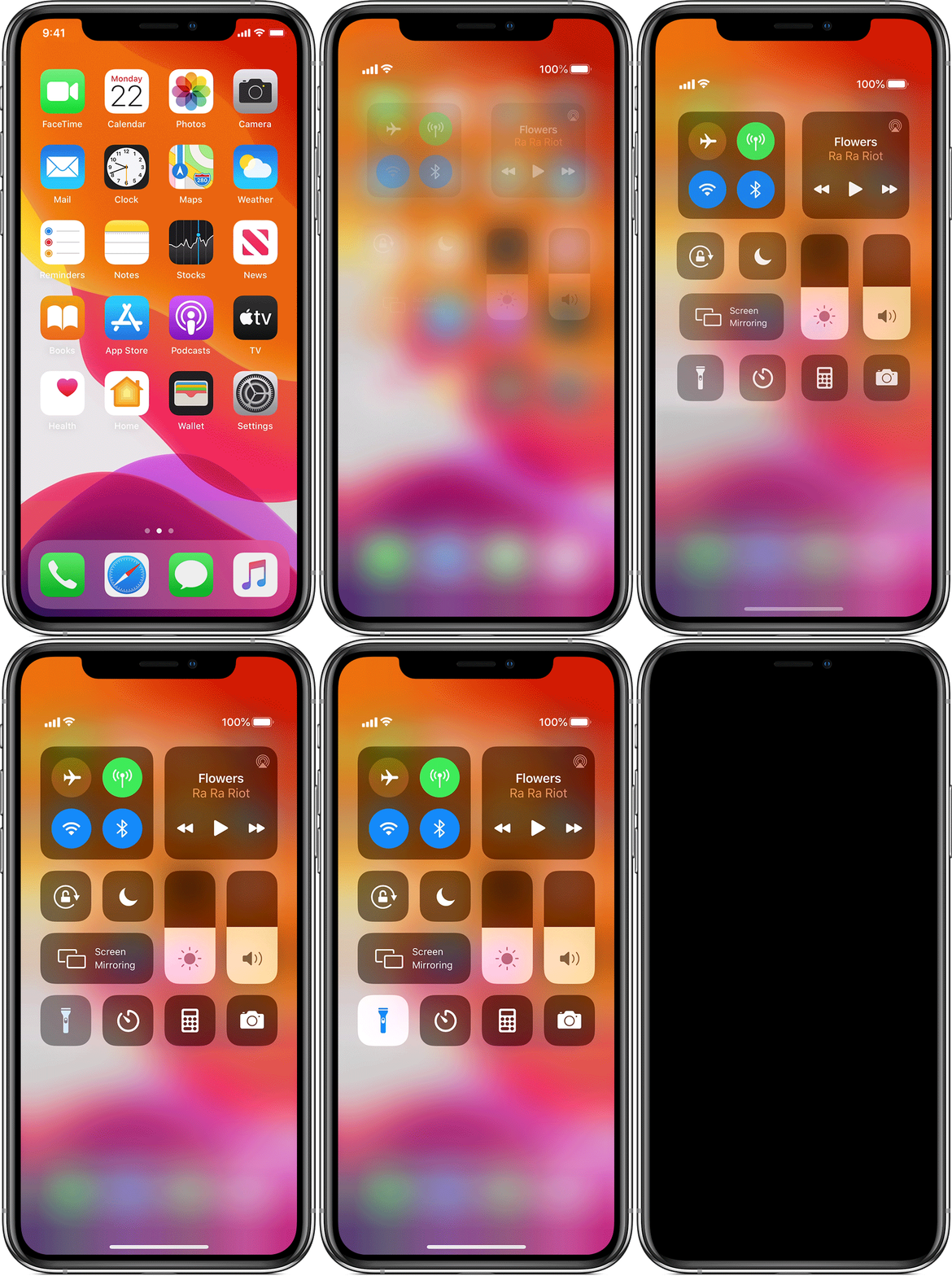
Use Control Center on iPhone X and later
 . again.
You can also turn on the flashlight from the Lock screen: Firmly press the Flashlight button , in the bottom-left corner.
There are a few ways you can turn your flashlight on or off. You can ask Siri, or use Control Center on iPhone X or later, or on an iPhone 8 and earlier, iPad, or iPod touch.
Ask Siri
Here are a few examples of what you can ask:
Use Control Center on iPhone X and later
. again.You can also turn on the flashlight from the Lock screen: Firmly press the Flashlight button , in the bottom-left corner.
How do I turn flashlight off on iPhone 11 Pro Max
