Problem when when we merge cells

Hello friends, We have an issue when we merge cells. Column A is forenames, Column B is surnames, but we needed forename and surname in the same column. So we used the built in "combine" to merge the two cell info into one.


We then needed to copy the info in the cell with the forename and the surname, but that don't work since the whole formula is hidden in that cell. How can we save a plain text, without the formula?

Thanks for helping us out!

MacBook Pro 13″, macOS 12.1

Posted on Jan 25, 2022 11:47 AM

Reply
Question marked as Top-ranking reply

Posted on Jan 25, 2022 2:07 PM

Selecting a cell, then pressing command-C or choosing Copy from the edit menu always copies the cell's contents (in this case a formula) and its style (format). You do have some control of what is then pasted.

Example:
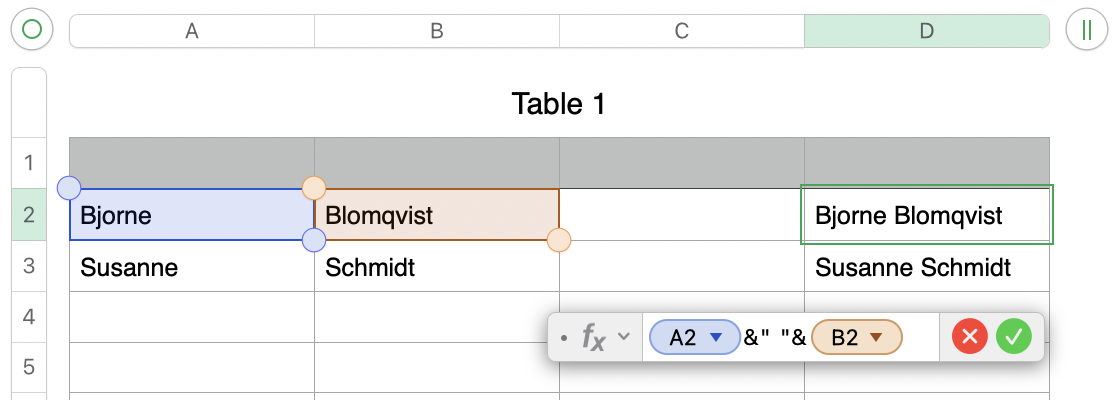

Original entered values in rows 1 and 2 of columns A and B

Formula in Editor shown as entered in D, and after clicking the green checkmark, filled down to D2.


All cells containing names in column D were selected, then copied using command-C.


After copying:

Selected (single click) the cell into which the first copied name was to be inserted.

This will differ from the location you want to paste the joined names)

Wen to Edit menu and chose "Paste Formula Results."
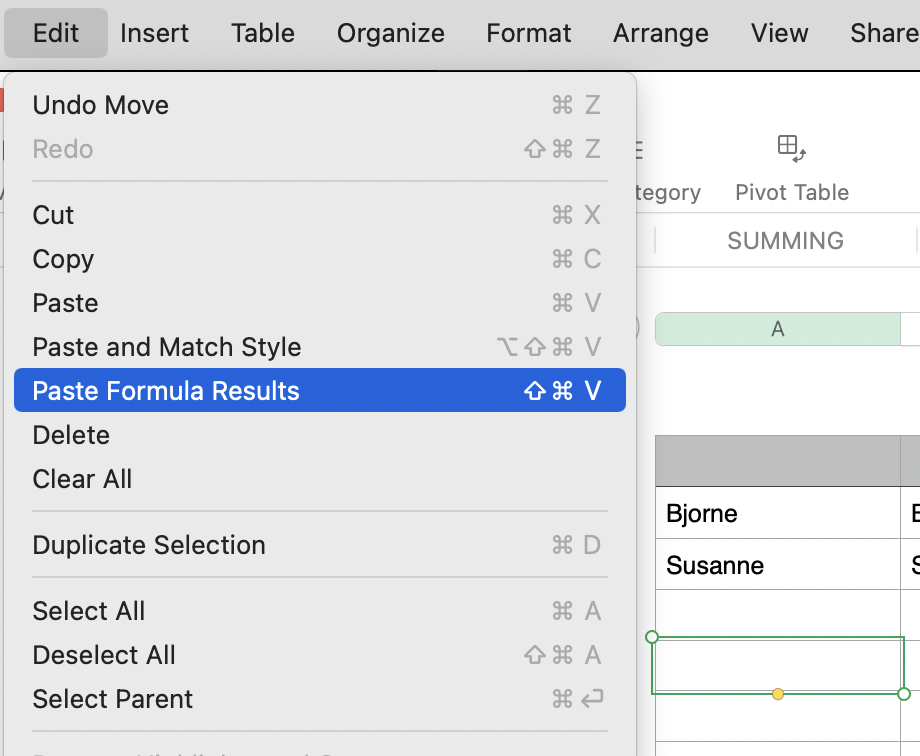


With this result:
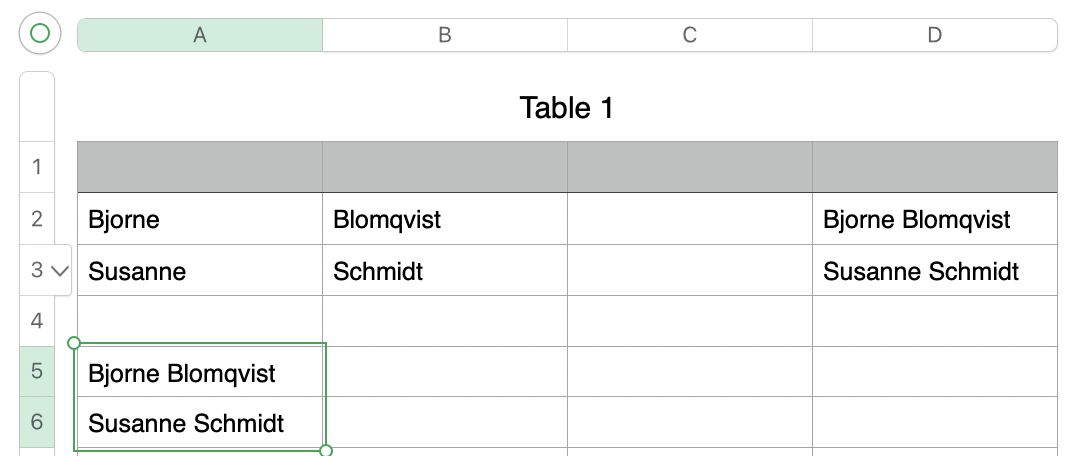
The selected cells contain the text shown, but NOT the formula that joined the names together


These could have been pastes after copying the full list from column D, then selecting cell A2 as the paste target for the first full name on the copied list, with the edited list then replacing the first names in column A,


OR after selecting D2 as the paste target for the edited list then replacing the formula in each of the cell that created the editend list.


Regards,

Barry

2 replies
Question marked as Top-ranking reply

Jan 25, 2022 2:07 PM in response to pablobianco

Selecting a cell, then pressing command-C or choosing Copy from the edit menu always copies the cell's contents (in this case a formula) and its style (format). You do have some control of what is then pasted.

Example:


Original entered values in rows 1 and 2 of columns A and B

Formula in Editor shown as entered in D, and after clicking the green checkmark, filled down to D2.


All cells containing names in column D were selected, then copied using command-C.


After copying:

Selected (single click) the cell into which the first copied name was to be inserted.

This will differ from the location you want to paste the joined names)

Wen to Edit menu and chose "Paste Formula Results."


With this result:

The selected cells contain the text shown, but NOT the formula that joined the names together


These could have been pastes after copying the full list from column D, then selecting cell A2 as the paste target for the first full name on the copied list, with the edited list then replacing the first names in column A,


OR after selecting D2 as the paste target for the edited list then replacing the formula in each of the cell that created the editend list.


Regards,

Barry

This thread has been closed by the system or the community team. You may vote for any posts you find helpful, or search the Community for additional answers.

Problem when when we merge cells

Welcome to Apple Support Community
A forum where Apple customers help each other with their products. Get started with your Apple Account.