Welcome!
How about some data? I love data. These are benchmark data from the MacTracker database, available free in the Mac App Store:
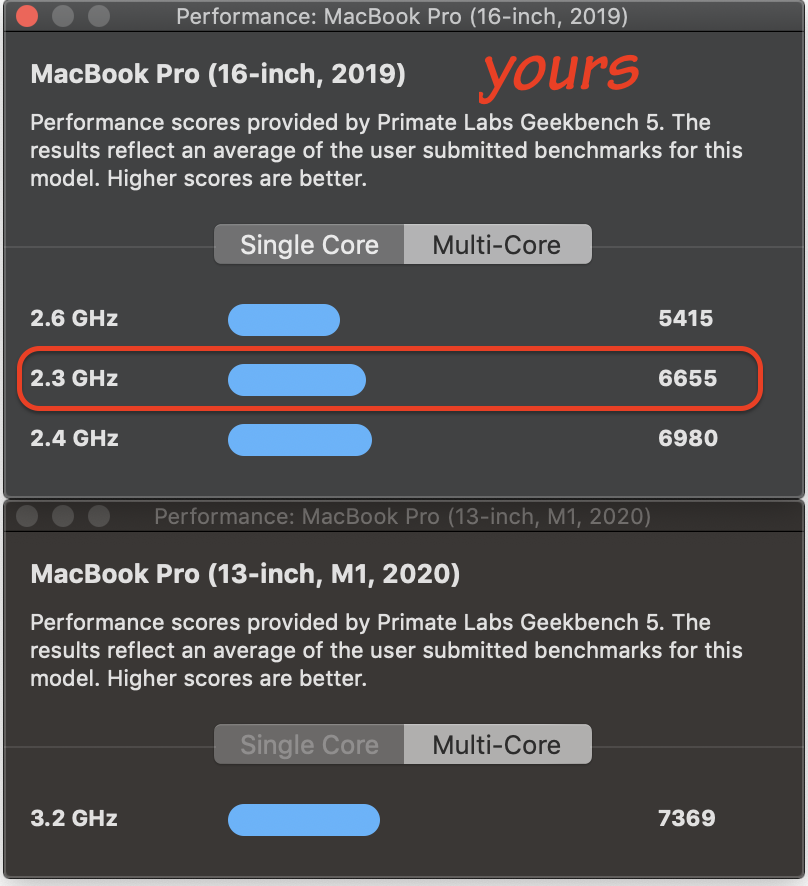
Those tests are usually for base models. However RAM amount does not seem to make a great differences in these results; storage transfer speeds are hugely more telling.
From EtreCheck drive reports I see posted here, the 2020 M1 has about a 10 percent faster data transfer to and from storage than the late-model Intel Macbook Pros. The difference above could be exactly that.
So, my pros and cons on the idea of changing:
Cons:
- The ~10% numerical difference in the scores above is, I doubt, enough for you to notice in everyday use.
- The 16GB RAM you now have is useful to Illustrator and Photoshop, which are not light-duty apps.
- The external monitor is going to make the computer work harder and hotter—thus the fan noise—on either model. Changing won't fix that.
- You can attach only one (1) external monitor to a 2020 M1 Macbook Pro
Pros:
- There are features† in macOS Monterey that only work on an Apple Silicon chipset.
- The 13-inch 2020 M1 I got to "babysit" while a friend was overseas last year showed impressive battery runtime.
As lobsterghost says, it's up to you. I've given you some data points to consider.
And, as for the fan issue, there are ways to mitigate that with your existing computer. Please post back with details on how you use the external, where the Macbook Pro is placed while feeding an external monitor--stuff like that.
† — see the footnotes to this Apple page for details: macOS Monterey - New Features - Apple




