Apple Watch Ultra workout no longer allows me to change the highlight to another metric like BPM

I just upgraded to the new Ultra. Now, when working out the workout app won’t let me scroll down to another metric like BPM which I can do in my older watch.

Apple Watch Ultra

Posted on Sep 23, 2022 9:30 PM

Reply
Question marked as Top-ranking reply

Posted on Sep 26, 2022 11:43 AM

Hi backdoc94,


We're happy to provide some assistance.


Based on your original post, we recommend the troubleshooting steps via the link below since it sounds like you want to personalize your workout views.


View and edit workout metrics on Apple Watch - Apple Support


To perform the troubleshooting actions recommended by the article above, please read through and complete the steps in the section titled "Personalize workout views."


The workout views you see depend on the kind of workout you’re doing. Cardio-focused workouts have more workout views by default, but you can edit some of them to suit your workout style.
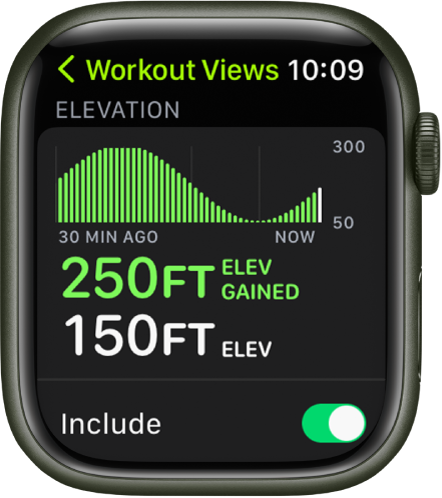
The Workout Views screen showing the Elevation metric. Near the top is a graph showing elevation increases and decreases over time. Below is the amount of elevation gained and the current elevation. At the bottom is the Include switch.

Open the Workout app  on your Apple Watch.

Turn the Digital Crown to the workout you want to do.

Tap the More button, tap the Edit button in any tile, then tap Workout Views.
Scroll through the workout views, then tap “Include” next to the metrics you want to appear during the workout.
To select the metrics that appear in the first two workout views, tap the Edit button in the Metric 1 or Metric 2 set, tap a metric, then choose a different metric.


The steps above will help you to personalize your workout views.


If the original problem persists after trying our suggested troubleshooting steps, provide us with specifics on what you see for more help, and we will continue from there.


Thanks for using the Apple Support Communities.


Cheers!

1 reply
Question marked as Top-ranking reply

Sep 26, 2022 11:43 AM in response to backdoc94

Hi backdoc94,


We're happy to provide some assistance.


Based on your original post, we recommend the troubleshooting steps via the link below since it sounds like you want to personalize your workout views.


View and edit workout metrics on Apple Watch - Apple Support


To perform the troubleshooting actions recommended by the article above, please read through and complete the steps in the section titled "Personalize workout views."


The workout views you see depend on the kind of workout you’re doing. Cardio-focused workouts have more workout views by default, but you can edit some of them to suit your workout style.

The Workout Views screen showing the Elevation metric. Near the top is a graph showing elevation increases and decreases over time. Below is the amount of elevation gained and the current elevation. At the bottom is the Include switch.

Open the Workout app  on your Apple Watch.

Turn the Digital Crown to the workout you want to do.

Tap the More button, tap the Edit button in any tile, then tap Workout Views.
Scroll through the workout views, then tap “Include” next to the metrics you want to appear during the workout.
To select the metrics that appear in the first two workout views, tap the Edit button in the Metric 1 or Metric 2 set, tap a metric, then choose a different metric.


The steps above will help you to personalize your workout views.


If the original problem persists after trying our suggested troubleshooting steps, provide us with specifics on what you see for more help, and we will continue from there.


Thanks for using the Apple Support Communities.


Cheers!

This thread has been closed by the system or the community team. You may vote for any posts you find helpful, or search the Community for additional answers.

Apple Watch Ultra workout no longer allows me to change the highlight to another metric like BPM

Welcome to Apple Support Community
A forum where Apple customers help each other with their products. Get started with your Apple Account.