Hi Apple-inquires,
For help with adding a contact to a group chat, first view the information about which messages you can add contacts from. The details below found in the article here will get you started. Add and remove people in group text messages on your iPhone or iPad
- "With iMessage, you can add someone to a group text message if there are three or more people in the group and everyone is using an Apple device. To remove someone, you need four or more people in the group.
- You can’t add or remove people in group SMS/MMS messages and you can't add or remove someone if anyone in the group uses a non-Apple device. Learn the difference between iMessage and SMS/MMS messages."
If this is an iMessage group text the steps below found in the same article will assist:
"How to add someone to a group text message
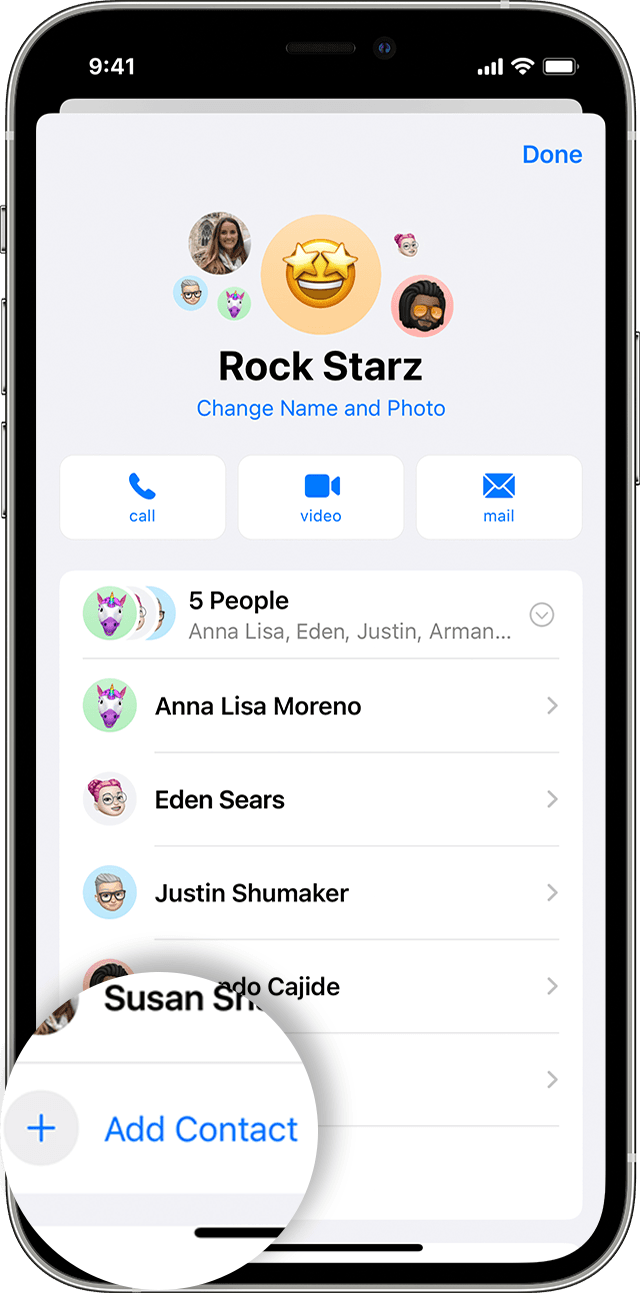
- Tap the group message that you want to add someone to.
- Tap the group icons at the top of the thread.
- Tap the gray arrow icon to the right of the contacts, then tap Add Contact
 .
. - Type the contact that you want to add, then tap Done."
You can also ensure your iOS is fully updated with the steps here: Update your iPhone or iPad
If you still don't see the option and all of the requirements are met, reach out to Apple Support directly to further assist.
Contact - Official Apple Support
Contact Apple for support and service - Apple Support
Best.


