All my downloaded music gone vanished shows I have to download it again? Wtf!!!

The song list is still there the albums are BUT all the music I downloaded says it’s not there and I have to download again! Wtf!!!!!

I haven’t missed a payment or anything but it’s all vanished off my phone! What gives??????? Now I’m supposed to download >35GB all over again? That’s going to take me days to weeks! I am very P.O. Right now!!!! What happened and how do I stop it from happening again?????????????? I had over 2500 albums downloaded! I stopped counting at letter E when I hit 1000 albums. This is unacceptable! You need to make it better do that music doesn’t just Vanish! I don’t know if iOS is the right option so to clarify all my downloaded music has vanished out of downloads on my iPhone in my Apple Music app. It was there this morning. I didn’t do anything to my phone at all (no settings adjustments or anything) and now tonight

its all gone! That is not acceptable. How do I keep it from happening again? What are you going to Fido to prevent it happening again?

iPhone 13 Pro, iOS 16

Posted on Mar 15, 2023 6:04 PM

Reply

Similar questions

1 reply

Mar 17, 2023 2:00 PM in response to CatP1999

Hello CatP1999,


We understand that you have a huge music library that has somehow disappeared. We'll do our best to assist you with restoring it. To clarify, do you have more than one device that is signed in with the same Apple ID? If so, does the music appear on that device? Did this occur after making any changes to your account or your device? Also, where did the music originate from? For example, did you download the music with your Apple Music subscription, was it purchased in iTunes or both? Having these details may be able to allow us to isolate the behavior.


In the meantime, we'd like to provide you with a few steps that may help to resolve this issue:

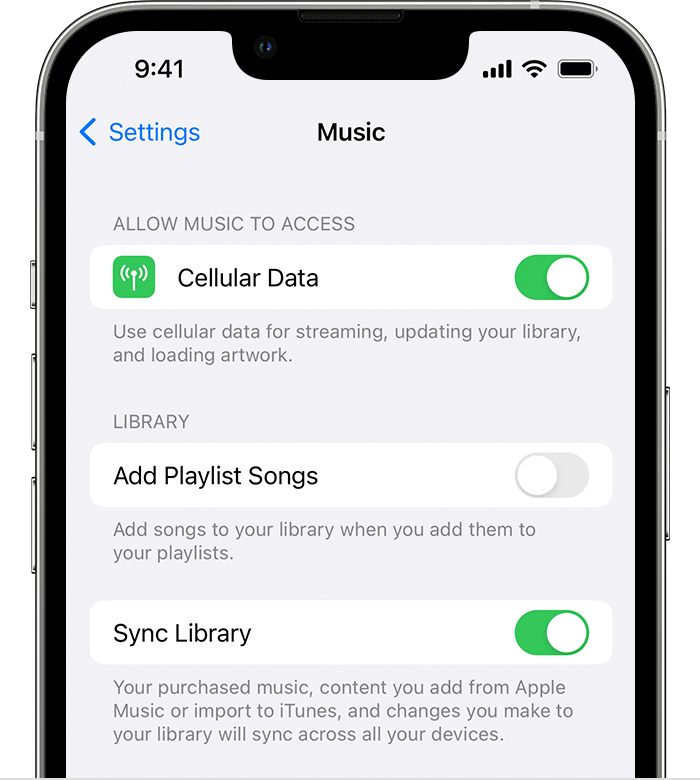
• If you Subscribe to Apple Music, toggle Sync Music Library off and back on again. (Completing this step refreshes your music library)

1. "Be sure that your iPhone is signed in with the same Apple ID that you use with your Apple Music subscription.

2. Go to Settings.

3. Tap Music.

4. Turn off Sync Library and back on again.

iPhone showing Music Settings and Sync Library turned on


• If music purchased from iTunes is missing

Learn how to find and download music that you purchased from the iTunes Store"


More details here: If songs are missing from your music library after you turn on Sync Library


Thanks for connecting with Apple Support Communities.

We look forward to your reply.


This thread has been closed by the system or the community team. You may vote for any posts you find helpful, or search the Community for additional answers.

All my downloaded music gone vanished shows I have to download it again? Wtf!!!

Welcome to Apple Support Community
A forum where Apple customers help each other with their products. Get started with your Apple Account.