
How to transfer photo captions from iPhone 13 Pro to MacBook Air?

How do you transfer photo captions from an iPhone 13 Pro (iOS 16.4.1) to a MacBook Air (M1, OSX 13.3.1)?

I've tried syncing with the Photos app and I've tried Airdrop with the Captions option selected – no joy.

I have hundreds of photos with captions from my travels with details about the photo or situation. I'm hoping that I don't have to recreate all of them by hand on my MacBook. Or, do I have to go into programmer mode and write some custom code to get this done? If so, surely somebody has already done this... Any help would be appreciated.

MacBook Air 13″, macOS 13.3

Posted on Apr 27, 2023 7:07 AM

Reply

Similar questions

1 reply

May 1, 2023 9:50 AM in response to RayfromFremont

Hello RayfromFremont,


Let's use the steps below to import your photos using Image Capture to see if that still persists:


1. Connect your device to your computer using a cable, then turn the device on.
You may be asked to unlock your device with a passcode or to trust the device.
2. In the Image Capture app  on your Mac, select the device in the Devices or Shared list.
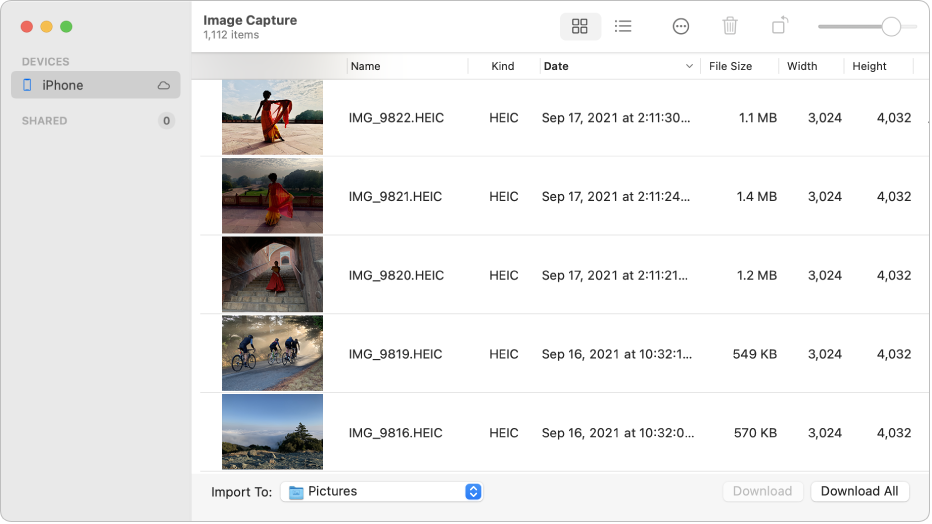
The Image Capture window showing pictures to be imported from an iPhone.
3. Use the tools in the Image Capture toolbar to change how the thumbnails are shown:
Increase or decrease the size of the thumbnails: Drag the slider. 
View images as a grid of larger thumbnails: Click the Icon view button
View images as a list: Click the List view button.
Rotate images: Click the Rotate button as many times as needed. To rotate the item to the right, press and hold the Option key, then click the button as many times as needed.
4. Select images, if you don’t want to import all of them.
5. Click the Import To pop-up menu at the bottom of the window, then choose where to save the images or to create a PDF or a webpage that contains them.
To download images to another location, choose Other, then choose a location.
6. Click Download (if you selected images) or Download All.
By default, items you download remain on your device. If you prefer to remove them from your device, click the Action button  in the Image Capture toolbar, then either deselect “Keep originals” or select “Delete after import” (the option available depends on the type of device you connected).


You can also find those steps in this resource: Transfer images in Image Capture on Mac - Apple Support That should help to isolate that behavior further.


Let us know how that goes, and we'll keep moving forward based on your results.

This thread has been closed by the system or the community team. You may vote for any posts you find helpful, or search the Community for additional answers.

How to transfer photo captions from iPhone 13 Pro to MacBook Air?

Welcome to Apple Support Community
A forum where Apple customers help each other with their products. Get started with your Apple Account.