How to reduce 120GB system data on Mac beyond clearing caches?

So, i have this system data built up from God knows what because catches is not one.

Ive tried to clear some space in my Mac but is futile. Very frustrating at this point because this SD is the biggest culprit of all, more than 120gb.

Pls help me with a diferent option than what i already found on youtube. Pls pls pls!!


[Re-Titled by Moderator]

Original Title: syatem data too big

Posted on Sep 14, 2025 12:10 AM

Reply
Question marked as Top-ranking reply

Posted on Sep 15, 2025 4:24 AM

mare131313 wrote:

So, i have this system data built up from God knows what because catches is not one.
Ive tried to clear some space in my Mac but is futile. Very frustrating at this point because this SD is the biggest culprit of all, more than 120gb.
Pls help me with a diferent option than what i already found on youtube. Pls pls pls!!

[Re-Titled by Moderator]
Original Title: syatem data too big

Let us guess how this happened


The Drive Capacity of this computer maybe of the 256 GB variety ?


Are we warm ?


The System Data mentioned, has a mount point of /System/Volume/Data which makes this Volume part of the Operating System


That said, it is not possible to reduce it - full stop


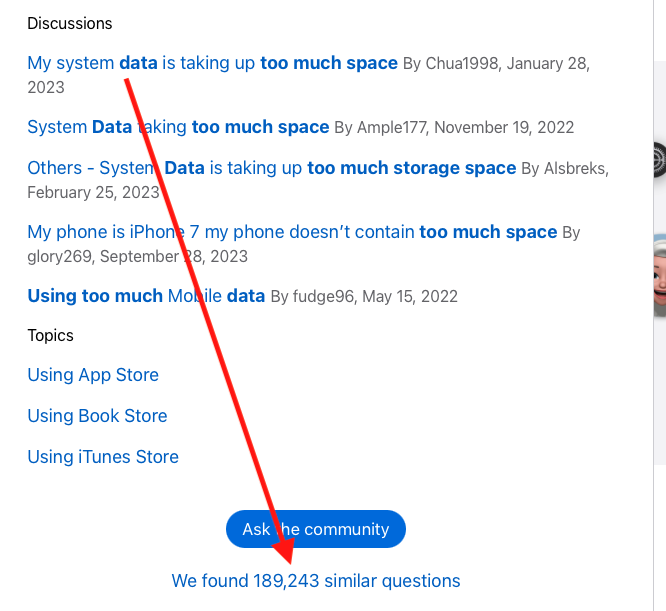
If you do a search on the front page of these forums using, System Data is using too much space


You will find this issue has been discussed at great length, refer image below


The more  popular and effective ways to address this issue is to Start Over from Scratch 


For Apple Silicon computer >> Use Disk Utility to erase a Mac with Apple silicon.


For Apple Intel computers >>   Use Disk Utility to erase an Intel-based Mac followed by How to reinstall macOS


Always make a Time Machine Backup  before  proceeding 


It is also suggest to  Only Migrating the User Account and nothing more.


Emphasis on User Account Only


Reinstall the Needed and not the Wanted applications from the Apple Apps Store or Directly from the Developers 


3 replies
Question marked as Top-ranking reply

Sep 15, 2025 4:24 AM in response to mare131313

mare131313 wrote:

So, i have this system data built up from God knows what because catches is not one.
Ive tried to clear some space in my Mac but is futile. Very frustrating at this point because this SD is the biggest culprit of all, more than 120gb.
Pls help me with a diferent option than what i already found on youtube. Pls pls pls!!

[Re-Titled by Moderator]
Original Title: syatem data too big

Let us guess how this happened


The Drive Capacity of this computer maybe of the 256 GB variety ?


Are we warm ?


The System Data mentioned, has a mount point of /System/Volume/Data which makes this Volume part of the Operating System


That said, it is not possible to reduce it - full stop


If you do a search on the front page of these forums using, System Data is using too much space


You will find this issue has been discussed at great length, refer image below


The more  popular and effective ways to address this issue is to Start Over from Scratch 


For Apple Silicon computer >> Use Disk Utility to erase a Mac with Apple silicon.


For Apple Intel computers >>   Use Disk Utility to erase an Intel-based Mac followed by How to reinstall macOS


Always make a Time Machine Backup  before  proceeding 


It is also suggest to  Only Migrating the User Account and nothing more.


Emphasis on User Account Only


Reinstall the Needed and not the Wanted applications from the Apple Apps Store or Directly from the Developers 



This thread has been closed by the system or the community team. You may vote for any posts you find helpful, or search the Community for additional answers.

How to reduce 120GB system data on Mac beyond clearing caches?

Welcome to Apple Support Community
A forum where Apple customers help each other with their products. Get started with your Apple Account.


