OK, that's why context matters. I don't see how relative references or INDIRECT() is going to help here.
Instead, I think you need an IF() statement to compare the day of this row to the day of the previous (or next) row. If they are the same then you know you have a second work shift on the same day, so you don't need to add the day's allocation.
I'm thinking something like this where I added some additional columns to help show the idea:
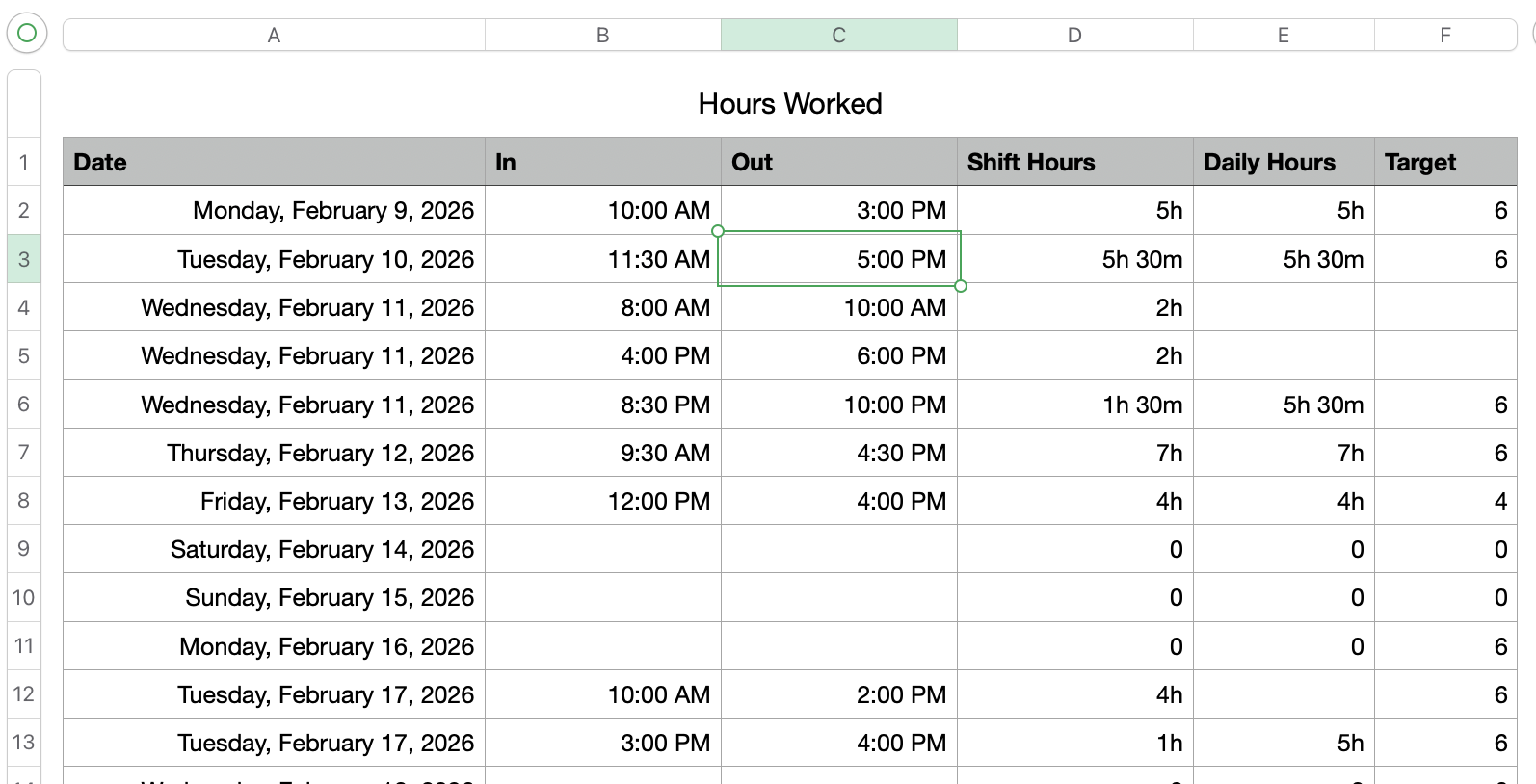
In this table, columns A, B, C, and F match your original template.
(Note that columns B and C are set as Duration cells, which is important when doing time-based calculations.)
Column D is a simple calculation that Subtracts the In time from the Out time to get a number of hours worked on this entry. e.g. cell D2 is simply:
=C2-B2
The first piece of magic comes in cell E2. The formula here is:
=IF(A2=A3,"",SUMIF(A,A2,D))
This says that if the cell A3 (the date of the next shift) is the same as A2 (the date of this shift), then return an empty string. Otherwise, if A3 and A2 are different, add up the values in Column D ("Shift Hours") whose value in column A matches the value in A2.
In other words, this adds up the values of the shifts that match the current date in column A, and only does this for the last shift/row on any given day.
Fill this column down and you'll get the sum of hours worked for each distinct day in column A (you may need to play some games with the last row in the table since it won't have a working day - just create a dummy row with some far-future date, or amend the formula to compensate).
The second piece of magic is column F. For this you need a LOOKUP to find the number of hours that should be worked this day. For that, I did something similar to what I did with the Daily Hours column, and set F2 to:
=IF(A2=A3,"",XLOOKUP(DAYNAME(A2),Target Hours::A,Target Hours::B,0,0,1))
This says that IF the date of this row matches the date in the next row then return an empty string (nothing to do here), otherwise, perform an XLOOKUP where it takes the DAYNAME() of the value in cell A2 and looks that value up in column A of the 'Target Hours' table. For any match, return the corresponding value from column B in the Target Hours table.
This will fill in the expected number of hours based on the DAYNAME() of the date in column A, as long as the next row in the table has a different date. Thus surpassing the value showing multiple times for multiple shifts in the same day.
From here it should be easy to add another column that compares the Daily Hours with the Target hours and flag any days that are over/under, but that's a separate project :)