Weather widget not working in Tahoe

On my iMac, the default widget for the Weather app was working up until a few weeks ago. Now I get an error message, simply saying "weather unavailable." This appears in the widget and in the desktop app, although I am still able to get custom readings for cities stored in the app. I thought upgrading Tahoe to 26.0.1 might solve the issue, but it remains. My attempts to refresh the default widget have failed thus far, and I am at a loss on what to do now.

iMac 24″, macOS 26.0

Posted on Oct 15, 2025 1:03 PM

Reply
Question marked as Top-ranking reply

Posted on Oct 16, 2025 9:14 AM

Don Goldberg1 wrote:

On my iMac, the default widget for the Weather app was working up until a few weeks ago. Now I get an error message, simply saying "weather unavailable." This appears in the widget and in the desktop app, although I am still able to get custom readings for cities stored in the app. I thought upgrading Tahoe to 26.0.1 might solve the issue, but it remains. My attempts to refresh the default widget have failed thus far, and I am at a loss on what to do now.


Apple Weather app is unavailable check that Location Services is enabled for it in Settings...


Toggle some changes, then come back to your preferred settings.
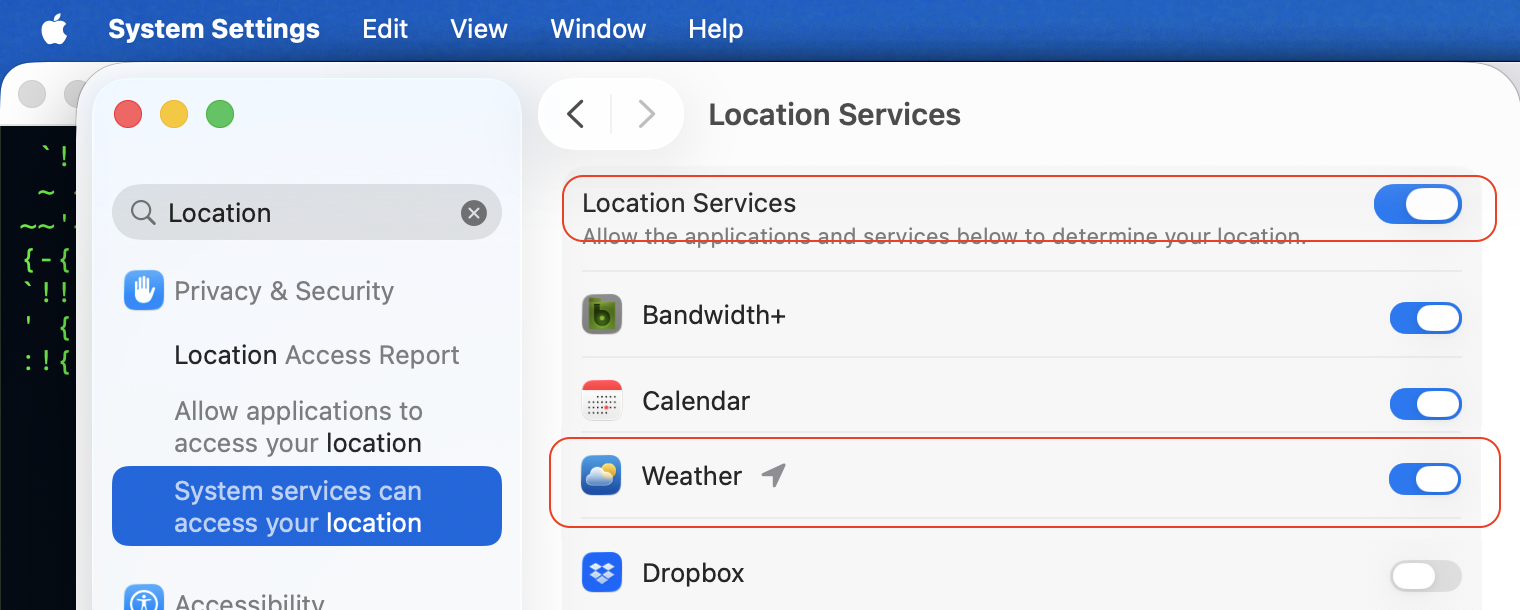


Same for Date & Time ie automatic for Location Toggle some changes, then come back to your preferred setting and compare your results
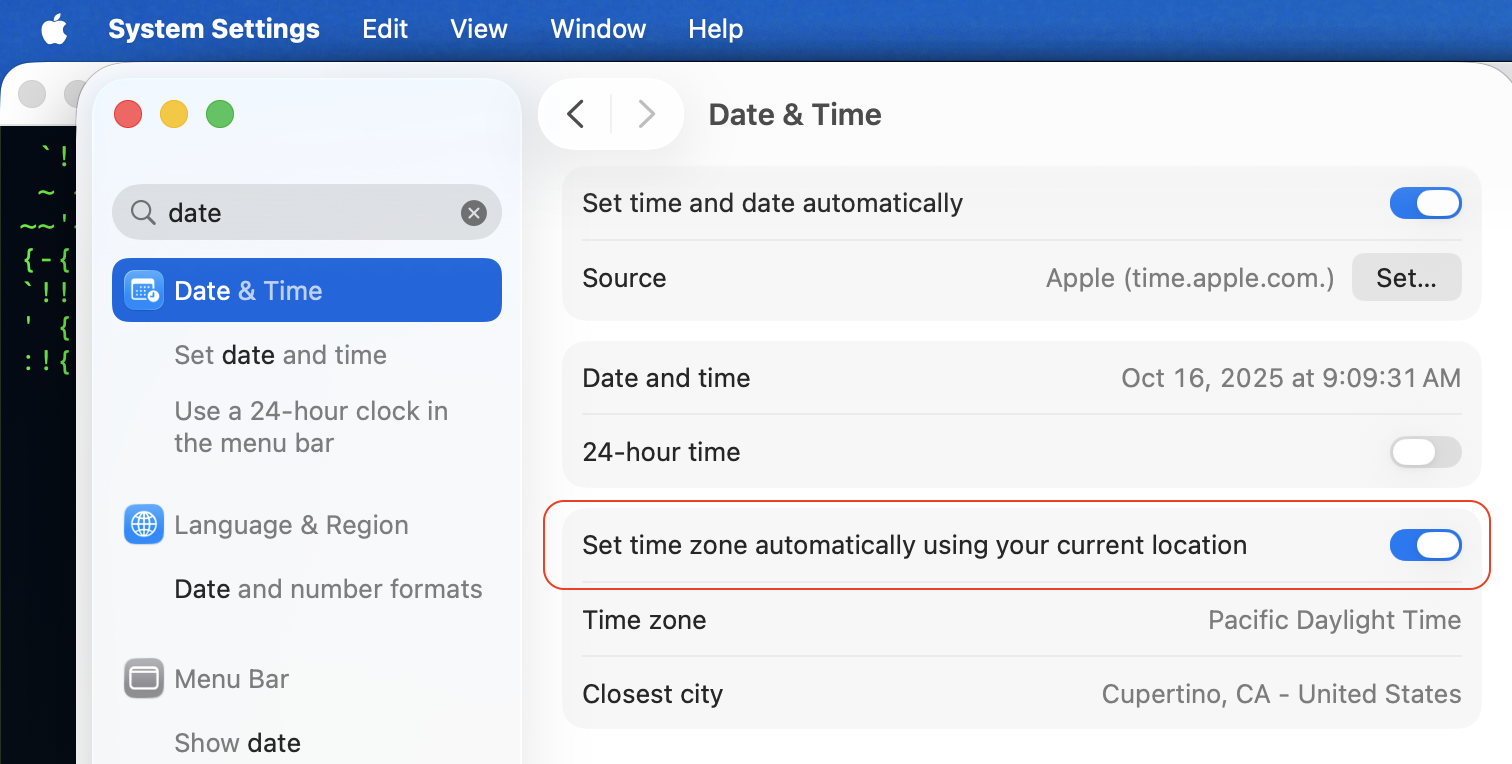


no resolve—


A SafeBoot Start up your Mac in safe mode - Apple Support will sort many anomalies

certain system caches get cleared and rebuilt, third party system modifications and system accelerations are disabled temporarily.


Login and test. Reboot as normal and test. Caches get rebuilt automatically.


The current stable release of Tahoe including bug fixes, security updates is macOS 26.0.1

Keep your Mac up to date - Apple Support

Keep your Mac up to date - Apple Support


To be proactive you can file a bug report / submit your Apple Feedback here:

Feedback - Weather - Apple

13 replies
Question marked as Top-ranking reply

Oct 16, 2025 9:14 AM in response to Don Goldberg1

Don Goldberg1 wrote:

On my iMac, the default widget for the Weather app was working up until a few weeks ago. Now I get an error message, simply saying "weather unavailable." This appears in the widget and in the desktop app, although I am still able to get custom readings for cities stored in the app. I thought upgrading Tahoe to 26.0.1 might solve the issue, but it remains. My attempts to refresh the default widget have failed thus far, and I am at a loss on what to do now.


Apple Weather app is unavailable check that Location Services is enabled for it in Settings...


Toggle some changes, then come back to your preferred settings.


Same for Date & Time ie automatic for Location Toggle some changes, then come back to your preferred setting and compare your results


no resolve—


A SafeBoot Start up your Mac in safe mode - Apple Support will sort many anomalies

certain system caches get cleared and rebuilt, third party system modifications and system accelerations are disabled temporarily.


Login and test. Reboot as normal and test. Caches get rebuilt automatically.


The current stable release of Tahoe including bug fixes, security updates is macOS 26.0.1

Keep your Mac up to date - Apple Support

Keep your Mac up to date - Apple Support


To be proactive you can file a bug report / submit your Apple Feedback here:

Feedback - Weather - Apple


Oct 20, 2025 9:16 AM in response to Don Goldberg1

Ah - great observation! Mine was "unavailable" in the control bar and showing the first explicitly configured location in the menu bar. I do not generally use WiFi, so it was already off. But turning it on resurected the widget as well as updated the menu bar location to current. It did not immediately die when I turned WiFi off again.


This seems to suggest that neither the widget nor the menu bar can make use of course location even though it is available.

Oct 17, 2025 7:51 AM in response to Don Goldberg1

I have noticed that on Tahoe 26.0.1 when you uncheck the box to show weather on the menu bar, it ALSO disables weather background access. Toggling background access back on ALSO puts it back on the menu bar. But regardless neither the menu bar nor the widget shows weather for the current location. The menu bar shows the next configured location in the weather app, and the widget shows "Weather Unavailable".


I have toggled location access, date/time settings and background access as well as rebooted multiple times with no resolution.

Weather widget not working in Tahoe

Welcome to Apple Support Community
A forum where Apple customers help each other with their products. Get started with your Apple Account.


