App icons for uninstalled apps still visible in Apps

I downloaded Creative Cloud and installed Acrobat. I later uninstalled them however I can still see their icons in 'Apps' however they are no longer in Finder. When I click these obsolete icons, it just says file not found. I can't drag them into the trash.

MacBook Air 13″

Posted on Oct 20, 2025 7:40 AM

Reply
Question marked as Top-ranking reply

Posted on Oct 20, 2025 10:11 AM

Did you uninstall the apps or just delete them? If a developer provides an uninstaller, you're generally better off using that instead of simply dragging apps to the Trash.


In the case of Adobe apps, if you dragged the app to the Trash then you DID NOT delete it, which is why it's still showing up in Apps. Adobe provides an uninstaller for Creative Cloud (also for other apps like Photoshop). In the case of the CC app, what is inside the CC folder that's in your Applications folder is not the app, it's an alias.
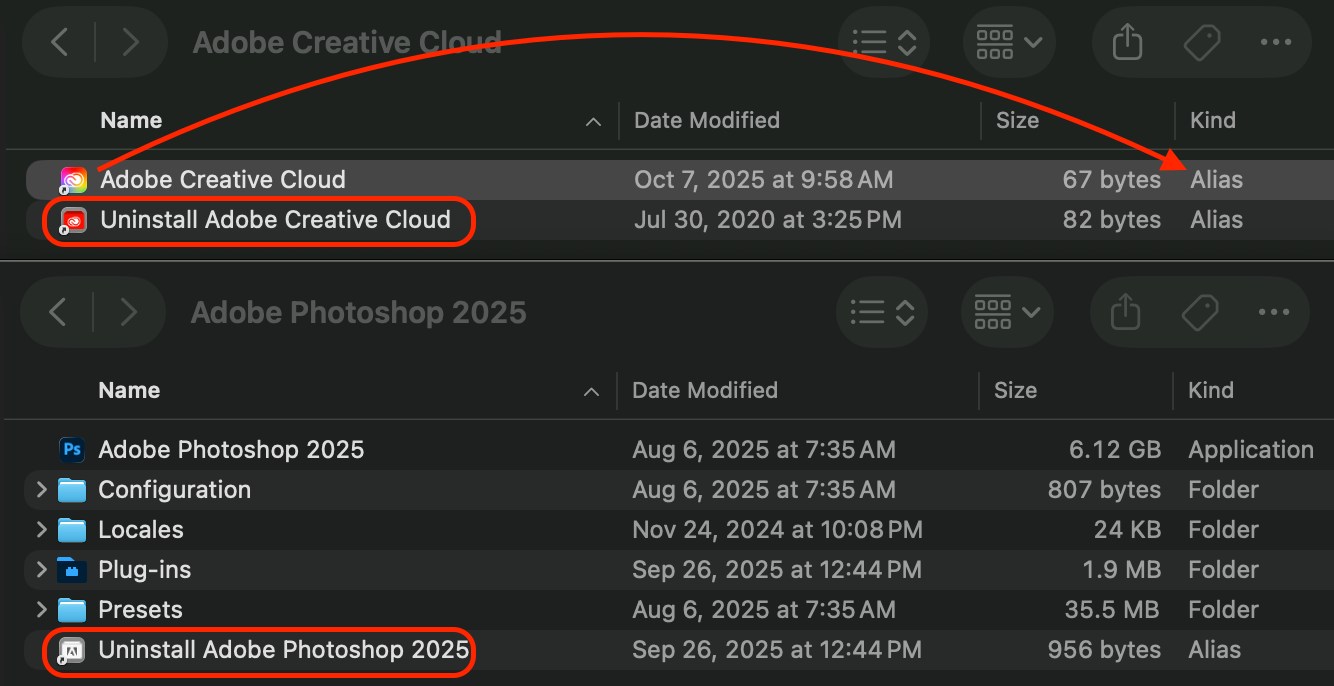


The actual app (along with several helper apps) lives in Applications > Utilities > Adobe Creative Cloud > ACC. That's why they provide an uninstaller.


2 replies
Question marked as Top-ranking reply

Oct 20, 2025 10:11 AM in response to 007bw

Did you uninstall the apps or just delete them? If a developer provides an uninstaller, you're generally better off using that instead of simply dragging apps to the Trash.


In the case of Adobe apps, if you dragged the app to the Trash then you DID NOT delete it, which is why it's still showing up in Apps. Adobe provides an uninstaller for Creative Cloud (also for other apps like Photoshop). In the case of the CC app, what is inside the CC folder that's in your Applications folder is not the app, it's an alias.


The actual app (along with several helper apps) lives in Applications > Utilities > Adobe Creative Cloud > ACC. That's why they provide an uninstaller.

Oct 20, 2025 7:46 AM in response to 007bw

007bw wrote:

I downloaded Creative Cloud and installed Acrobat. I later uninstalled them however I can still see their icons in 'Apps' however they are no longer in Finder. When I click these obsolete icons, it just says file not found. I can't drag them into the trash.


Have you shut down and restarted...


A SafeBoot Start up your Mac in safe mode - Apple Support will sort many anomalies

certain system caches get cleared and rebuilt you can login and test Reboot as normal and compare your results.


for your third party app, reference:

https://helpx.adobe.com/creative-cloud/apps/manage-apps/creative-cloud-desktop-app/uninstall-creative-cloud-desktop-app.html

This thread has been closed by the system or the community team. You may vote for any posts you find helpful, or search the Community for additional answers.

App icons for uninstalled apps still visible in Apps

Welcome to Apple Support Community
A forum where Apple customers help each other with their products. Get started with your Apple Account.