On the Mac, you should be able to launch the Voice Memos application, locate the specific recording, and then simply drag and drop that recording onto the Otter application, provided that the latter is designed to be a drop target. Otherwise, the drop target can be your Desktop and then on to Otter.
The Voice Memo recording is a *.m4a (Apple MPEG-4 audio) and its Spotlight search should be:
kind:mpeg-4
or
kind:audio +(.m4a)
Both just worked on my macOS Tahoe 26.0.1 to find .m4a audio including my Voice Memo items.
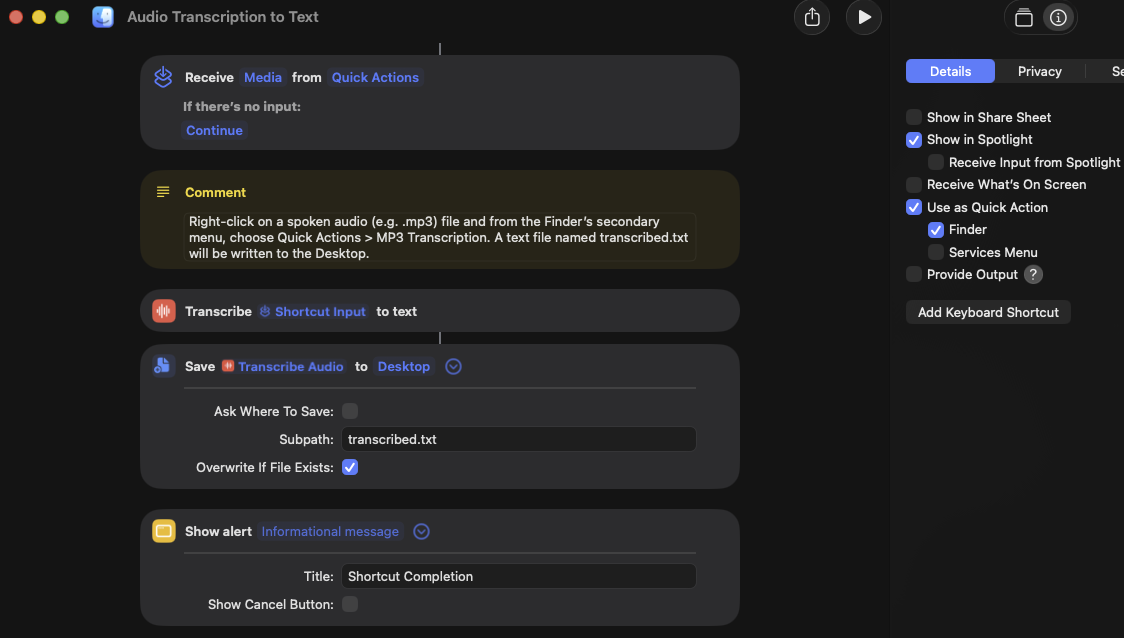
There is also an Apple Shortcuts action named Transcribe Audio that does what it says which with an appropriate Shortcut solution, might replace Otto.ai.
Here is a working example that writes out a file transcription.txt to the Desktop. It can be refined further to filter non-zero audio files with the .m4a file extension.
[Edited by Moderator]




