MacBook Pros lose internet but keep Wi-Fi

Hi all, for more than a year now, my wife and I (two separate MacBook Pros) are losing the internet connection several times a day (at home). We don't lose the wifi connection, and our iPads and iPhones don't lose either the wifi or the internet -- just the MacBooks. So I don't think it has anything to do with the router. I used to think it had something to do with Mail being open, but I no longer think that. Any ideas? We're both losing the internet several times a day. Thank you!

Posted on Nov 12, 2025 8:51 AM

Reply
Question marked as Top-ranking reply

Posted on Nov 12, 2025 5:10 PM

You have made a connection using 802.11ax rules on channel 100 in the 5GHz band.


RSSI (signal strength) is very good at -39, you must be very close to your Router. So close you might want to consider a direct ethernet connection. The signal falls away as you move further away and at about -75 becomes completely unusable.


NSS 2 says you are using BOTH of your two antennas.

MCS index of 11 says you are using 1024 patterns per signaling interval and SHOULD be achieving Transmit Rate of AT LEAST 567 M bits/sec for each of your two antennas for a composite rate of at least 1134 M bits/sec.


BUT -- you are only seeing Tx Rate of 286 M bits/sec total. It looks like somebody else is on your channel !


What is not shown (but can be looked up in standard tables) is that using 80 MHz on channel 100 uses all channels from 100 to 112, inclusive, and ANY other device on any of those channels at any speed will clobber your data.


--------

The usual way we do this with ONE Router and No boosters is to set the Router to "automatic" channel selection. Then when the Router powers up, it listens momentarily to what is already on the air, and adjusts to the least-busy channel.


it is not an accident that every debugging procedure starts with "cycle the power to your Router."


The next level we can use is to use the SCAN tool in Wireless Diagnostics to look around at what is visible over the air around the Mac. This has the advantage of showing what is seen at the Mac, which may be slightly different than what is seen at the Router(s).


this is what it looks like. Click on channel heading to sort by channel number:
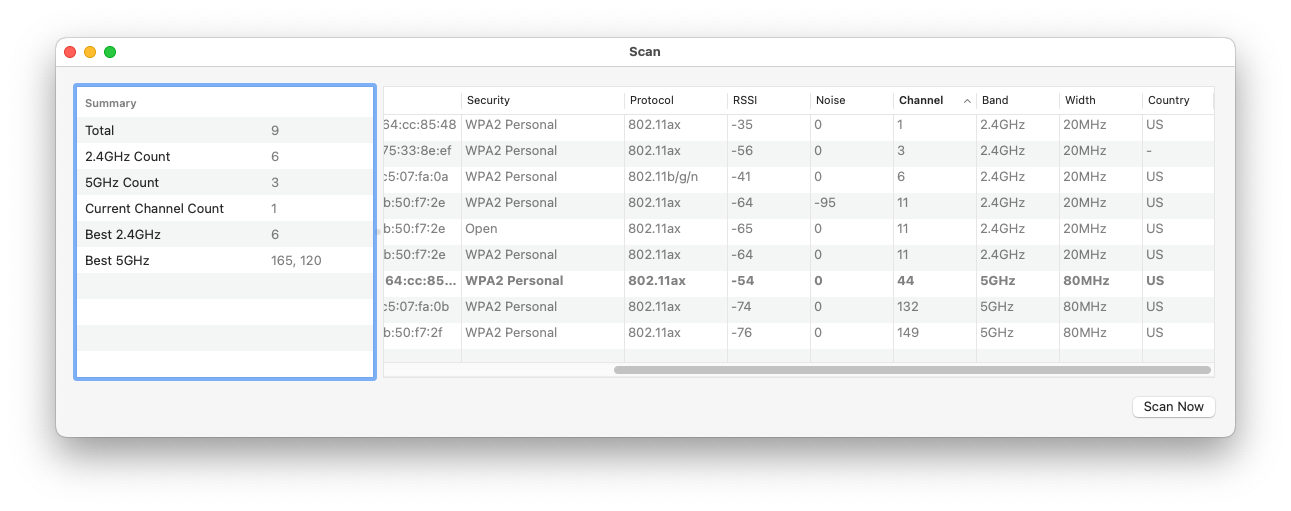
(drag and drop on Preview to see larger and scroll)


let me know what you think.

16 replies
Question marked as Top-ranking reply

Nov 12, 2025 5:10 PM in response to MarkPek

You have made a connection using 802.11ax rules on channel 100 in the 5GHz band.


RSSI (signal strength) is very good at -39, you must be very close to your Router. So close you might want to consider a direct ethernet connection. The signal falls away as you move further away and at about -75 becomes completely unusable.


NSS 2 says you are using BOTH of your two antennas.

MCS index of 11 says you are using 1024 patterns per signaling interval and SHOULD be achieving Transmit Rate of AT LEAST 567 M bits/sec for each of your two antennas for a composite rate of at least 1134 M bits/sec.


BUT -- you are only seeing Tx Rate of 286 M bits/sec total. It looks like somebody else is on your channel !


What is not shown (but can be looked up in standard tables) is that using 80 MHz on channel 100 uses all channels from 100 to 112, inclusive, and ANY other device on any of those channels at any speed will clobber your data.


--------

The usual way we do this with ONE Router and No boosters is to set the Router to "automatic" channel selection. Then when the Router powers up, it listens momentarily to what is already on the air, and adjusts to the least-busy channel.


it is not an accident that every debugging procedure starts with "cycle the power to your Router."


The next level we can use is to use the SCAN tool in Wireless Diagnostics to look around at what is visible over the air around the Mac. This has the advantage of showing what is seen at the Mac, which may be slightly different than what is seen at the Router(s).


this is what it looks like. Click on channel heading to sort by channel number:

(drag and drop on Preview to see larger and scroll)


let me know what you think.

Nov 12, 2025 3:10 PM in response to leroydouglas

if no joy, read on...


Wi-Fi Radio Signals from your Router fall off as the cube of the distance. Provided you are close to your Router and have clear line of sight and no competition from neighbors' Routers or known interference producers like microwave ovens.


All others need to do a more careful analysis to find out what is happening.


Wireless diagnostics:


Hold down the Option key while you click on the Wi-Fi icon on the menubar to open up the tools for investigating and fixing Wi-Fi issues


First is "Open Wireless diagnostics", which opens the wireless diagnostics Assistant, but does not proceed.

NB> Wireless Diagnostics is an App that puts up its own MenuBar.


Using its Window menu, there are about eight different things you can do from here, but the top-level is to choose Diagnostics off the Window menu, or simply click (Continue) to do a quick check for Gross misconfiguration or operating problems. Your Admin password will be required. If any recommendations are shown, you should consider then seriously.


Next is to hold down the Option key and click the Wi-Fi icon as before. The screen that opens shows operating parameters of your Wi-Fi network. Screenshot, transcribe, or photograph the results and post back in a reply on the forums. Looks like this older one.


Nov 12, 2025 7:10 PM in response to MarkPek

[in my opinion] somebody is talking on all or part of the channel your Router selected when it powered up.


The usual way we deal with this with ONE Router and No boosters is to set the Router to "automatic" channel selection. Then when the Router powers up, it listens momentarily to what is already on the air, and adjusts to the least-busy channel.


it is not an accident that every debugging procedure starts with "cycle the power to your Router."


>> Do this:

Power your Router OFF, wait a quarter minute, then power it back on again. It is very likely to move to a different channel, and if it does, your problems might be solved.

Nov 13, 2025 10:35 AM in response to MarkPek

<< I'm looking at the Tx Rate right now and it's alternating between 286 and 1200. Does that tell us anything? >>


YES!


When your Router is the only one using channels 100 through 112 inclusive, and your neighbor's Router is not talking, you get what you should: 1200.


When you neighbor's Router sends something, it clobbers your data and your Transmit Rate drops to 286 and possibly disconnects.


¿Did you power cycle your Router yet?

did it move to a different channel?

Nov 13, 2025 2:04 PM in response to MarkPek

<< You think our neighbor is using our wifi? But we have a very elaborate password . . .>>


Your neighbor is NOT using your Wi-Fi by logging in Through your Router.


Your neighbor is using part of the Radio Spectrum, available to all nearby, that you are already using for your Router.


When you transmit message between your Router and you Macs and other devices, it uses a portion of the public radio spectrum reserved for this sort of use. But there is no referee that gives you exclusive use.


--------

This is part of the "spectrum" display from an inexpensive Utility called Wi-FI Explorer. It show that multiple routers in the bands shown have Routers, and they are all colliding with each other massively:


Everywhere they overlap, users are losing speed, disconnecting, and getting nothing done.

Nov 12, 2025 4:24 PM in response to MarkPek

"MacBook Pros lose internet but keep Wi-Fi"


IMPORTANT NOTE:

Keep Personal Info off of these Forums:

These forums are here for everyone out there to view. So, just be certain to keep personal information(i.e. Hardware Address and MAC Address) off of these forums and other forums too. Anyone out there can read this info. For your Security & Privacy: I have asked the host to rid of or modify of the screenshots you've provided. :)

MacBook Pros lose internet but keep Wi-Fi

Welcome to Apple Support Community
A forum where Apple customers help each other with their products. Get started with your Apple Account.

