Why do browser search results show states far from my location on all devices?

Why are my browser search Results come up inaccurate for all my devices, phone, laptop, iPad. The results shown are states, miles away from me. I live in Pa, but results shown are states up in Georgia, Washington state, Virginia, Indiana, etc


[Re-Titled by Moderator]

Original Title: Search results

Posted on Nov 16, 2025 7:16 AM

Reply
Question marked as Top-ranking reply

Posted on Nov 16, 2025 6:15 PM

You are asking for more privacy with the use of Private Relay. The search engine has no idea what your location is as they are not able to determine that like they normally would by your IP Address and that is the purpose of Private Relay. So when your IP Address is showing a location other than where you are at, you are going to need to specify what location you want to search for. If you do not specify that location or request a search result near you what will be provided is the location as seen by your IP Address and that would not be your actual location when using Private Relay.


The solution in that case is to specify the location in your search, such as "Find Apple Stores in Philadelphia". When I do that in a location other than Philadelphia, I see the stores located there with the top result being the Apple Walnut Street Store.


9 replies
Question marked as Top-ranking reply

Nov 16, 2025 6:15 PM in response to Jassy

You are asking for more privacy with the use of Private Relay. The search engine has no idea what your location is as they are not able to determine that like they normally would by your IP Address and that is the purpose of Private Relay. So when your IP Address is showing a location other than where you are at, you are going to need to specify what location you want to search for. If you do not specify that location or request a search result near you what will be provided is the location as seen by your IP Address and that would not be your actual location when using Private Relay.


The solution in that case is to specify the location in your search, such as "Find Apple Stores in Philadelphia". When I do that in a location other than Philadelphia, I see the stores located there with the top result being the Apple Walnut Street Store.


Nov 16, 2025 2:38 PM in response to Jassy

Jassy wrote:

I do not use VPN. Private relay is on. I don’t see maintain general location option. Can you further assist? Thx


iCloud Private Relay uses a proxying mechanism to mask your IP source address from the connection destination network, and also masks your IP destination address from your source network.


This means the source IP address that is visible to the designation network and destination server will be wrong, and means that the destination IP address that is visible to the coffee shop or the local ISP will also be wrong.


This means that your connections are more private.


That’s the purpose of Private Relay (and ODoH for DNS data). (Similar to Private Relay, some other web tools use DoH and OHTTP to mask source and destination addresses and DNS.)


This also beyond the inaccuracy inherent in IP address geolocation. About the only thing that’s certain with geolocation is the country or region associated with the IP address. the local,ISP-assigned IP addressing routinely shows up in neighboring states, due to how the ISP has configured their internal networking and their reporting. And this inaccuracy is a good thing for the ISP (read: it’s cheaper; as maintaining increased IP geolocation accuracy increases costs and complexity), and is a good thing for the ISP’s users (as increased accuracy increases the risks of targeted malfeasance against the users).


The browser-provided agent info is also becoming less identifying with newer browser versions, too.


This all also means that the advertisers have to work harder and get better at targeting and tracking people. Which the various immense advertising entities such as Alphabet Google and Meta Facebook are doing.


Related: https://coveryourtracks.eff.org/


Related: https://www.apple.com/privacy/docs/iCloud_Private_Relay_Overview_Dec2021.PDF


Related: https://en.wikipedia.org/wiki/Internet_geolocation


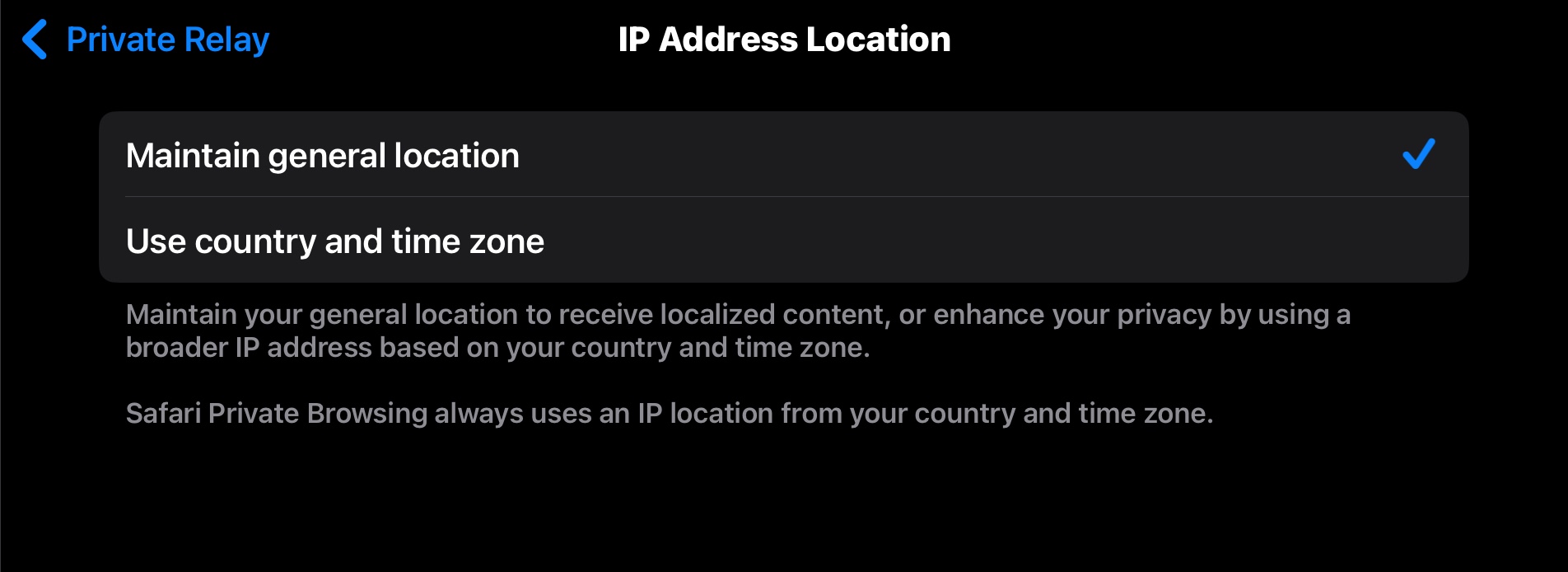
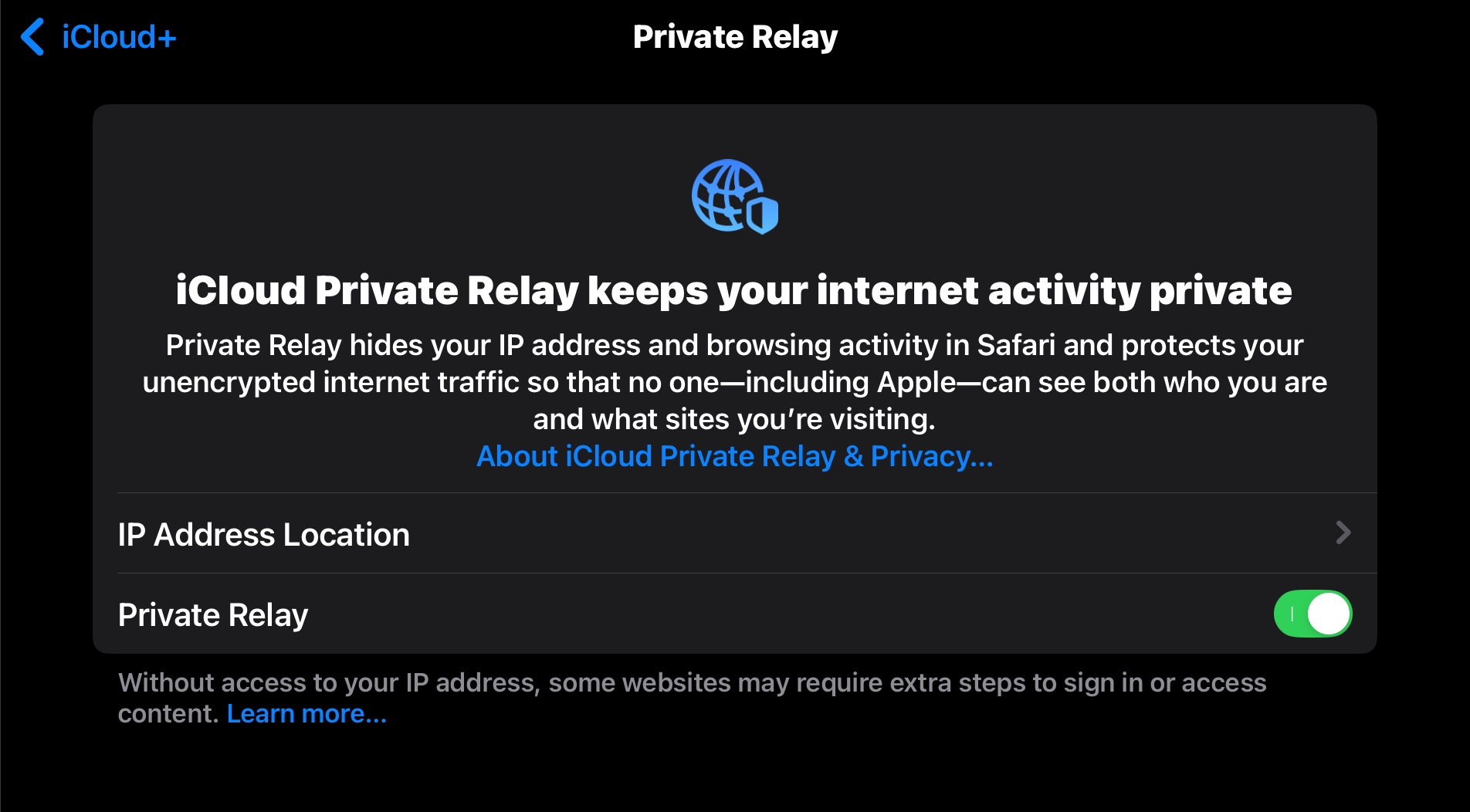
Example of the iCloud Private Relay locality setting:

Nov 16, 2025 8:07 AM in response to Jassy

Jassy wrote:

Why are my browser search Results come up inaccurate for all my devices, phone, laptop, iPad. The results shown are states, miles away from me. I live in Pa, but results shown are states up in Georgia, Washington state, Virginia, Indiana, etc

Are you using a VPN, or possibly iCloud Private Relay with 'Maintain General Location' disabled?

Nov 16, 2025 5:13 PM in response to Jassy

Jassy wrote:

Thank you. But as that explanation is thorough and a bit long, it didn’t answer my dilemma. Those screen shots show exactly what I have. Relay is on and maintain general location is checked. I live in Philadelphia, Pa. All I want to know is how to stop when I search for Targets near me Targets from Washington state, Indiana, Georgia or Virginia, to name a few, don’t show up. Rather targets in Philadelphia, Pa do.


I am unsure what you are asking.


Your original question seemed to be asking why location accuracy is off.


This reply seems to be asking for better location accuracy.


If you want privacy, then tracking won’t usually be accurate. That due to Private Relay, and whatever other steps you might take.


If Target is tracking you (somewhat accurately), then they’re using some other means. Might be a saved cookie or other saved data, a locally installed app, the tracking mentioned at EFF, or otherwise. Or the previous connection from the IP address set up the location.


If Target is not tracking you and you want Target to track you, then either shut off Private Relay, or tell Target which zip code or which store you want to use. If you do provide location info to Target, I’d expect Target to set a cookie, and that will be preserved for a while.


It’s also possible target is just confused, or the search engines are picking up suggestions from all of the different Target locations and reporting whichever hit their algorithm selects.


Even ignoring IP geolocation availability and accuracy, vendors can know a whole lot:

https://medium.com/@karimalmourad93/she-didnt-tell-anyone-she-was-pregnant-but-target-knew-121d220d87be


Nov 16, 2025 7:25 PM in response to Jassy

Jassy wrote:

You are way misunderstanding. I am not and did not ask or asking for privacy or more privacy. Target was just an example I used. It could be any store or any entity. I am not saying or complaining that anyone is tracking me. All I asking is why do search results show up in cities and states hundreds of miles from me. If I search for Apple stores near me and I am in Philadelphia I don’t want stores in North Carolina showing up in the results. I want stores in Philadelphia to show up. That is all. Why does it happen and how does it get corrected.


Your two requests are contradictory.


You asked for location privacy.


That’s Private Relay.


You got location privacy.


Now you want businesses and search engines to know where you are; to permit location tracking.


That’s the opposite of Private Relay.


Pick one.


You can keep Private Relay enabled, specify a location search area in your web searches, or can visit the Target website and provide a search location there. Or you can disable Private Relay.

Nov 16, 2025 3:41 PM in response to MrHoffman

Thank you. But as that explanation is thorough and a bit long, it didn’t answer my dilemma. Those screen shots show exactly what I have. Relay is on and maintain general location is checked. I live in Philadelphia, Pa. All I want to know is how to stop when I search for Targets near me Targets from Washington state, Indiana, Georgia or Virginia, to name a few, don’t show up. Rather targets in Philadelphia, Pa do.

Nov 16, 2025 5:26 PM in response to MrHoffman

You are way misunderstanding. I am not and did not ask or asking for privacy or more privacy. Target was just an example I used. It could be any store or any entity. I am not saying or complaining that anyone is tracking me. All I asking is why do search results show up in cities and states hundreds of miles from me. If I search for Apple stores near me and I am in Philadelphia I don’t want stores in North Carolina showing up in the results. I want stores in Philadelphia to show up. That is all. Why does it happen and how does it get corrected.

Why do browser search results show states far from my location on all devices?

Welcome to Apple Support Community
A forum where Apple customers help each other with their products. Get started with your Apple Account.