macOS 26.1 Tahoe bug with displayed storage

I'm having storage issues where my MacBook is sending me notifications and displaying that my Mac is almost out of storage. When I look at the breakdown, half of my storage is being taken up by system data (went up to 120 GB and fluctuates around there).


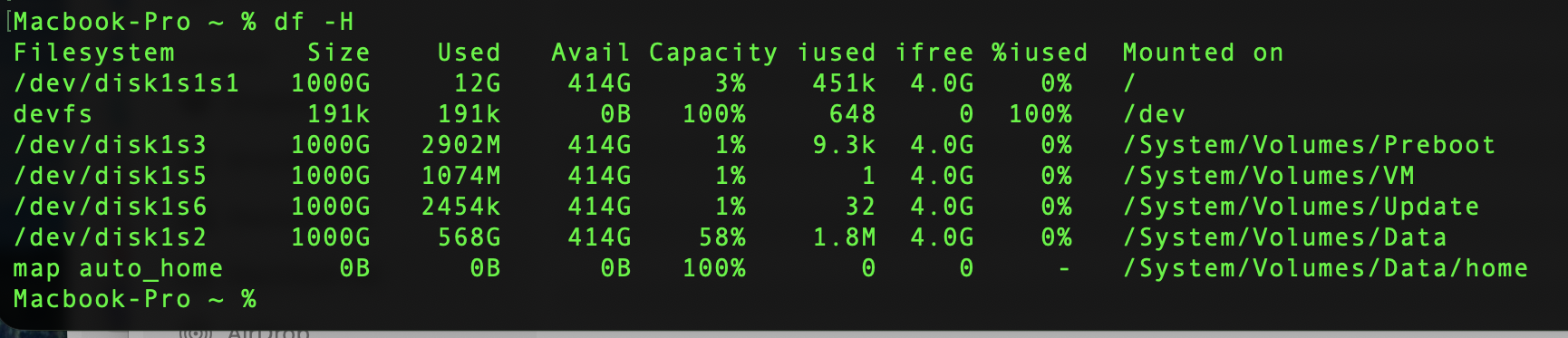
I ran the following commands on Terminal and it shows that only 11GB is being used.


Even after letting my Mac sit idle and restarting multiple times, my system data just increases by the day and does not go down.

Is this just a display bug or is there something else I can do to free up storage?

I have already gone through my applications, backups, cache, application support, and group containers files.

MacBook Air 13″, macOS 26.1

Posted on Nov 17, 2025 12:13 PM

Reply
8 replies

Nov 17, 2025 12:40 PM in response to _emily__

_emily__ wrote:

I'm having storage issues where my MacBook is sending me notifications and displaying that my Mac is almost out of storage. When I look at the breakdown, half of my storage is being taken up by system data (went up to 120 GB and fluctuates around there).

I ran the following commands on Terminal and it shows that only 11GB is being used.
https://discussions.apple.com/content/attachment/f4437bd3-dfe8-48c0-b2a7-f27b9d93e94f

Even after letting my Mac sit idle and restarting multiple times, my system data just increases by the day and does not go down.
Is this just a display bug or is there something else I can do to free up storage?
I have already gone through my applications, backups, cache, application support, and group containers files.


Small point—Your screen shot is showing Gi

if you want GB the command would be, copy and paste:

df -H 


The big picture:
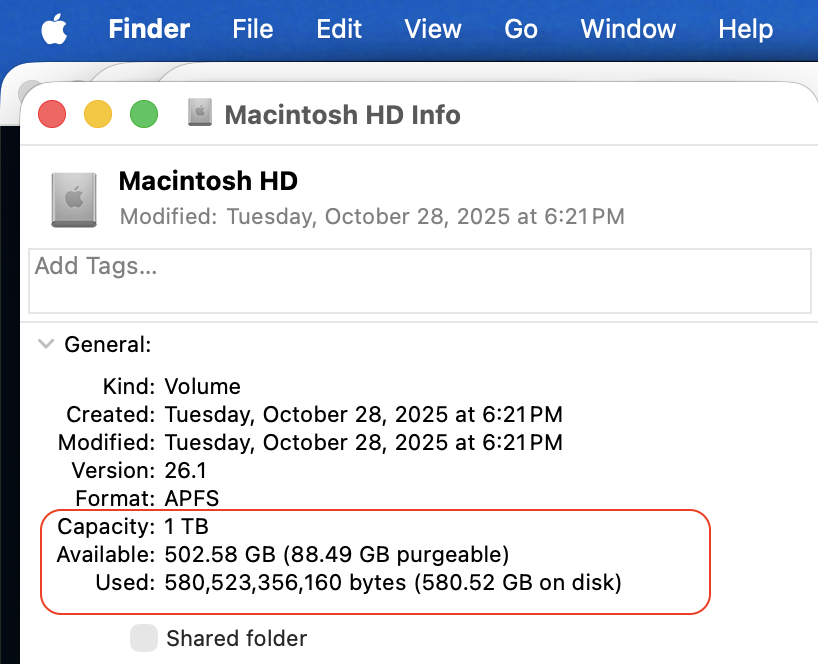


There are some issues with System Data sucking up GB, frustrating for some.

The macOS can take days before it releases/restores... there is used, purgeable, free space


reboot the machine, do a safeboot all effect what is presented in your "System Data"


I would not waste a lot of time trying to micro -manage storage space, like deleting an app and trying to correlate that with what you are seeing in your storage...are you will drive yourself nuts.


What Apple used to label "Other" is now labeled "System Data".


You can jump a lot of hoops, a myriad of things you can try....


All Volumes within a Container share space without penalty—giving and taking as needed:


• Trash

• Time Machine local backups

• Virtual memory

• cache memory

• tmp files

• etc...


In these Communities have shown—what seems the best resolve is erase the Machine, reinstall the macOS, and restore your user data from backup


Erase your Mac and reset it to factory settings

Erase your Mac and reset it to factory settings - Apple Support


How to reinstall macOS Recovery (both M1/M2/M3/M4 and Intel) — How to reinstall macOS - Apple Support


Restore your Mac from a backup

Restore your Mac from a backup - Apple Support


Nov 27, 2025 3:06 AM in response to _emily__

Reducing System/Volume/Data is a common question. 


1 -  System data taking too much in MacOS Sono… - Apple Community


2 - Time Machine Local Snapshot won't delete - Apple Community


3 - Over 60% storage blocked by System Data - Apple Community


How to free up ‘System Data’ and other storage on your Mac from a fellow colleague  


Suggest getting an External SSD Drive and start moving your Pictures, Videos, Music and any other large files you have control over, OFF the Internal drive and Onto the External


There are  two effective ways to remedy this issue:


1. Quick Fix Actions:


For Apple Silicon computers, use Disk Utility to erase a Mac.


For Apple Intel computers, use Disk Utility to erase an Intel-based Mac, then reinstall macOS.


Always make a Time Machine backup before proceeding.


Migrate only the user account, not the entire system.


Reinstall only the necessary applications from the Apple App Store or directly from the developers.


2 - Generally


When the user discovers this issue, it’s likely because the computer’s internal drive capacity is small, such as 256 GB, which yours is


Unfortunately, the user’s storage needs may have increased since the computer was purchased. To future-proof the computer, consider spending extra money upfront on a larger drive capacity and adding more unified RAM.


Note - For Apple Silicon and newer computers. The SSD Drive and the Unified RAM are Soldered to the Logicboard and can not be upgraded.

Nov 27, 2025 7:15 AM in response to neuroanatomist

neuroanatomist wrote:

I find that Disk Inventory X provides results that match Disk Utility (and those from similar apps like DaisyDisk and OmniDiskSweeper).

Thank you for being as informative as you have been 👍


Though it remains that OP has the 256 GB Capacity drive with below situation


Which intern, your User Tip could be of some help to them or, maybe the Real Issue is elsewhere ?


Nov 28, 2025 8:22 PM in response to _emily__

_emily__ wrote:


Hi, thanks so much for your response.
So I've run the command again after deleting some files that werent coming up before and this is what comes up.

https://discussions.apple.com/content/attachment/b9e5f010-ed2c-4bac-bb47-7aa74bc12f9d

Ignore all those shown in the first screenshot for the "df -H" command. Those are hidden system areas that you cannot touch. The "Data" volume is the only one where that has your macOS user accounts & data (plus some system data which you should also avoid touching).


You should only move or delete data contained within your macOS home user folder(s) and then only the data you have personally created or placed there.


I also looked at my ~/Library folder but I'm not sure what I am able to delete from here, would you be able to help me with this?

https://discussions.apple.com/content/attachment/bfd00a9a-3a68-4e7f-aeec-5fe11ddfc969

You should not touch anything there either since that Library folder is hidden for a reason....most things in that folder should not be touched. The "iCloud Drive" and "CloudStorage" folders should be controlled through the iCloud System Settings. I don't know if "CloudStorage" is Apple related or third party....if third party, then control it from the third party app/service.


As for the "Application Support", "Containers" and "Group Containers".....look inside those folders to find out which app(s) are using the storage and use those apps to control that storage. Again, you probably should not manually touch anything within those folders (or subfolders).

Nov 27, 2025 3:59 AM in response to _emily__

If we may point out


Using Disk Inventory X version 1.3 as it appears in one of your images above


According to to what the Developer publishes is intended for (macOS 10.13 - 10.15)


The newest development seem to have ending with macOS 10.15 Catalina released October 7, 2019.  and Before the first Apple Silicon computers were released in 2020


Would not put too much on how and what this application would report regarding Used versus Free Space

Nov 27, 2025 2:58 AM in response to leroydouglas


Hi, thanks so much for your response.

So I've run the command again after deleting some files that werent coming up before and this is what comes up.


I also took a look at my Macintosh disk and disk utility and they show around the same thing


I also looked at my ~/Library folder but I'm not sure what I am able to delete from here, would you be able to help me with this?

macOS 26.1 Tahoe bug with displayed storage

Welcome to Apple Support Community
A forum where Apple customers help each other with their products. Get started with your Apple Account.



