DonnaM-T wrote:
I have a 2024 MacBook. I updated it to Tahoe 26. I plugged in my WD Passport, and it backed up, but it used to show up in the bar across the top, and now it doesn't. I ejected it and plugged it back in to see if it would show up. It did not, and it didn't do a second backup. Does anyone know why it isn't showing up in the bar?
You do not see it in the menu bar. I have never seen an external in the menubar unless I am missing something going way back...
Side bar of Finder yes, Desktop yes.
—Make changes to your Finder Settings>Sidebar>Locations>External
—Finder Settings>General>Desktop>External
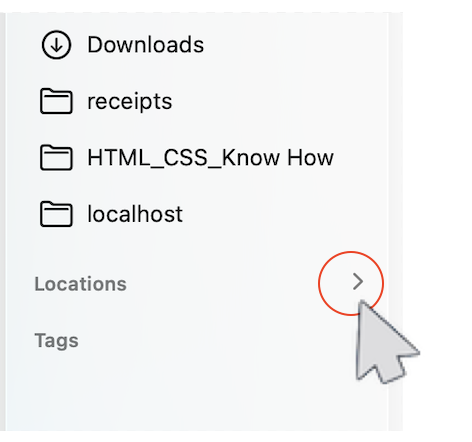
Still don't see it in Finder — move your mouse to the right side to reveal the hidden caret and spin the caret open.
If this is some third party proprietary software installed on the drive that you used for "WD Passport, and it backed up"
then you will have to contact their support for more insight‚ if in doubt search the developers website or contact their: Support/Help/FAQ/Known issues/compatibility/updates…
Contact a third-party vendor - Apple Support
Contact a third-party vendor - Apple Support
It is always advised to erase/reformat/initialize as new— any new out of the box external drive to remove any and all proprietary software— it typically does nothing but cause issue further down the line with macOS updates...
Erase and reformat a storage device in Disk Utility on Mac
Erase and reformat a storage device in Disk Utility on Mac - Apple Support
ref: Back up your Mac Back up your Mac with Time Machine - Apple Support

