Spotlight Command + L dictionary lookup issue

Before when I look up a word in spotlight and hit "command + L", it previews the explanation of this word.

MacOS Tahoe seems not supporting this feature anymore by default.

Is there a way that I can set it back? I use it sooooo often, really cannot live without it.

MacBook Pro 13″, macOS 26.1

Posted on Nov 26, 2025 11:27 PM

Reply
18 replies

Nov 27, 2025 7:40 AM in response to ClementineCC

Don't overlook the ability to directly lookup a word that you can see on your screen with an existing keyboard shortcut. Without any other text selected, hover (no need to select or click) your pointer over the word spotlight in your original post and press ctrl+cmd+d (⌃⌘D).


English is the first dictionary entry in my Apple Dictionary application that I configured with that application's Settings panel.

Nov 27, 2025 8:33 AM in response to Luis Sequeira1

Luis Sequeira1 wrote:

That is a bold assumption.

Unfortunately, I don't know of any way to sort threads by reply or me too count. I tried to do it manually but eventually locked up the Safari tab after page 37. But here are my manual results until then:


Launchpad - 332 replies 35,768 views

freezing  - 144 replies 35,768 views

External displays - 108 replies 17922 views

Touch ID - 87 replies 14,159 views

Audio glitches - 63 replies 14,763 views

Draining battery - 39 replies 12,030 views

Overheating - 47 replies 11,461 views

Time Machine NAS - 51 replies 10,727 views

Out of memory - 88 replies 10,476 views

Login problems -41 replies 10,018 views


People that used Launchpad have been vocal about it, those of us who never used it just continue to use our macs :-)

Obviously I'm still using my Mac. I'm not going out of my way to complain, but that doesn't mean I don't disagree. I haven't experience most of those problems listed above, but I agree with several of them.


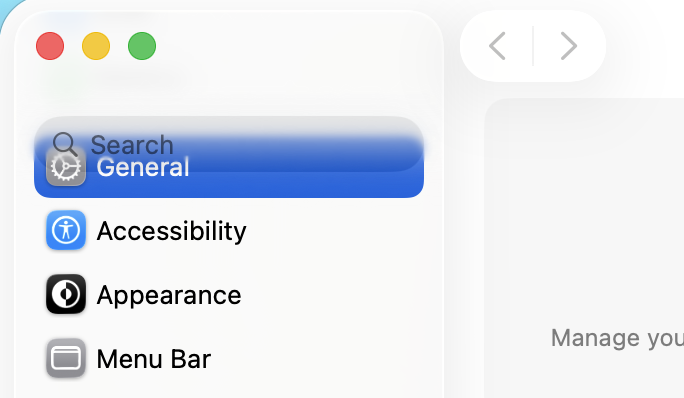
Curiously, I didn't see many complaints about Liquid Glass. That's clearly one of the most objectively worst aspects of Tahoe. Who can look at this and think, "Yes! That's good design"


Nov 27, 2025 8:47 AM in response to etresoft

I'm not sure what the point of your post is. As of 2024 there were over 100 million Mac users. I feel safe to say at least 10 million have installed Tahoe. So I don't understand what listing a very tiny percentage of complaints has to do with anything. Most of which are caused by incompatible third-party software.


Personally I've had none of the issue listed. Although. I don't use Time Machine with NAS so maybe that's one.

Nov 27, 2025 8:58 AM in response to etresoft

etresoft wrote:


Luis Sequeira1 wrote:

That is a bold assumption.
Unfortunately, I don't know of any way to sort threads by reply or me too count. I tried to do it manually but eventually locked up the Safari tab after page 37. But here are my manual results until then:

Launchpad - 332 replies 35,768 views
freezing  - 144 replies 35,768 views
External displays - 108 replies 17922 views
Touch ID - 87 replies 14,159 views
Audio glitches - 63 replies 14,763 views
Draining battery - 39 replies 12,030 views
Overheating - 47 replies 11,461 views
Time Machine NAS - 51 replies 10,727 views
Out of memory - 88 replies 10,476 views
Login problems -41 replies 10,018 views

People that used Launchpad have been vocal about it, those of us who never used it just continue to use our macs :-)
Obviously I'm still using my Mac. I'm not going out of my way to complain, but that doesn't mean I don't disagree. I haven't experience most of those problems listed above, but I agree with several of them.

I also have not experienced most of these issues.


Curiously, I didn't see many complaints about Liquid Glass. That's clearly one of the most objectively worst aspects of Tahoe. Who can look at this and think, "Yes! That's good design"


https://discussions.apple.com/content/attachment/cfcf0822-acbe-442a-9668-98a83ab95c68


Do you mean the huge rounded corners? Very poor design, IMHO.


Do you mean the Search overlapping General? That is obviously some bug, and NOT a design option.

And, FWIW, how did you get that image, in the first place? I see SEVEN other items before General (and no overlap):


Nov 27, 2025 9:43 AM in response to dialabrain

dialabrain wrote:

I'm not sure what the point of your post is.

I was challenged! I'm sure you can understand the need to reply. 😄


As of 2024 there were over 100 million Mac users. I feel safe to say at least 10 million have installed Tahoe.

People have been saying 100 million for a few years now. It's got to be more than that. I don't have any data for Tahoe. But my EtreCheck results show that in December 2024, 66% of users had upgrade to Sequoia. 50% of users have Apple Silicon, so there's no technical barrier to upgrading.


So I don't understand what listing a very tiny percentage of complaints has to do with anything. Most of which are caused by incompatible third-party software.

I don't know the overall percentages. The Apple hosts have access to that kind of information. I've asked for it, but they haven't provided anything so far.


Personally I've had none of the issue listed. Although. I don't use Time Machine with NAS so maybe that's one.

I haven't experienced most of those issues. But I have experienced a few. And I've seen a few more that aren't in the top ten. Launchpad is the most annoying issue for me. When I use the new version, I keep wanting to use the arrow keys, but those don't work anymore. And it's unpredictable. Just now I went to try it to better describe how the arrow keys don't work, but I can't get it into an "icon" mode for some reason. I guess I can manually click the app button. But I hate those buttons and never click them. Yet somehow, it does get into different modes on its own and stays there. And those are just a few of a very long list of annoyances about this new interface. Wether you use it or like it or not, many people see it as a downgrade.

Nov 27, 2025 9:58 AM in response to Luis Sequeira1

Luis Sequeira1 wrote:

Do you mean the huge rounded corners? Very poor design, IMHO.

No. I don't include any subjective issues. I do think the corners are too rounded, but that's a preference. I'm talking about things that are objectively wrong. Displaying partially transparent controls on top of each other is objectively wrong.


Apple is actively scaling back many of these poor design choices. Just now I went over to one little annoyance I discovered that I haven't seen anyone else mention. But when I tried it on 26.1, it seems like Apple's already fixed it. On one hand, that's good for Apple and users. But now I need to redo those #%@^$@! videos again. So much for getting caught up this week while Apple's on Thanksgiving vacation!


Do you mean the Search overlapping General? That is obviously some bug, and NOT a design option.

It's neither a bug nor a design choice. It's lack of interest in the Mac platform.

Spotlight Command + L dictionary lookup issue

Welcome to Apple Support Community
A forum where Apple customers help each other with their products. Get started with your Apple Account.


