Cell references changed to values with mixed format

Why have some of my cell references turned to values instead of alpha numeric columns and row header references - and even those now have a mismatch of normal cell references with values added at the end of the reference? I just opened the sheet for the first time on Sequoia 15.7.2.


Thanks.


MacBook Pro 16″, macOS 15.7

Posted on Dec 1, 2025 7:13 AM

Reply
Question marked as Top-ranking reply

Posted on Dec 1, 2025 1:31 PM

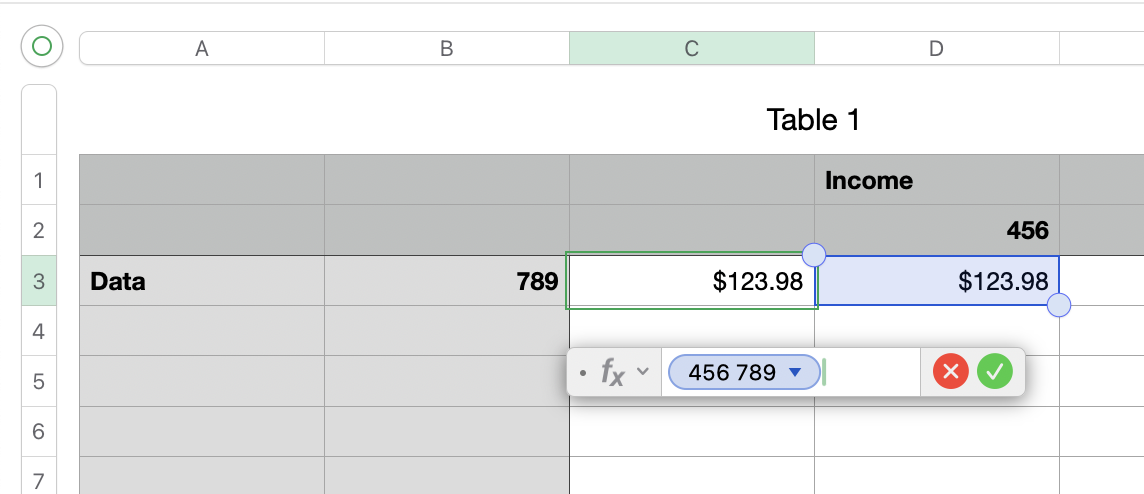
You have "use header names as labels" turned on. The references in your formulas will use the header names, not the alphanumeric columns and rows. Without knowing what cells are being referenced and seeing the table and the headers of the tables that have the referenced cells, I can only assume the references are correct. For the first one, you might be seeing numbers in the cell reference because the table with the referenced cell has more than one header row and header column and those other headers have numbers in them. If there is more than one header row, the reference will use the lowest one. If there is more than one header column, it will use the rightmost one. See my simple example below for cell C3 that is referencing cell D3.


3 replies
Question marked as Top-ranking reply

Dec 1, 2025 1:31 PM in response to Bardonicloud

You have "use header names as labels" turned on. The references in your formulas will use the header names, not the alphanumeric columns and rows. Without knowing what cells are being referenced and seeing the table and the headers of the tables that have the referenced cells, I can only assume the references are correct. For the first one, you might be seeing numbers in the cell reference because the table with the referenced cell has more than one header row and header column and those other headers have numbers in them. If there is more than one header row, the reference will use the lowest one. If there is more than one header column, it will use the rightmost one. See my simple example below for cell C3 that is referencing cell D3.


Cell references changed to values with mixed format

Welcome to Apple Support Community
A forum where Apple customers help each other with their products. Get started with your Apple Account.