How to turn off dark mode home screen in IOS 26.1

I just upgraded to 26.1 IOS. Big mistake. Can't turn off dark home screen. Is there any solution that works?


I've tried all the steps I found on utube. Dark mode is off. Was never turned on. Deleted and re-created the wallpaper.


What a colossal waste of time this is!

Posted on Dec 12, 2025 5:49 AM

Reply
3 replies

Dec 13, 2025 11:43 PM in response to sknjuser

  1. Is this your corporate/organisation/enterprise/School Management iPhone? Then please contact the system administrator of your corporate//organisation/enterprise/School Management
  2. If it is your device, in that case, do you have any profile installed by your corporate/organisation/enterprise/School Management?
    1. Erase the profile added by you If you have installed a profile on your own --> Install or remove configuration profiles on iPhone - Apple ...
    2. Or please contact the system administrator of the organisation who provided the profile to you


A corporate profile installed on your iPhone could potentially be contributing to the inaccessibility of certain features. 

Here's why:

  • Restrictions: Corporate profiles can have restrictions placed on apps and functionalities. These restrictions might be limiting some activity, causing it to be unresponsive or quit.
  • Managed Apps: IT departments might deploy specific navigation apps through the profile, potentially blocking certain functions or features.
  • Security Settings: Corporate profiles often have stricter security settings that could affect app or function behavior. This might be causing unexpected behavior of an App or functions.


Here's what you can do:

  • Check with IT: The best course of action is to contact your IT department. They can explain the restrictions set by the corporate profile and see what is affected. They might be able to adjust settings or suggest alternative apps or features approved for corporate use.
  • Look for App Conflicts: See if your IT department uses a different app through the corporate profile. Conflicting apps might cause crashes.


Additional points to consider:

  • Even if the profile isn't directly affecting the function, it's still a good idea to check with IT. They might be aware of similar issues and have workarounds.
  • While troubleshooting, make sure you prioritize safety. Don't fiddle with your phone. 


By working with IT and considering these possibilities, you can hopefully identify if the corporate profile is the culprit and find a solution that allows you to use the iPhone to your liking.


Dec 13, 2025 11:42 PM in response to sknjuser

sknjuser wrote:

I just upgraded to 26.1 IOS. Big mistake.

Was your device Jailbroken? If that's the situation, please be informed that attributing the issues to iOS updates may not be accurate.


I have been updating my devices ever since I bought my first device in 2009. iPhone 3Gs, 4S, 5, 6, SE (1st Gen), 7, 8 and iPhone 12 Pro, iPad Pro, iPhone 13, Macbook Air 2019, MacBook Pro 16"
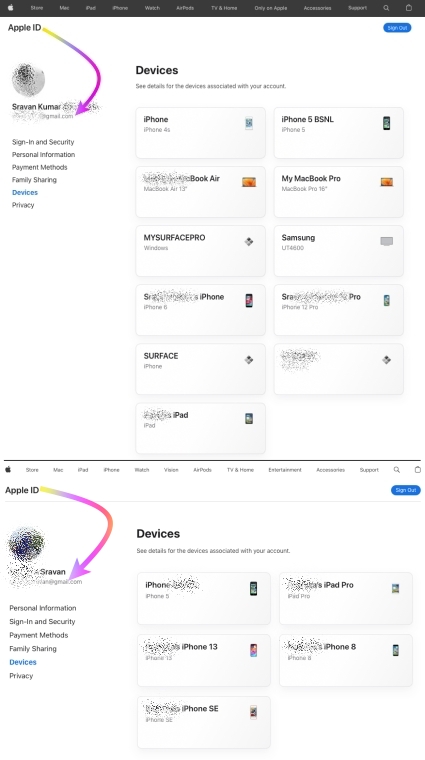


I never had any issues with any iOS, iPadOS, or macOS updates to date.


I would personally recommend everyone update their devices instead of listening to rumors from people who may not have kept their devices free from any spurious software.


iOS / iPadOS devices cannot be hacked or infected with Virus / Malware / Spyware if it is updated to the latest iOS/iPadOS unless you have intentionally downloaded spurious software or unauthorized apps directly from the internet and installed them on your device or/and have Jailbroken


iOS updates generally aim to enhance user experience, boost security, and fix bugs rather than disrupt core features. Issues after updates might stem from underlying, unmentioned factors. Updates won't typically alter personal data but may refine settings or features. Backup before major updates for safety. Review Apple's update details and backup advice for a smooth process.


This seems purely coincidental, so please check the settings on your device.


See what each update does: OS — iOS 26, About iOS 18 Updates, About iOS 17 Updates, About iOS 16 Updates, About iOS 15 Updates, About iOS 14 Updates, About iOS 13 Updates, About iOS 12 Updates, and so on...


How to turn off dark mode home screen in IOS 26.1

Welcome to Apple Support Community
A forum where Apple customers help each other with their products. Get started with your Apple Account.
