First thing to do, is update to Sequoia 15.7.3 or... upgrade Tahoe 26.
What's new in the updates for macOS Sequoia - Apple Support
What's new in the updates for macOS Tahoe - Apple Support
Then if that does not help?
As a test:
Turn On "Prevent automatic sleeping when display is off"

Set "Turn display off when inactive" to 5 or 10 minutes
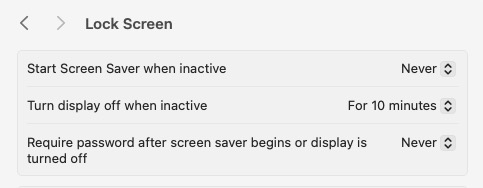
Leave the Mac Mini On and only allow the display(s) to turn Off during the day.
Then test manually Sleep from the Apple Drop Down menu over night.
Or optionally Shut Down at night and when away for a day or more.
Also FWIW:
Automatic computer sleep has been hit and miss for years.
It works fine for some setups and causes crashing for others.
Settings, third-party software and external devices all play a role.
So in the end, there is no one size shoe fits all solution to the problem.


