Bad battery life on M5 MacBook Pro

MacBook Pro M5 battery draining very fast.


I bought my new MacBook Pro m5 14 inch a few days after it was released in October this year.

I'm doing very light use on my Mac the only apps that are open are safari, chatgpt, pages and Spotify and I get 8 hours of battery life max. in about 20 minutes I lost around 5 percent. nothing is running in the background and I started completely fresh instead of transferring from my old Mac.

Did this happen to anyone else?

MacBook Pro 14″

Posted on Dec 21, 2025 5:08 AM

Reply
7 replies

Dec 21, 2025 7:45 AM in response to shchf

That computer is a battery-CAPABLE device, It is not optimized as a battery-operated device (it is not an iPhone.)


Your computer performs best when connected to AC power, such as the power adapter. It can use the full output of the Power Adapter AND when doing especially challenging work could also freely "borrow" power from the battery. In some cases, even with the power adapter connected, the charged state may decline during very stressful work.


When used only on battery, your computer has no extra cushion of power, and may perform more slowly. However, for ordinary non-stressful tasks this may not be objectionable (possibly not even noticeable.)


In general, you should ALWAYS connect a power source when it is possible to do so, and only run on batteries (which could be somewhat slower) when no power sources are at hand. Modern Macs maintain optimum battery charge levels under program control, and will NEVER over-charge. Connected to Power is NOT necessarily charging.

Dec 21, 2025 8:07 AM in response to shchf

The test conditions Apple uses to produce their battery marketing data are using ONE simple App to play one web stream in a limited-size window and brightness turned down Very low. NOTHING MORE.


If you do exactly that, then Apple suggests (but does not warrant) that you will get similar results. What you are describing you are actually doing is NOT "very light work".


--------

When you set it down in one place, or set it down for the night, Plug it in. Then you won’t CARE whether it would drain the battery. 


from tech specs here:


MacBook Pro (14-inch, M5) - Tech Specs - Apple Support


Battery and Power

M5 *4


  • Up to 24 hours video streaming
  • Up to 16 hours wireless web
  • 72.4-watt-hour lithium-polymer battery
  • 70W USB-C Power Adapter
  • USB-C to MagSafe 3 Cable
  • Fast-charge capable with 96W or higher USB-C Power Adapter


*4) Testing conducted by Apple in September 2025 using preproduction 14-inch MacBook Pro systems with Apple M5, 10-core CPU, 10-core GPU, 24GB of unified memory, and 1TB SSD. Wireless web battery life tested by browsing 25 popular websites while connected to Wi-Fi. Video streaming battery life tested with 1080p content in Safari while connected to Wi-Fi. Display brightness set to 8 clicks from the bottom and keyboard backlight was off. Battery life varies by use and configuration. See apple.com/batteries for more information.


Dec 21, 2025 8:15 AM in response to shchf

Your computer sounds like it is working great.


By far the easiest way to cause poor performance, instability, overheating and crashing is to install ANY third-party speeder-uppers, Cleaners, Optimizers, Virus scanners, Bit Torrent, or a VPN that you installed yourself. 


if you would like Readers to give you a detailed analysis of exactly what resources are being used where, post an etrecheck report.


Dec 21, 2025 8:17 AM in response to shchf

Etrecheck:

Consider downloading and running this little "discovery" utility, Etrecheck. It changes NOTHING. Etrecheck was developed by a senior contributor here, and uses mostly system calls and simple tests to collect often-needed information.


it contains little tests for speeds of devices, CPU utilization, memory usage, energy usage and a digest of recent problems, in one easy to use package. it does not even need to be Installed. Because less can be learned when your Mac is running great, best time to run is when your problems are actually occurring, if possible.


if you follow the directions faithfully, its report (pre-laundered of all personally-identifiable information) can be "Shared" to the System ClipBoard, then Pasted into an ‘Additional Text’ window in a reply on the forums.


Use Etrecheck Pro for free:

http://Etrecheck.com


The amount of data you get can be daunting. If you POST your report, some Readers here are willing to look over those reports, and can provide valuable insights.
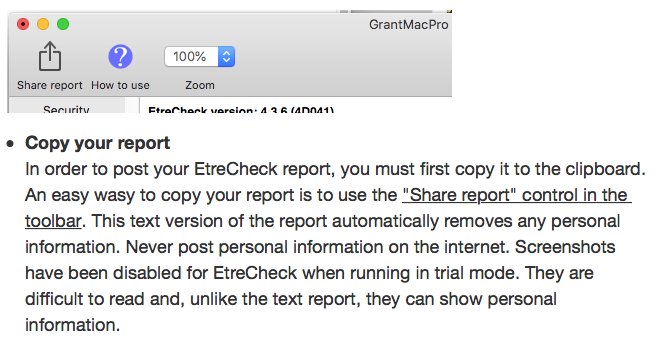

then start a reply on the forums, click the "Additional text"icon in the reply footer, and PASTE



Dec 21, 2025 10:13 AM in response to shchf

shchf wrote:

So just to make sure your point is that what I'm experiencing (1 percent drop every 5 minutes while using only apps like Chatgpt, pages and safari) is fine and nothing weird?

That sounds pretty good to me, based on what I have seen with some newer Macs. "Using Safari" can be very different for different people. If there are many windows or tabs open, and even one is broadcasting video (say, from advertising) continuously (many sites do that), that can drain a battery rapidly. ChatGPT -- don't know how much it taxes a computer. "Using ... apps like ..." -- well it depends how many such apps you are using and what they are doing. If you have anything like anti-virus, those can tax a battery also.


At work, almost no one can get 8 hours of computer use just off the battery.


I guess my question would be similar to Grant's point in their earlier post -- why are you trying to run a laptop all day on a battery? Battery life is degraded in such daily use scenarios; to maximize battery longevity, connect the laptop to power whenever it is available and let the battery health management that is built in to the Apple MacOS manage the battery levels.

Bad battery life on M5 MacBook Pro

Welcome to Apple Support Community
A forum where Apple customers help each other with their products. Get started with your Apple Account.
