
Changed number
How do I deregister iMessage after changing number?
iPhone 12 Pro Max, iOS 16
How do I deregister iMessage after changing number?
iPhone 12 Pro Max, iOS 16
Hi Steve,
This document tells you how to Deregister iMessage on your iPhone or online - Apple Support
(Edit: I'd just go to the link. Apple likes it when we copy and paste bits from documents into responses so I'll do it here, but it always ends up in a mess when I do it.)
Deregister iMessage on your iPhone
If you still have your iPhone, you can deregister iMessage with these steps:
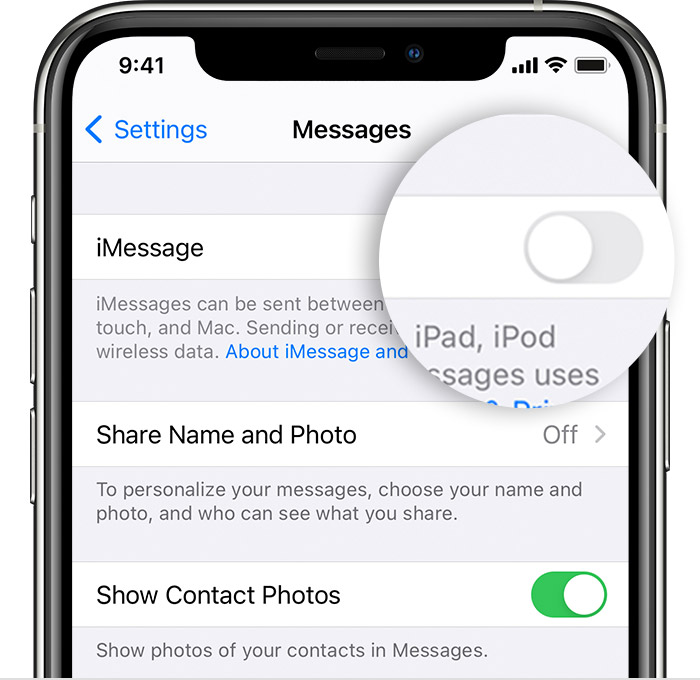

Deregister iMessage online
If you don't have access to your iPhone, you can deregister iMessage online.
After you complete deregistration, your phone number is removed from
iMessage services. You should be able to receive text messages right
away but it might take a few hours for some Apple devices to recognize
that you're not using iMessage when they send you a message.
If someone sends an iMessage to your Apple ID, you'll get it on your
other Apple devices. If someone sends a text to your phone number,
you'll get the message as an SMS/MMS only on your phone.
Hi Steve,
This document tells you how to Deregister iMessage on your iPhone or online - Apple Support
(Edit: I'd just go to the link. Apple likes it when we copy and paste bits from documents into responses so I'll do it here, but it always ends up in a mess when I do it.)
Deregister iMessage on your iPhone
If you still have your iPhone, you can deregister iMessage with these steps:
Deregister iMessage online
If you don't have access to your iPhone, you can deregister iMessage online.
After you complete deregistration, your phone number is removed from
iMessage services. You should be able to receive text messages right
away but it might take a few hours for some Apple devices to recognize
that you're not using iMessage when they send you a message.
If someone sends an iMessage to your Apple ID, you'll get it on your
other Apple devices. If someone sends a text to your phone number,
you'll get the message as an SMS/MMS only on your phone.
Changed number
