Hello Cipriann,
Thanks for posting in the Apple Support Communities.
We understand you have Beats Studio Buds, but you're unable to use the left earbud, right?
If we have that correct, let's try resetting your Beats Studio Buds to see if that will clear up what's occurring. We'll include the steps below to help with this, and you can find additional information here: Reset your Beats Studio Buds - Apple Support
1. Place both earbuds in the charging case. Leave the case open.
2. Press and hold the system button on the case for 15 seconds or until the LED indicator light flashes red and white.
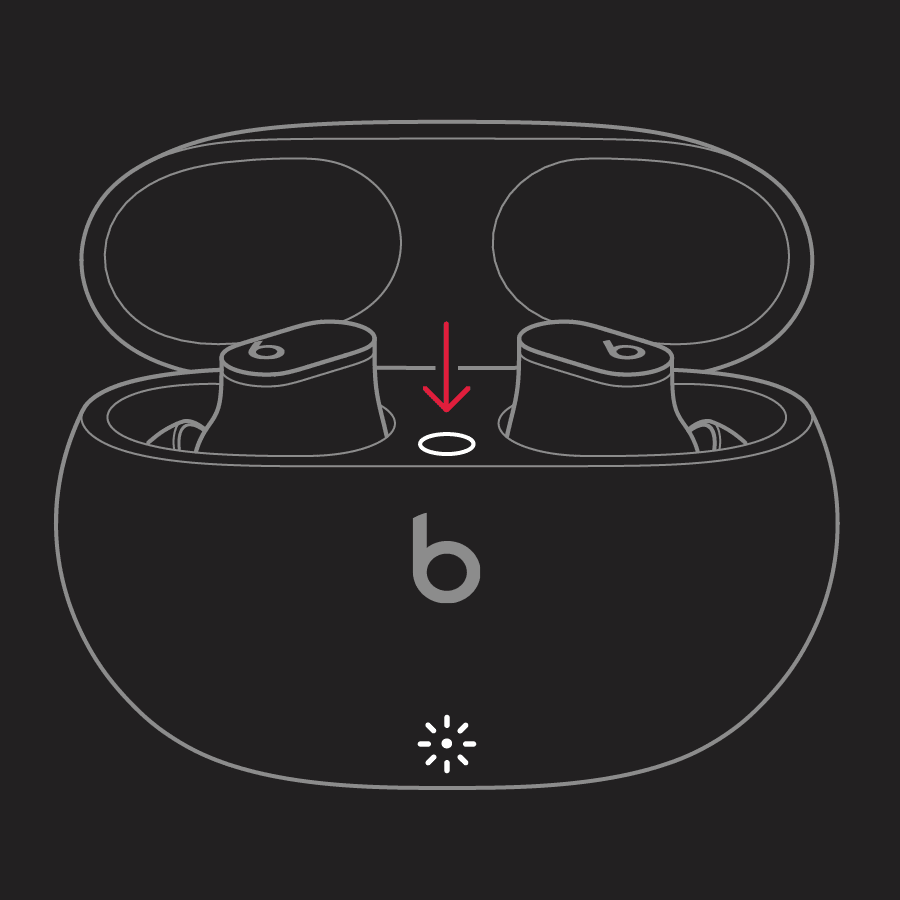
3. Release the system button.
In addition, be sure you have the latest iOS version installed on your iPhone. The latest iOS version can help with installing any firmware updates needed for your Beats, so this may help in clearing up what's occurring as well. If an update is available, be sure to complete a backup before getting started with the installation. The following resource will help with backing up and updating, if needed: Update your iPhone or iPad - Apple Support
We hope this is able to help. If not, confirm which steps you've taken so far and include any additional information that may be helpful. We'll use these details to gain a better understanding of what could be occurring to provide you with the best next steps to take.
Have a great day!