Sign in to iPhone without enabling iCloud sync

How can I sign in to iPhone without enabling iCloud sync(Photos, Contacts... etc)?

I don't want to store any sensitive data to iCloud but every time I sign in my iPhone with my Apple ID, it automatically syncs everything without asking me.


iPhone 12, iOS 16

Posted on Jan 28, 2023 12:55 PM

Question marked as Top-ranking reply

Posted on Jan 30, 2023 1:48 PM

Hello overfeed2791,


Thank you for reaching out to Apple Support Communities.


You can choose what you want to sync with iCloud. These steps should help:


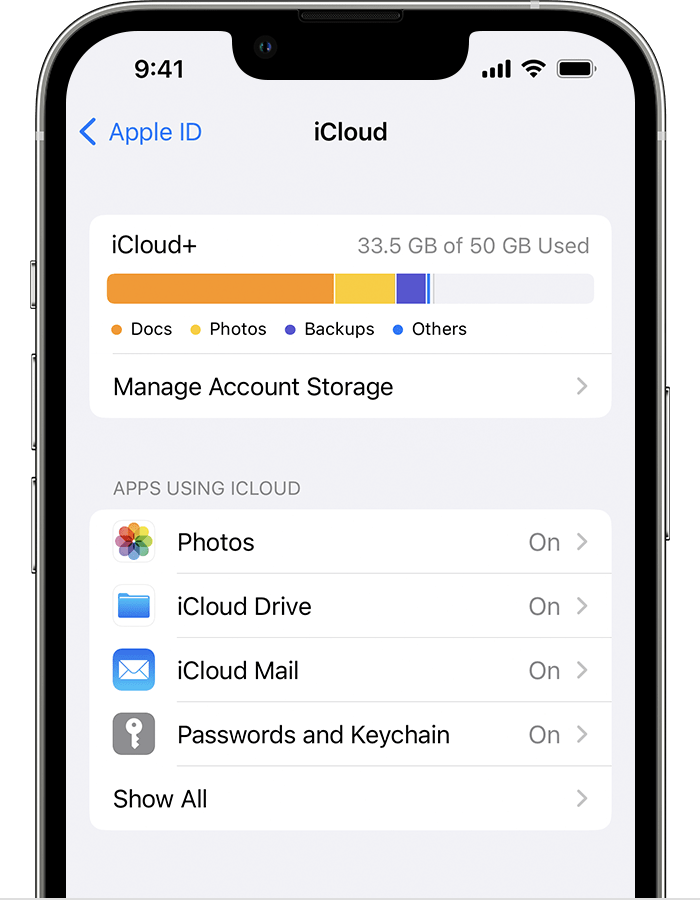
"Choose which apps to use with iCloud

Learn how to find your iCloud settings on your iPhone, iPad, or iPod touch, Mac, or PC.

On your iPhone, iPad, or iPod touch

  1. Go to Settings > your name. 
  2. Tap iCloud.
  3. Tap to choose which apps you want to use iCloud.Choose which apps to use with iCloud on your iPhone"


More details can be found here: Change your iCloud settings


Let us know if you run into any issues.


Cheers!


1 reply
Question marked as Top-ranking reply

Jan 30, 2023 1:48 PM in response to Community User

Hello overfeed2791,


Thank you for reaching out to Apple Support Communities.


You can choose what you want to sync with iCloud. These steps should help:


"Choose which apps to use with iCloud

Learn how to find your iCloud settings on your iPhone, iPad, or iPod touch, Mac, or PC.

On your iPhone, iPad, or iPod touch

  1. Go to Settings > your name. 
  2. Tap iCloud.
  3. Tap to choose which apps you want to use iCloud.Choose which apps to use with iCloud on your iPhone"


More details can be found here: Change your iCloud settings


Let us know if you run into any issues.


Cheers!


This thread has been closed by the system or the community team. You may vote for any posts you find helpful, or search the Community for additional answers.

Sign in to iPhone without enabling iCloud sync

Welcome to Apple Support Community
A forum where Apple customers help each other with their products. Get started with your Apple Account.