Beats Studio Buds popping noise

These are my second pair of Studio Buds. Can somebody help me? I’m having trouble in the right ear. The buds are popping and hissing.

I’ve done a reset and repaired the device, made sure they are fully charged, still no change. :( Do I need an Apple repair?

Thank you.

Beats

Posted on Jun 22, 2023 10:07 AM

Reply
Question marked as Top-ranking reply

Posted on Jun 23, 2023 6:09 PM

Hi cv-mac,


Confirm you've reset your headphones using the specific steps outlined here:


"Reset your Beats Studio Buds or your Beats Studio Buds +

If you have sound, Bluetooth, or charging issues with your earphones, you might want to reset them.


  1. Place both earbuds in the charging case, and keep the case open.
  2. Press and hold the system button on the case for 15 seconds or until the LED indicator light flashes red and white.
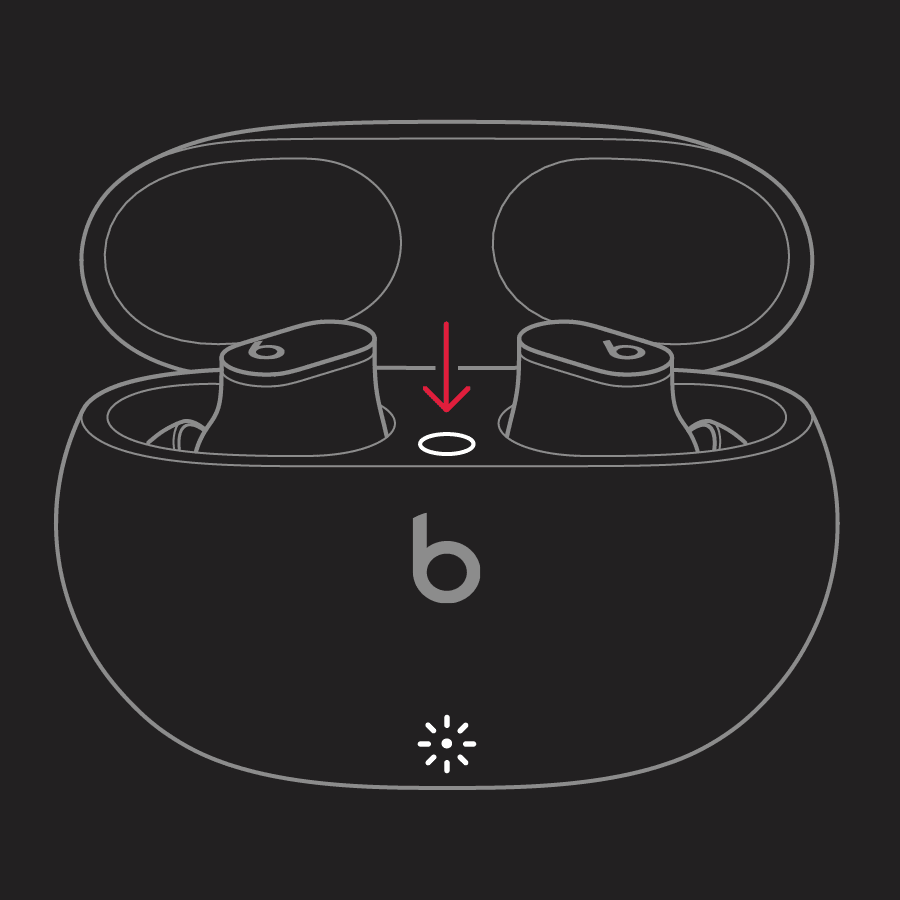
  3. illustration of case open with earbuds inside and arrow pointing to system button
  4. Release the system button.


The LED indicator light will continue to flash white, which means that you can pair your Beats Studio Buds or your Beats Studio Buds + with your iPhone, Mac, Android device, or other device again.

If you're having issues resetting your Beats Studio Buds or your Beats Studio Buds +, contact Apple Support."


If so, and the issue persists with the popping or issues with the right bud, contact Apple Support as they may need inspecting.


Take care.

Similar questions

1 reply
Question marked as Top-ranking reply

Jun 23, 2023 6:09 PM in response to cv-mac

Hi cv-mac,


Confirm you've reset your headphones using the specific steps outlined here:


"Reset your Beats Studio Buds or your Beats Studio Buds +

If you have sound, Bluetooth, or charging issues with your earphones, you might want to reset them.


  1. Place both earbuds in the charging case, and keep the case open.
  2. Press and hold the system button on the case for 15 seconds or until the LED indicator light flashes red and white.
  3. illustration of case open with earbuds inside and arrow pointing to system button
  4. Release the system button.


The LED indicator light will continue to flash white, which means that you can pair your Beats Studio Buds or your Beats Studio Buds + with your iPhone, Mac, Android device, or other device again.

If you're having issues resetting your Beats Studio Buds or your Beats Studio Buds +, contact Apple Support."


If so, and the issue persists with the popping or issues with the right bud, contact Apple Support as they may need inspecting.


Take care.

This thread has been closed by the system or the community team. You may vote for any posts you find helpful, or search the Community for additional answers.

Beats Studio Buds popping noise

Welcome to Apple Support Community
A forum where Apple customers help each other with their products. Get started with your Apple Account.