Hi cv-mac,
Confirm you've reset your headphones using the specific steps outlined here:
"Reset your Beats Studio Buds or your Beats Studio Buds +
If you have sound, Bluetooth, or charging issues with your earphones, you might want to reset them.
- Place both earbuds in the charging case, and keep the case open.
- Press and hold the system button on the case for 15 seconds or until the LED indicator light flashes red and white.
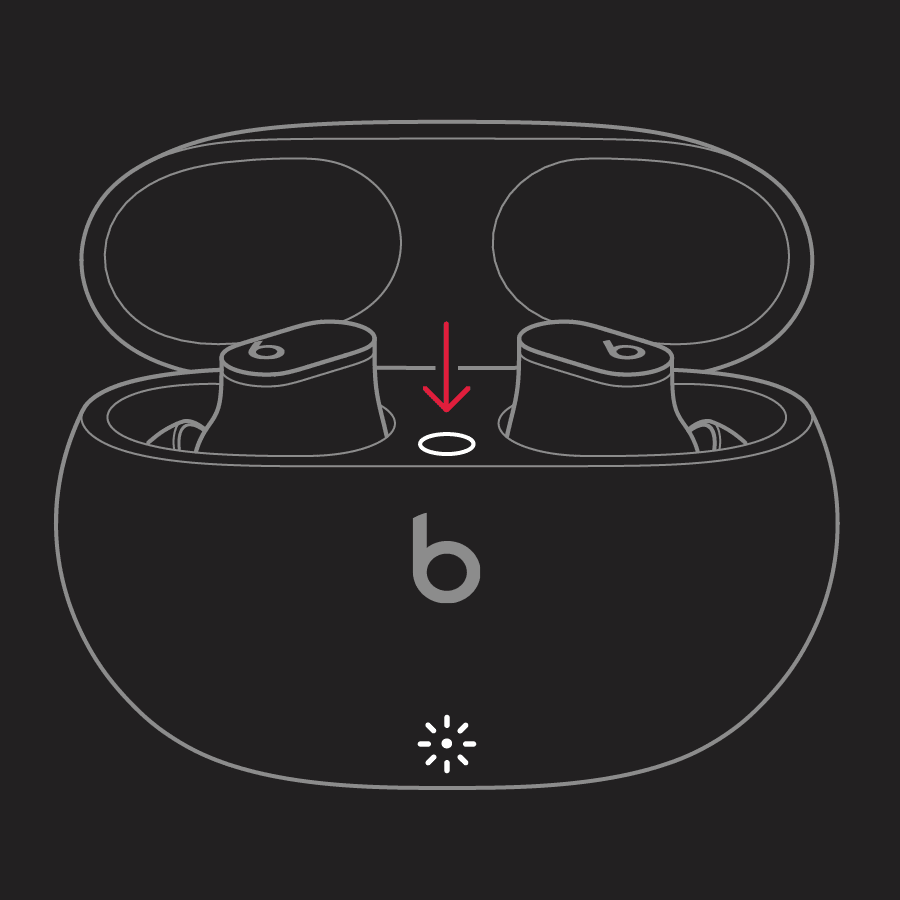
- Release the system button.
The LED indicator light will continue to flash white, which means that you can pair your Beats Studio Buds or your Beats Studio Buds + with your iPhone, Mac, Android device, or other device again.
If you're having issues resetting your Beats Studio Buds or your Beats Studio Buds +, contact Apple Support."
If so, and the issue persists with the popping or issues with the right bud, contact Apple Support as they may need inspecting.
Take care.

