Split screen function is missing on my iPad Pro after update

Hello,


After a recent update-that I wasn’t aware was happening, the three dots at the top of my iPad Air gen 5 screen no longer functions as before. Instead, I only have ‘enter full screen mode’, ‘add window’ and ‘minimize’ then ‘close’. Also, every time I open an app, it’s in the new ‘floating window mode’ or whatever it’s really called. Can I go back to the way it was before? With all my apps opening in full screen mode and the three dots behaving as before? I ASSUME this new method is to make it easier to switch between windows and apps but I was doing just fine before. In the future, it might be a better policy if Apple OFFERED the “new” methods with a full demonstration as to how they would work rather than surprise me with what they consider a ‘gift’.


Thanks in advance for any help at all. Quite frankly I’m surprised it updated without my permission as I removed the ‘auto download and update’ permission. This has been very enervating and aggravating and your help would be most appreciated.


Kind regards,

MDM (Mad Dog Mother)


[Re-Titled by Moderator]


iPad Pro, iPadOS 14

Posted on Mar 29, 2025 7:27 AM

Reply
Question marked as Top-ranking reply

Posted on Mar 30, 2025 3:51 AM

Expanding upon information already provided by 6x6


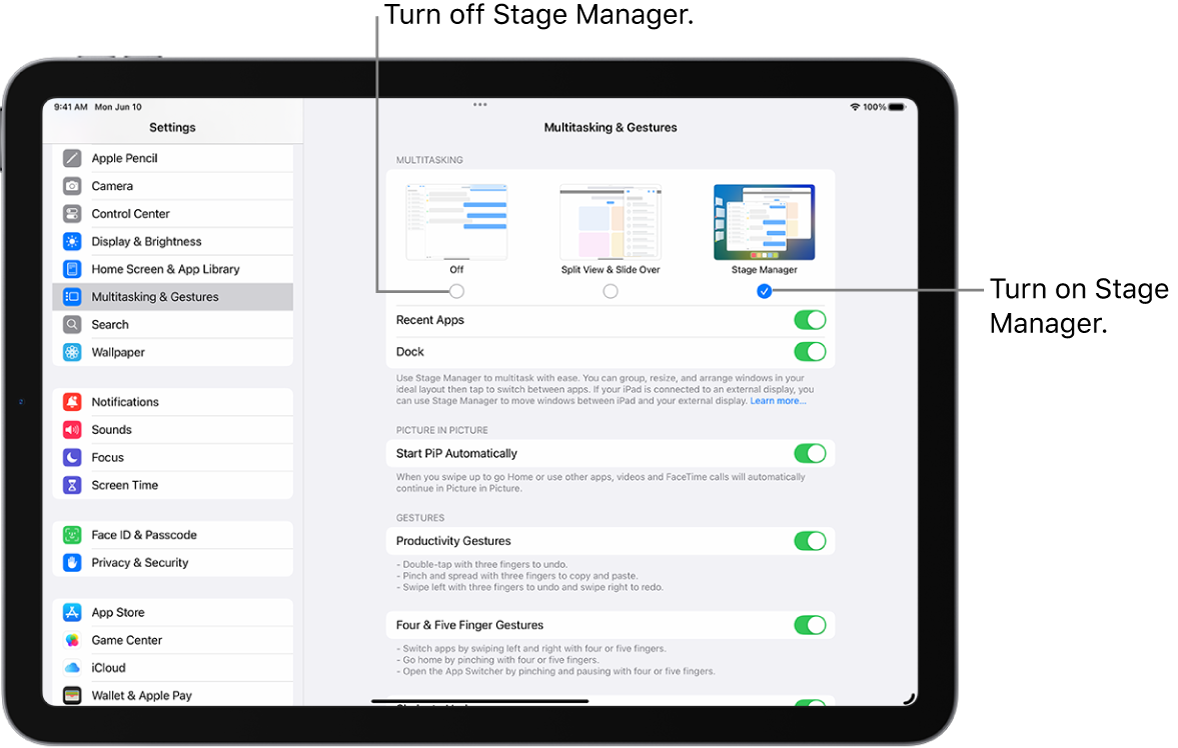
The update likely enabled Stage Manager, this feature providing a windowed desktop environment with re-sizeable App windows.


Stage Manager can be enabled/disabled from iPad settings. To disable:

Settings > Multitasking & Gestures > [Multitasking] - select Split View & Slide Over or OFF


Selecting Split View & Slide Over restores the full-screen multitasking view with which you are familiar. Selecting OFF completely disables all iPadOS multitasking features - which is unlikely to be your intent.


The iPad User Guide provides additional information about Stage Manager and its features:

Move, resize, and organize windows with Stage Manager on iPad - Apple Support


2 replies
Question marked as Top-ranking reply

Mar 30, 2025 3:51 AM in response to Chickivow

Expanding upon information already provided by 6x6


The update likely enabled Stage Manager, this feature providing a windowed desktop environment with re-sizeable App windows.


Stage Manager can be enabled/disabled from iPad settings. To disable:

Settings > Multitasking & Gestures > [Multitasking] - select Split View & Slide Over or OFF


Selecting Split View & Slide Over restores the full-screen multitasking view with which you are familiar. Selecting OFF completely disables all iPadOS multitasking features - which is unlikely to be your intent.


The iPad User Guide provides additional information about Stage Manager and its features:

Move, resize, and organize windows with Stage Manager on iPad - Apple Support


This thread has been closed by the system or the community team. You may vote for any posts you find helpful, or search the Community for additional answers.

Split screen function is missing on my iPad Pro after update

Welcome to Apple Support Community
A forum where Apple customers help each other with their products. Get started with your Apple Account.