iCloud Drive isn't a separate storage device like an extra hard drive. iCloud Drive is a synchronization service. So iCloud Drive is a folder on your Mac. If you see a folder named "My Stuff" in your iCloud Drive folder, then you are seeing the "My Stuff" folder on your Mac.
Things in your iCloud Drive are copied to iCloud.com where you can see them and use them from the browser. If you have other devices connected to iCloud, then the contents of iCloud Drive can be seen and used on those other machines, as well. But, the "My Stuff" folder is local to you. This applies to anything you put in the iCloud Drive folder.
If you are not interested in synchronizing these files with other devices, then iCloud Drive may not be a good choice. iCloud is not a backup service, it's a synchronization service. If you make mistakes in editing your files, those mistakes will be immediately copied to iCloud when you save.
If you have "Optimize Mac Storage" turned on, then when your Mac's hard drive gets really full, some lesser used files will be removed to make room. When you need one of those removed files, the Mac will grab the copy at iCloud.com and copy it to your Mac where it will again become a local file. You always use local files. This should all happen transparently. Perhaps the biggest downside of "Optimize" is that backups may not include all your files. I don't do "Optimize" on my Mac, though I use it on my iPhone which has way less storage.
Even without "Optimize" turned on, you can choose to remove a file from your local iCloud Drive folder. A right click on a file will produce a sub-menu

where you can choose "Remove Download" and replace the actual file with a link to iCloud.com. Then, when you double click on that link version of the file, it will download the file and open it in the usual app. You will again be dealing with a local file.
If you turn on iCloud Status in Finder>View, you can see how each file is being handled"
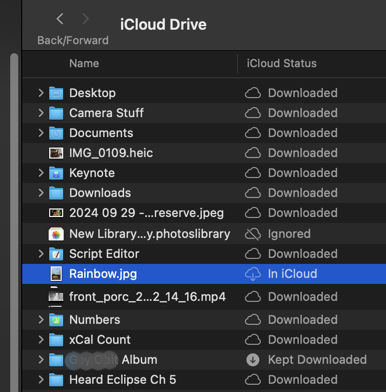
Desktop is both local and at iCloud.com
photoslibrary is ignored because it's the not allowed in iCloud Drive
Rainbow stays only in iCloud until clicked
Album is kept always local as well as at iCloud
Does this make more sense about iCloud Drive?
From the Tip: Understanding iCloud Drive - Apple Community


