macOS 26 volume and brightness UI control missing

I have a MacBook Air M1, and after updating to macOS 26 I noticed that when I press the keys to adjust the volume and screen brightness, the on-screen indicator showing the adjustment no longer appears. I have already tried restarting the computer, but nothing has changed.


[Edited by Moderator]

MacBook Air 13″, macOS 26.0

Posted on Sep 18, 2025 10:05 PM

Reply
Question marked as Top-ranking reply

Posted on Sep 18, 2025 11:37 PM

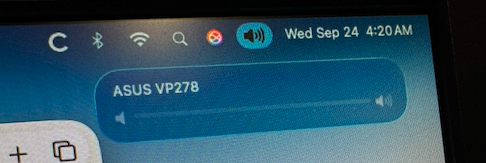
They do appear, just in a different location from before.

Instead of being right in the middle of the screen, they are more subdued and appear at the top right, just under the menu bar icon.


12 replies

Sep 24, 2025 1:27 AM in response to FabricioAcm96

FabricioAcm96 wrote:

I have a MacBook Air M1, and after updating to macOS 26 I noticed that when I press the keys to adjust the volume and screen brightness, the on-screen indicator showing the adjustment no longer appears. I have already tried restarting the computer, but nothing has changed.

[Edited by Moderator]

Have you tried restarting in Safe Mode.


Then test if the Volume appears where it should


Sometimes a Safe Boot followed by a Normal Boot will just put things right.


If not - there could be something in the main User Account playing up. To further isolate this - Set up users, guests, and groups on Mac. Then log out of the Main User account and log into the dummy account and test again if the issue persists.


If the issue is present in the dummy account - then, this appears to be a System Wide issue on the computer.


To avoid a session of Q&A, Q&A  and Q&A  


Download the Application Etrecheck  ( External Link ) directly from the Developer.


The Application is Not a " Silver Bullet "  and is  only a tool to examine the Hardware / Software used on this computer 


This is a Diagnostic Tool that makes no changes to the computer Hardware / Software used on this computer 


The application is free or paid from added features. 


The Report will Not Reveal Any Personal Information. 


Post back the Full Report - copy and paste - >>>> using the Additional Text Icon ( 3rd Icon to last ) <<<<


Sep 24, 2025 1:14 AM in response to charlesmykid

For me, it shows right under the menu bar, as I showed above.


Try changing the setting to show volume in the menu bar:


System Settings->Menu Bar->Sound


to "Always Show".


It occured to me: maybe there are too many items in the menu bar, and no space left?

I turned everything ON in System Settings->Meny Bar;

the volume icon does not show (it seems to have vanished under the notch);

but STILL when I press the volume buttons the visual feedback shows...


I cannot find a way to specifically turn the visual feedback on or off. It seems it is on all the time.


Oct 6, 2025 11:31 PM in response to Red and Blue

Red and Blue wrote:

I couldn't figure out at first why some peoples volume bar show shows up in the right corner and others have it more to the left, but now I see it all depends on where your position the sound icon. I use the sound icon frequently for changing between MacBook speakers and different AirPlay devices, I would like to have the volume bar appear in the right corner where it's easier to do you know where to look, then I have to get used to clicking on the icon of that position to control the audio selection for wireless devices. What I really want is a way to have the volume bar appear in the middle, down near the bottom of the screen


None of us can change how the volume display works.

You can let Apple know by providing feedback. But I have to say that, given that Apple has just changed it in macOS 26, I find it unlikely that they change it back.


https://www.apple.com/feedback

Oct 6, 2025 6:17 PM in response to Luis Sequeira1

I couldn't figure out at first why some peoples volume bar show shows up in the right corner and others have it more to the left, but now I see it all depends on where your position the sound icon. I use the sound icon frequently for changing between MacBook speakers and different AirPlay devices, I would like to have the volume bar appear in the right corner where it's easier to do you know where to look, then I have to get used to clicking on the icon of that position to control the audio selection for wireless devices. What I really want is a way to have the volume bar appear in the middle, down near the bottom of the screen

macOS 26 volume and brightness UI control missing

Welcome to Apple Support Community
A forum where Apple customers help each other with their products. Get started with your Apple Account.