How can I downgrade from macOS Tahoe 26 to earlier version on MacBook Pro?

on MacBook Pro from 2021. Do not use Time Machine; back up only individual files and such.

On Oct 4, 2025, thought was updating from 15.6 to 15.7 (Sequoia) but it brought in 26 (Tahoe) .

Most recent revert operating system (aka downgrade) entry found in community is from 4 years ago, thus useless.

;

Would appreciate a Link to chat with anyone supporting Macs who works at Apple. Twice got to button saying "Chat ..." but both tossed me back to top level of support pages.


[Re-Titled by Moderator]

Original Title: revert MacOS 26 to earlier version

MacBook Pro 16″, macOS 26.0

Posted on Oct 4, 2025 3:24 PM

Reply
22 replies

Oct 31, 2025 8:02 AM in response to t3w

t3w wrote:

Barney 15E: per original description of issue, i do Not use Time Machine. Thus bootable backup is moot.
However, your info might help other users.

There is no bootable backup required in your case.

Creating a bootable USB installer, as @Barney-15E has suggested, has no requirement for making use of any TM backup at all. (And no TM backup since Big Sur has been bootable.)


[...]
Thus want to revert aka downgrade OS, which seems to require wiping machine and starting from scratch = not feasible.

Downgrading the OS is still very doable, but you will have to have some form of backup of your personal files (TM not required) so that you can recover them after. Even a simple drag/drop copy of the contents of your home folder to an external drive will likely get you 99% of what you want.


Yes, it does require wiping the drive. This has always been a true of downgrading a Mac. But once wiped, the bootable USB installer does the heavy lift.

Oct 30, 2025 7:31 AM in response to jeffreythefrog

Even when you do this process, you will have Sequoia running on Tahoe firmware (preboot/recoveryOS/1TR). To really get back to Sequoia, you would need access to another M series Mac running Apple Configurator 2 and a data/charge USB C cable. Apple Configurator 2 would download an .ipsw Sequoia file. Details here.


When you're done, your laptop would be truly factory reset, for the rebuilding process.

Oct 5, 2025 2:24 PM in response to t3w

ok. I get you. :)


Before you start, I would create a bootable installer for your desired macOS. Please see Create a bootable installer for macOS – Apple Support (not absolutely necessary, but incase internet recovery acts squirrelly)


Then, to "revert OS", you will first want to make a complete backup of your data. You could use Time Machine, or manually move data to an external storage device.


Back up your Mac with Time Machine - Apple Support


Then, boot into recovery and use Disk Utility to erase your drive. And then you can reinstall macOS. You could use recovery to reinstall macOS, or exit recovery and use the bootable installer you already created.


Intro to macOS Recovery - Apple Support


And after all that, restore your data using Time Machine, or manually.

Oct 6, 2025 11:11 AM in response to t3w

t3w wrote:
Had 3 choices per System update dialog: 1 go to OS 26; 2 update a different app; or 3 update from 15.6 to 15.7 of OS. Chose option #3 - 100% sure of that. What i got was #1; that's a bug.


Color me skeptical. You would have been presented with two options, one with an Upgrade Now button, the other with Update Now / Update Tonight buttons. In macOS parlance, an update is within a major version (15.6 to 15.7) and an upgrade is a new major version (15 to 26).


Clicking the (i) next to the Other Updates section does preselect macOS 26, but the button changes to Upgrade and if you deselect macOS 26 and select macOS 15.7.1, the button reverts to Update.


The bottom line is that most likely you did take a declarative step to Upgrade to macOS 26 Tahoe.


Regardless, the upgrade was performed and if you lack a backup from before that happened, you cannot still downgrade to Sequoia without losing your data.


I suppose the lessons are 1) have a backup and ideally more than one and 2) be careful which button you press.


[Edited by Moderator]

Oct 4, 2025 4:05 PM in response to t3w

to "go backwards", it requires you to totally erase your drive and then reinstall your desired macOS. then afterwards, you can add your data back to the newly installed macOS.


but why would you like to downgrade? are you having issues since upgrading? rather than downgrading, you may want to let us know your issues. it could be something that the people here could help you resolve.


t3w wrote:

Would appreciate a Link to chat with anyone supporting Macs who works at Apple. Twice got to button saying "Chat ..." but both tossed me back to top level of support pages.

sorry, but there is no-one here that represents apple. we would be unable to provide you with such a link.

Oct 6, 2025 7:31 AM in response to t3w

t3w wrote:

1. re why want to downgrade aka revert OS.
got it via a bug; wasn't ready for this major upgrade and didn't click on it; 100% clicked on a Sequoia upgrade.
2. Now canNOT rename files while viewing in Preview. It lets you change name but doesn't save the new name. When you take a bunch of similar screenshots, it is too difficult to distinguish which is which from the file's icon.
3. in System settings for Storage, it still hadn't calculated how much space its own System was using after 3 hours.
That's 3 issues in less than a 24 hours.
Fyi, I made a career by finding bugs in software just by being within 10 feet of the machine it was using. Knew any wild bugs would bite me. Already behind on over 300 to-do things in life.

Have to ask


This Apple computer MacBook Pro (16-inch, 2021) - Technical Specifications ?


Possibly this one MacBook Pro (14-inch, 2021) ?


Both machines are Apple Silicon Computers which makes Downgrading to an older version of macOS a bit more complicated


Would seriously suggest reading through all the points in that link and then decide if Downgrading / Rolling back a version is really for you


https://eclecticlight.co/2023/09/30/how-to-clean-install-modern-macos/

Oct 6, 2025 6:00 AM in response to jeffreythefrog

Before you start, I would create a bootable installer for your desired macOS. Please see Create a bootable installer for macOS – Apple Support (not absolutely necessary, but incase internet recovery acts squirrelly)
And after all that, restore your data using Time Machine, or manually.

Time Machine will not migrate the data to an older macOS. You have to migrate from the backup you should have made immediately before installing the new OS.


Oct 6, 2025 12:15 PM in response to t3w

t3w wrote:

having to deselect a choice is ridiculous. I clicked exactly once; that should suffice.

The only way you'd have gotten to the place where you had to deselect Tahoe was if you clicked the little (i) next to the update button. So if you 'clicked exactly once' as you state, you'd have clicked on the Upgrade Now button next to macOS 26, or on the Update Now button next to the offered macOS 15.x update. Since you are now running Tahoe, I have a strong suspicion about which button you clicked.


Bug is the way these options are phrased if they don't do what is explicitly stated.

It does exactly what's stated. Click on the button by Tahoe you get Tahoe, click on the Other Updates button where a Sequoia update is listed, you get the Sequoia update.


Am not 100% sure what option 2 was, but am sure of 1 and 3 as well as which of those I chose. It looked like the the 3 choice in the final Update screen you included, however, there were no checkboxes, no other text, and no buttons for tonight vs now.
Wonder if the information hadn't fully loaded to my computer before made a choice?

Maybe, and I get the 'who reads those license agreements anyway' but even after that exactly one click you'd have had to agree to the license for macOS and that would state Tahoe or Sequoia.


For example, when I click the Update Now button next to Other Updates on my Mac still running 15.6.1, the next thing I see is this:
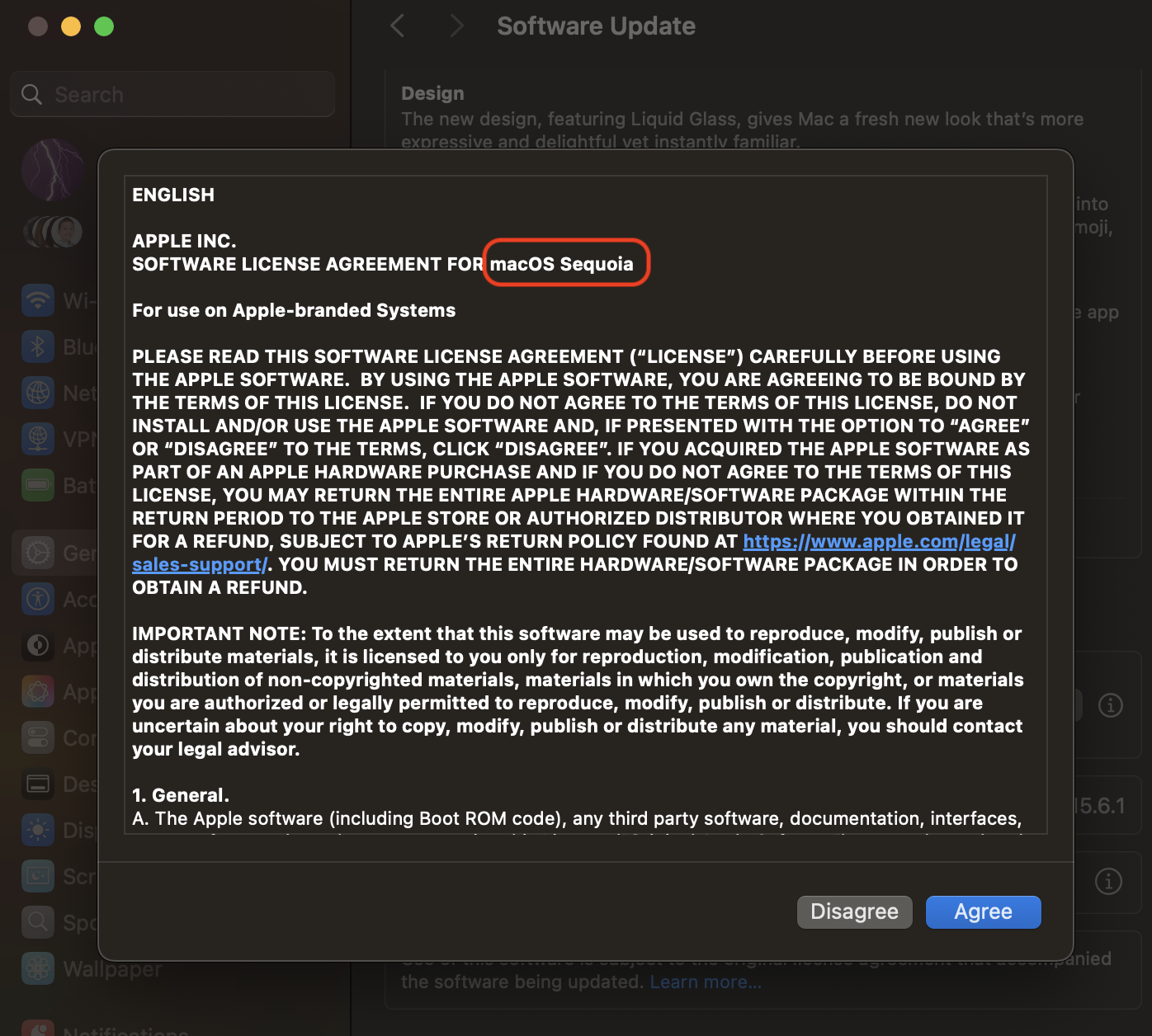


It's delivering the Sequoia update as selected, and since I don't want to reboot right now, I just clicked Disagree and I'm back to the initial update choices.


Oh well, water under the bridge for you at this point.


Oct 5, 2025 1:03 PM in response to jeffreythefrog

re why want to downgrade aka revert OS.

  1. got it via a bug; wasn't ready for this major upgrade and didn't click on it; 100% clicked on a Sequoia upgrade.
  2. Now canNOT rename files while viewing in Preview. It lets you change name but doesn't save the new name. When you take a bunch of similar screenshots, it is too difficult to distinguish which is which from the file's icon.
  3. in System settings for Storage, it still hadn't calculated how much space its own System was using after 3 hours.

That's 3 issues in less than a 24 hours.

Fyi, I made a career by finding bugs in software just by being within 10 feet of the machine it was using. Knew any wild bugs would bite me. Already behind on over 300 to-do things in life.

Oct 6, 2025 10:07 AM in response to Barney-15E

Barney 15E: per original description of issue, i do Not use Time Machine. Thus bootable backup is moot.

However, your info might help other users.

Also: intent was upgrade a minor version, and deal with major one later after a manual backup. Had 3 choices per System update dialog: 1 go to OS 26; 2 update a different app; or 3 update from 15.6 to 15.7 of OS. Chose option #3 - 100% sure of that. What i got was #1; that's a bug.

Thus want to revert aka downgrade OS, which seems to require wiping machine and starting from scratch = not feasible.


Oct 6, 2025 10:51 AM in response to neuroanatomist

neuroanatomist wrote:

Regardless, the upgrade was performed and if you lack a backup from before that happened, you cannot still downgrade to Sequoia without losing your data.

with Time Machine, I am to understand that is correct. but could you not manually move data to an external drive, and then after downgrading, manually move the data back onto the Mac?

Oct 6, 2025 10:55 AM in response to jeffreythefrog

jeffreythefrog wrote:
with Time Machine, I am to understand that is correct. but could you not manually move data to an external drive, and then after downgrading, manually move the data back onto the Mac?

True, data could be copied off then copied back. Settings, etc., would be lost, as would data stored by apps in the ~/Library folder (like locally-stored email attachments, etc.). Not an optimal solution, IMO.

Oct 6, 2025 11:40 AM in response to neuroanatomist

having to deselect a choice is ridiculous. I clicked exactly once; that should suffice.

Bug is the way these options are phrased if they don't do what is explicitly stated.

Am not 100% sure what option 2 was, but am sure of 1 and 3 as well as which of those I chose. It looked like the the 3 choice in the final Update screen you included, however, there were no checkboxes, no other text, and no buttons for tonight vs now.

Wonder if the information hadn't fully loaded to my computer before made a choice?


Re terminology, it changes way too often to even attempt to keep up.

e.g. Apple's Help stuff is getting too difficult to use for just that reason - if you don't know the terminology you cannot find what you need. Microsoft had that issue a decade ago - one of several reasons I switched to Macs then.


Oct 6, 2025 12:58 PM in response to t3w

t3w wrote:

the 16 inch one; M1 chip.
It seems rolling back would be worse, but I had hoped someone knew a trick for it.
Really don't have time to go thru all the online info, even with speed reading.

If indent the computer is running Tahoe 26.01 and you have No TM Backup from a time when running Sequoia 15.xx


This is No Magic Wand that can turn time back - full stop


Your choices have been put forth by several uses including myself 🦉-53


What you decide is now in your hands and nobody should or could make the final decision but you

How can I downgrade from macOS Tahoe 26 to earlier version on MacBook Pro?

Welcome to Apple Support Community
A forum where Apple customers help each other with their products. Get started with your Apple Account.




