The best practice is to plug into power whenever it’s convenient and run on battery only when you cannot connect to power. Your Mac uses Optimized Battery Charging, which is enabled by default. That is designed to charge the battery in a way that balances increased battery lifespan with your personal usage patterns. That's the feature that pauses charging at 80%.
About battery health management in Mac notebooks - Apple Support
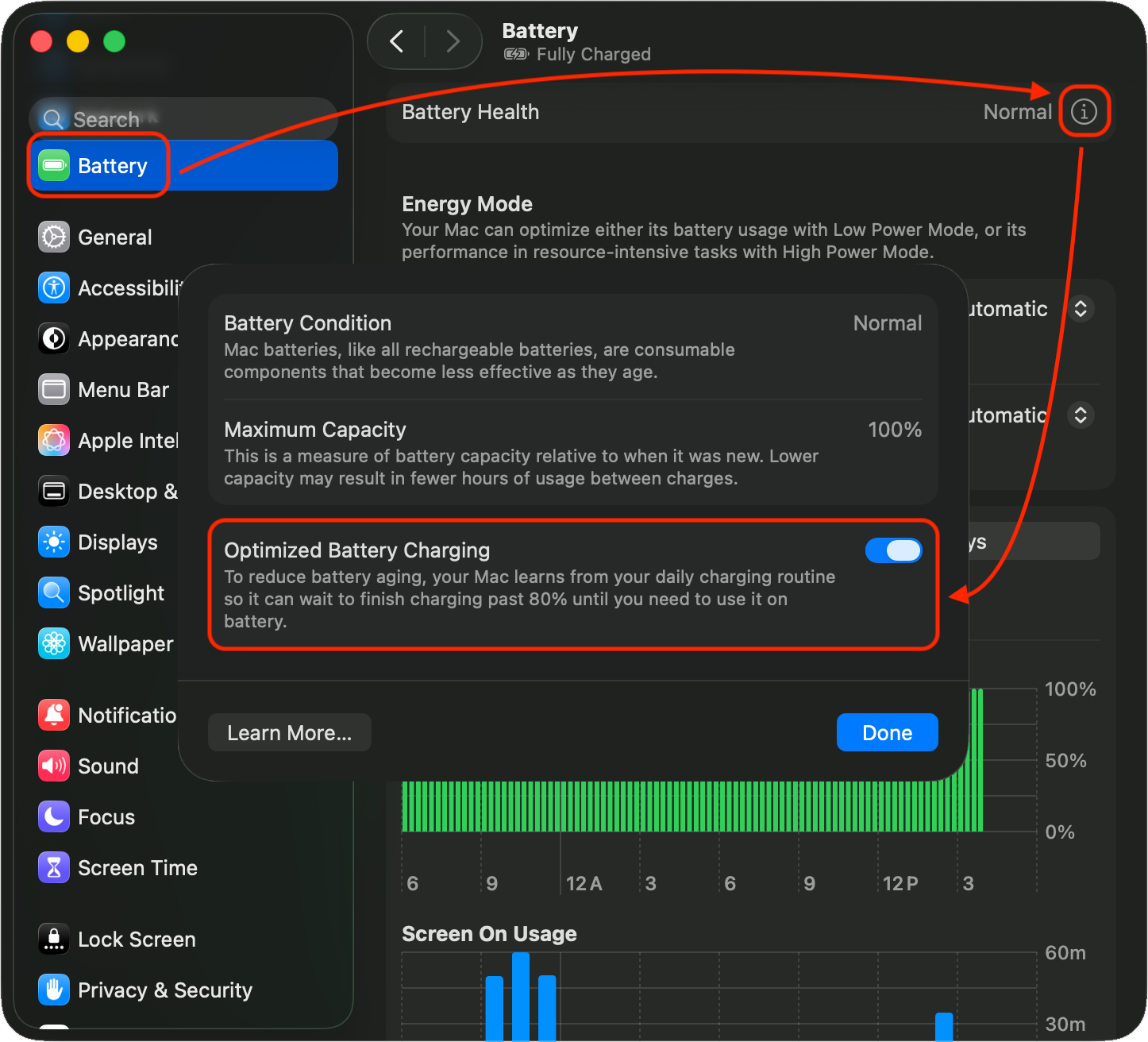
To confirm that Optimized Battery Charging is enabled, go to System Settings > Battery then click the (i) to the right of Battery Health. I don't recommend it, but if you want you can disable it with the toggle.
As for draining during inactivity, it is possible there are processes running in the background that are using significant resources. Check Activity Monitor, CPU tab, sort by % CPU to see what's running hard. This is not uncommon with apps/extensions that are not fully compatible with a macOS upgrade.
Activity Monitor User Guide for Mac - Apple Support
Regarding the Mac running the battery down to 80% while plugged in, that's not a Tahoe thing. One of my MBPs is still on Sequoia, you can see that's exactly what happened:



