Missing 'Customise Folder' option in macOS Tahoe update

There's no "Customise Folder" option in the latest Tahoe update on my mac - only the Tag option. Could you advice please?


[Re-Titled by Moderator]

Original Title: customise folder

MacBook Air, macOS 26.0

Posted on Nov 3, 2025 3:23 AM

Reply
Question marked as Top-ranking reply

Posted on Nov 3, 2025 8:22 AM

I'm not sure if you mean this or not. but here's the apple support "how to" article: Change icons for files or folders on Mac.

6 replies

Nov 3, 2025 4:36 AM in response to miezekatze11

There are several unexpected dependencies in Tahoe, and perhaps you are being affected by one of them. The Customize Folder option is associated with Tags in the UI. For the Customize Folder option to be enabled, you must have some Tags designated as favorites.


In Finder, go to Finder menu > Settings > Tags tab. If the Box at the bottom for favorites is empty, drag some of the tags down into that box. Then select a folder and check the contextual menu for the Customize Folder option.
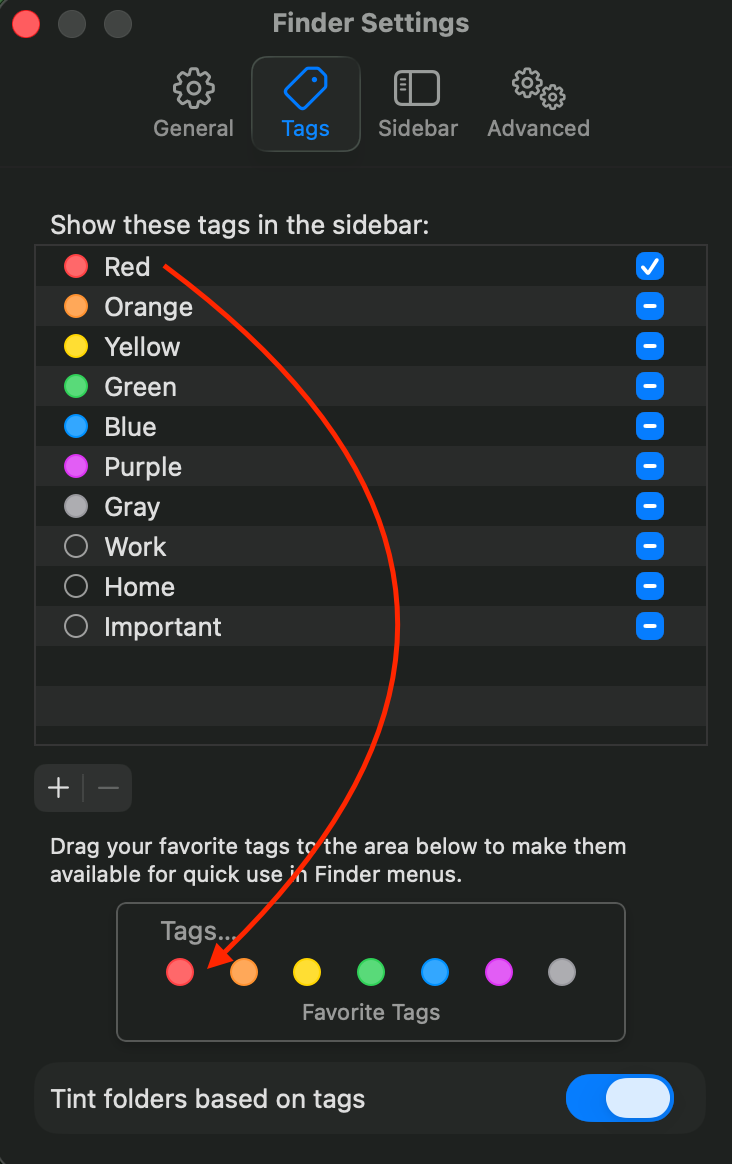


If you already had some favorite tags, or if the above doesn’t work, then post back.

Missing 'Customise Folder' option in macOS Tahoe update

Welcome to Apple Support Community
A forum where Apple customers help each other with their products. Get started with your Apple Account.


