Vandestadt wrote: … Thanks, Richard. Using your information, I checked the external HD, and it is formatted as Mac OS Extended (Journaled).
Good. For future reference, APFS is rather better, especially for solid state drives. But you are fine!
It also contains two files: 1 identified as Photo library 2 and this contains the 3000+ photos, and one file named "photos" containing albums designated by years.
I'm guessing that you mean Photos.photoslibrary and Photos Library 2.photoslibrary. These are "packages," a type of folder with a bit of protection, that have the database and supporting files. The default name, the name given when you first open Photos, is Photos Library.photoslibrary, and that is usually in the Pictures folder belonging to the user on the internal drive. (You might want to check that, as well.) So apparently these Libraries have been purposely created by someone.
… I guess I have three questions arising:
1/ am I now able to delete the files containing the 3000+ on both the iMac and the external disc or should I run some sort of merge programme first?
2/ would it be prudent to now save all 6000 photos on to my external disc as a backup?
It's prudent to keep double copies of everything. I do Time Machine backups to two different drives, one solid state and the other spinning, just in case. (I've recently had two SSDs go belly up!) iCloud should not be thought of as a backup, since it quickly copies mistakes.
Here's one merging suggestion: In your System Library choose the menu File>Import, and select the other Library, then "Review for Import." Photos will tell you that some pictures are already in the Library.
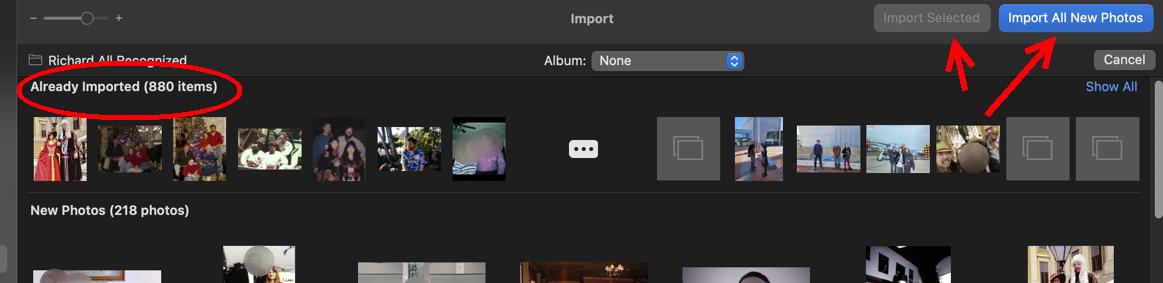
Then you can go through and select among the new ones, or just Import All New Photos. Super easy! Pictures that look the same but have different filenames or different resolutions may get through the filter, so you can get those later with Photos' built-in duplicate finder.
If you've done lots of organizing of pictures into albums and folders, then you lose that organization-- the import process only gets pictures, not albums. If Albums and Folders are important, then the best merge system is the trusted 3rd party app PowerPhotos ($40) ) which will merge Libraries preserving the organization.
3/ how can I move the file holding albums on the external disc and incorporate them back into my iMac
The Library Package, like any folder, can just be grabbed and dragged to the Pictures folder on the internal drive, if you don't want to keep it kept on the external drive.
If by "incorporate" you instead just mean that it's the main one-- You can continue to double click on any Library to open it in Photos. Photos will, next time, open the same Library. The System Library is the one that Safari and other apps can be allowed access to. iCloud connects only to the System Library. If you change the System Library designation to another one, then all the pictures in the new System Library will be added to what's already in the iCloud Library, and it may initiate an extensive and lengthy re-scanning. Switching System Libraries connected to iCloud is done only after a good deal of thought and preparation.

