The cellular signal strength on an iPhone is primarily dependent on the service provider and the network coverage they offer based on the plan you have selected. Different carriers have varying levels of coverage in different geographical areas, and the strength of your signal can fluctuate depending on your proximity to cell towers, obstacles like buildings or natural terrain, and overall network congestion.
It’s important to understand that there are no software settings on your iPhone that can directly boost cellular signal strength. However, if you are consistently experiencing a poor signal despite being in an area with generally good coverage, it’s worth checking a few things. First, ensure your iPhone’s software is up to date, as carrier settings updates can sometimes improve connectivity. You can also try toggling Airplane Mode on and off, which forces the device to reconnect to the network and may establish a stronger signal.

A few carriers (Cellular Service Providers) do not provide Carrier Settings in full, but they offer APN settings, for example
- Google FI, which has APN to be entered manually as h2g2
- MTN Ghana, which provides an APN pin to be updated manually, as the internet
- BSNL in India, which provides APN pin to be updated manually as bsnlnet (Watch the GIF below)
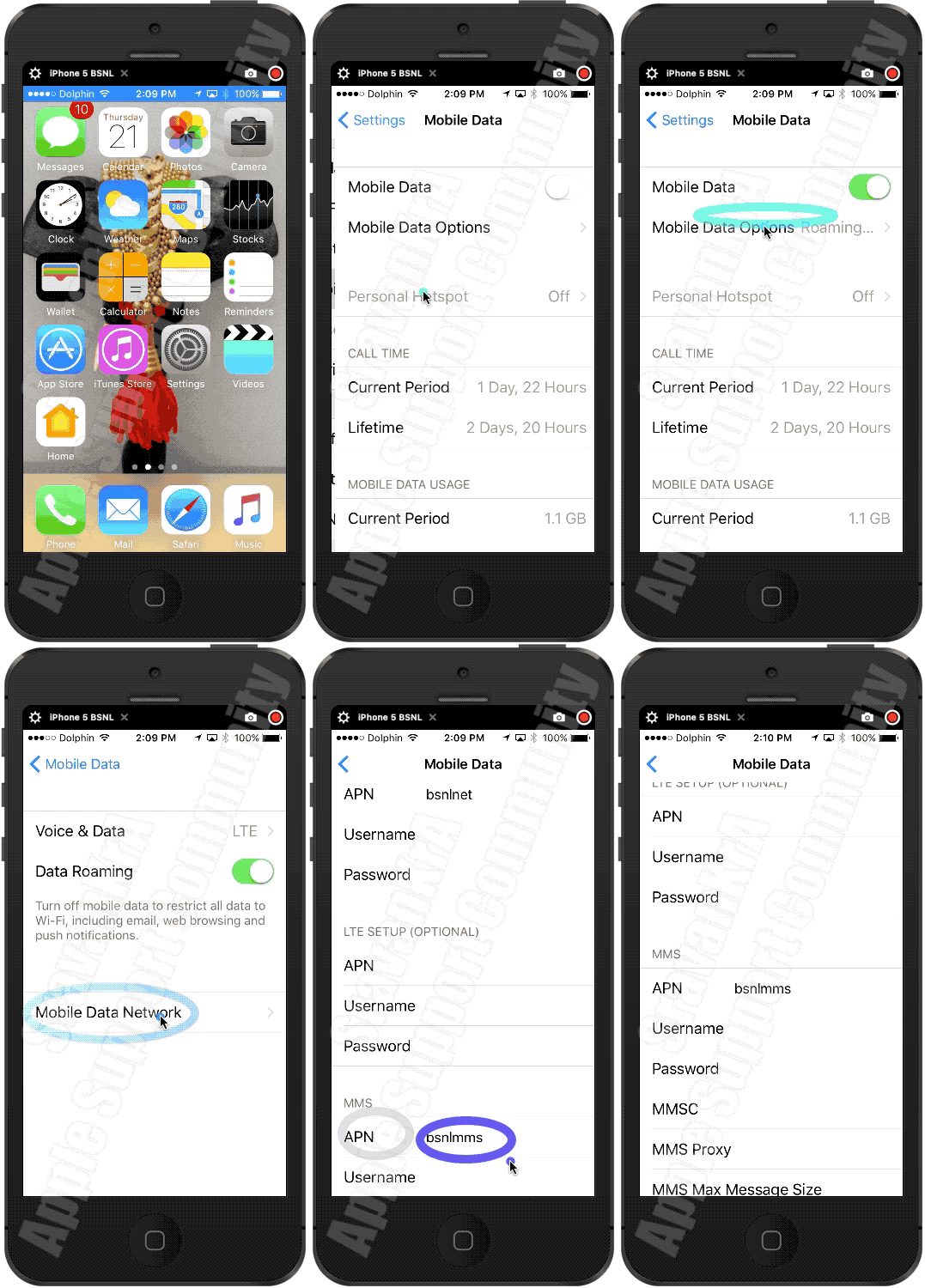
Settings > Mobile Data > APN [under Mobile Data APN] enter the APN pin
View and edit your APN settings
If your carrier allows it, you can view your APN settings in one of the following locations: Settings > Cellular > Cellular Data Options > Cellular Network. Settings> Mobile Data > Mobile Data Options > Mobile Data Network.
View and edit your Access Point Name (APN) on your iPhone ...
Use the APN pin based on your carrier. Ask them (Your Carrier) or search using any search engine.
If these steps don’t help and the problem persists, there’s a possibility that the internal radio antenna of your iPhone may be damaged. This can happen if the device has been dropped or exposed to physical stress. In such cases, having your iPhone inspected and repaired by an authorized service provider is the only solution that could restore proper signal strength. A damaged antenna can significantly impair your ability to connect to cellular networks, leading to dropped calls, slow data speeds, and limited coverage.
If you have either dropped the device accidentally or exposed it to liquid or used it beyond acceptable temperature limits then…
Take your device to an Apple Retail Store or Apple Authorized Service Provider, or contact Apple Support:
Find Locations - Location Selector - Apple
Contact Apple for support and service - Apple Support
Get a Genius Bar Reservation and Apple Support Options - Apple
Contact Genius Bar.
Manage Reservations - My Reservations - Apple
In summary, while the quality of your cellular signal is largely out of your iPhone’s control and relies on your carrier’s network infrastructure, keeping your device in good physical condition and ensuring software updates are installed can help mitigate connectivity issues.

