Hello NavinAS,
Thanks for posting in the Apple Support Communities.
It sounds like you're unable to adjust the video preferences with a certain website on your MacBook Pro, right?
If that's correct, let's confirm you have the latest macOS version to be sure that's not related to what's occurring. If an update is available, this could install the latest browser versions to clear this up. For assistance with updating your MacBook Pro, check out the following resource: Update macOS on Mac - Apple Support
Use Software Update
Before installing new software, it's a good idea to back up your Mac.
1. From the Apple menu in the corner of your screen:
• Choose System Settings. Then click General in the sidebar, and Software Update on the right.
• Or choose System Preferences. Then click Software Update.
2. If Software Update finds new software, click the Update Now or Upgrade Now button to install it.
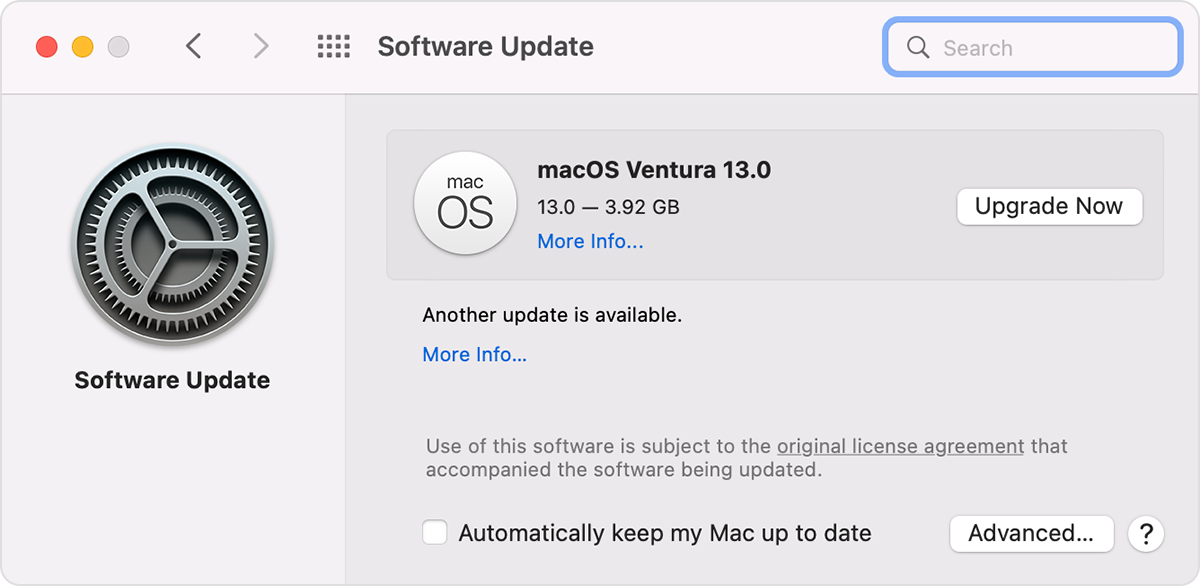
3. Enter your administrator password, if asked. During installation, your Mac might restart, and you might see a progress bar or blank screen several times.
If Software Update says that your Mac is up to date, then no new software is currently available for your Mac model. Software Update shows only updates and upgrades that are compatible with your Mac.
If you have the latest macOS version installed already, see if you can adjust the video quality to '1080p' or 'Best' on the website. If that isn't helpful, you'll need to work directly with their support teams on this as they may not support the video quality with browsers. Check out the following resource found from Zee5 Help Center: Video quality is poor for all videos - Zee5 Help Center
Should you need additional assistance, be sure to reach out directly to them.
Take care!