ulbrandt wrote: …it makes the process impossible for me
I think that may be because iCloud.com was never meant to be a place for mass operations. Since iCloud is a synchronization service and not a backup service, everything at iCloud can be handled on the Mac where things are way easier.
If you want jpgs in Finder, then the best way to go is to do it with Photos on the Mac. You just use File>Export>Export Unmodified originals if you want those, or File>Export>Export nn Photos to get edited versions. Or both. As always, you should do this in smaller batches.
Having both originals and edits as jpgs takes twice as much storage, and for my money, it's way better to just get a copy of the whole Library, which is smaller and has more information.
So instead, what I would do is format the external drive in APFS with the Disk Utility. Then create a new Photos Library on the external drive, make it the System Library, connect it to iCloud, and turn off Optimize.. Then sit back, relax, and wait for it to fill up with all your pictures.
To do that, you create a new Library with the Library Chooser-- close Photos and option-click the Photos icon to get this:
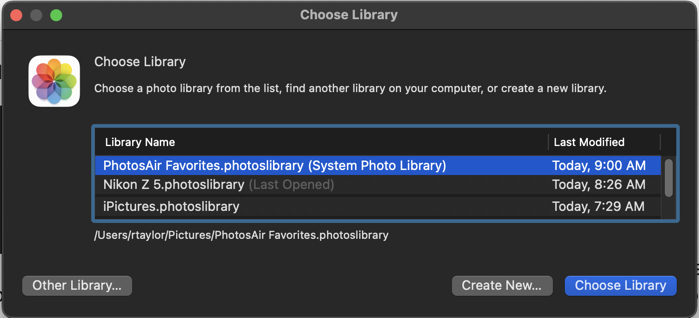
This shows the Libraries you already have (probably only one, but I have a bunch) and has a "Create New" button. You can put the new Library on the external drive with whatever name makes sense to you.
Only the Library designated as the System Library can connect to iCloud, so you have to make this new one the System Library using Photos' Settings>General
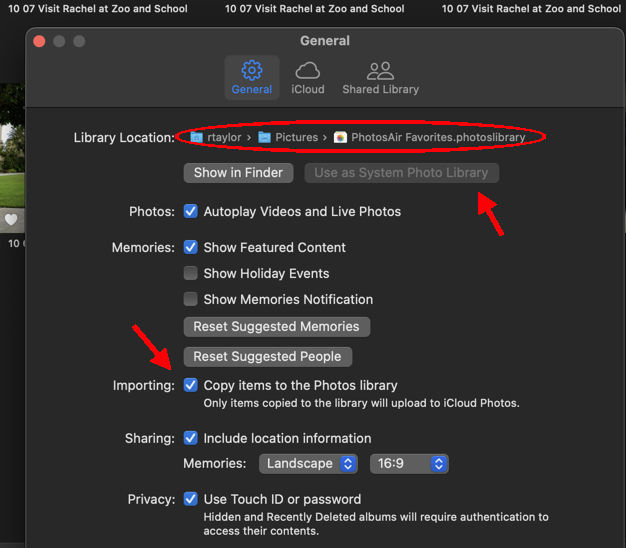
The General Settings shows the location of the Library, and it has a button for "Use as System Photos Library." Mine is grayed out, because it already is. Be sure that "Copy" is checked-- it should be the default.
Then connect to iCloud with Photos' Settings>iCloud.
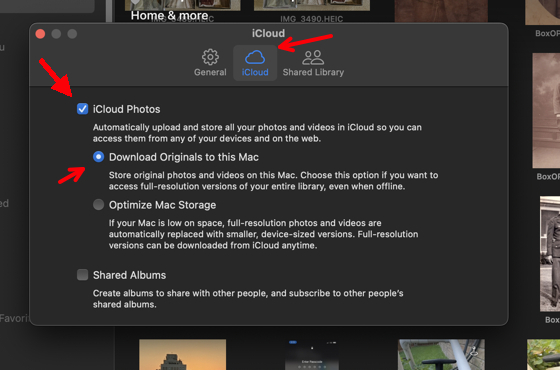
Just check iCloud Photos and "Download Originals."
It will probably take a few days to transfer all the pictures at iCloud.com to your Mac, but you don't have to do a thing. Well, you should leave your iMac turned on, and don't have the Photos app up front-- you don't want it to think syncing would slow your work. Overnight is good.
This way you get the full unmodified original files along with any edits, crops. or comments that you've made. And you can view this Library in Photos, where, if you want, you can export picture files at your leisure.