Mackbook M1 charging every day!

MacOS 26 always tries to discharge the battery to 80%, even though the Mac is plugged in.

Another issue is when the Mac is idle: when folded, the battery drained 1% every 4-5 days, but now it's 80% after 2 days of inactivity.

I bought the laptop 8 months ago, and with MacOS 18, I only got 12 charge recycles in 7 months, but now it's 18 charge recycles in 1 month.


[Edited by Moderator]

MacBook Air 13″, macOS 26.0

Posted on Oct 31, 2025 5:29 AM

Reply
2 replies

Oct 31, 2025 6:22 AM in response to Reznik63

The best practice is to plug into power whenever it’s convenient and run on battery only when you cannot connect to power. Your Mac uses Optimized Battery Charging, which is enabled by default. That is designed to charge the battery in a way that balances increased battery lifespan with your personal usage patterns. That's the feature that pauses charging at 80%.


About battery health management in Mac notebooks - Apple Support


To confirm that Optimized Battery Charging is enabled, go to System Settings > Battery then click the (i) to the right of Battery Health. I don't recommend it, but if you want you can disable it with the toggle.
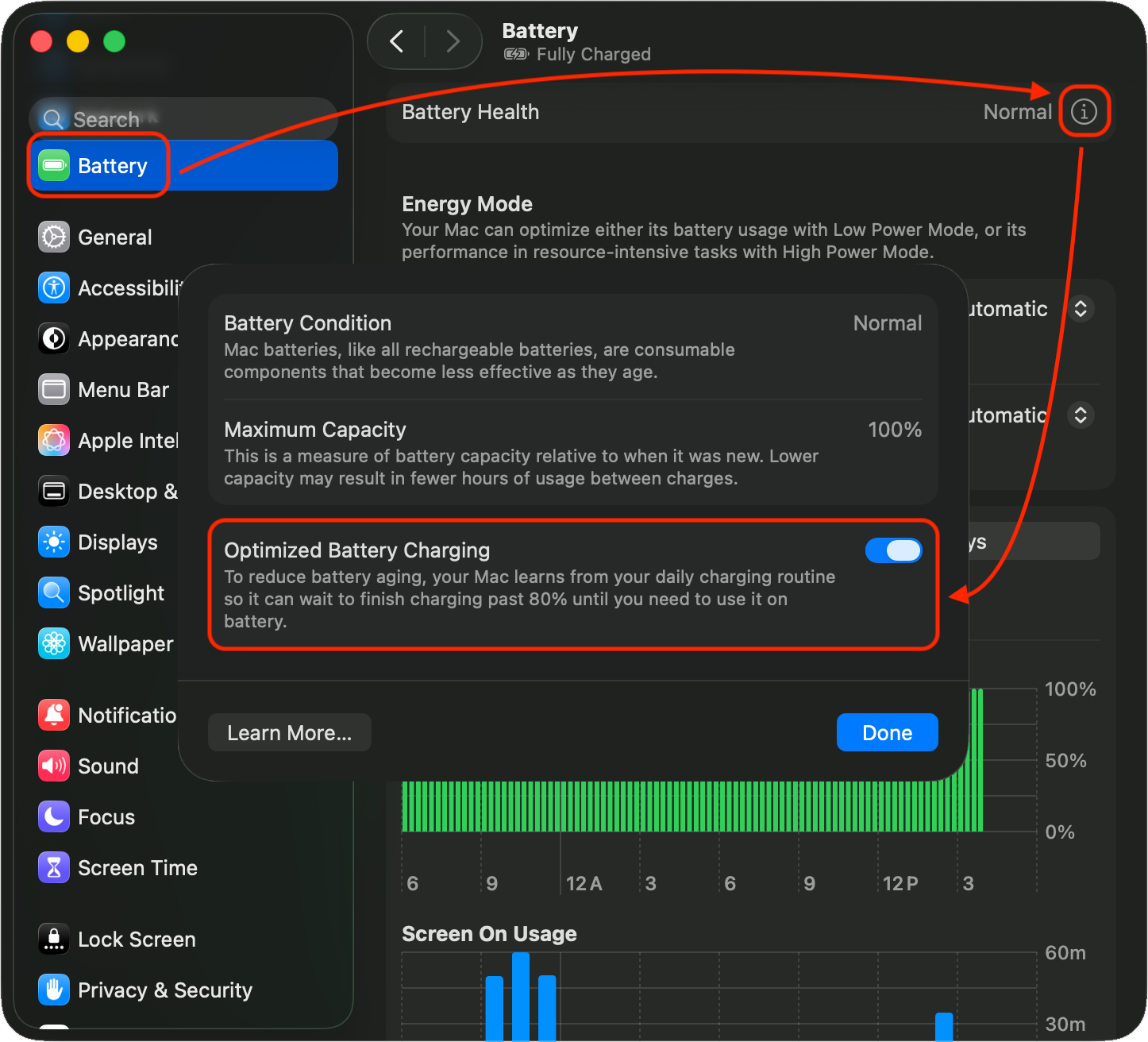


As for draining during inactivity, it is possible there are processes running in the background that are using significant resources. Check Activity Monitor, CPU tab, sort by % CPU to see what's running hard. This is not uncommon with apps/extensions that are not fully compatible with a macOS upgrade.


Activity Monitor User Guide for Mac - Apple Support


Regarding the Mac running the battery down to 80% while plugged in, that's not a Tahoe thing. One of my MBPs is still on Sequoia, you can see that's exactly what happened:



Oct 31, 2025 9:31 AM in response to Reznik63

I bought the laptop 8 months ago, and with macOS 18....


Please clarify. There is no "macOS 18". macOS jumped from v15 to v26 in September.


Was it used or did you buy a refurbished one directly from Apple? The M1 Macbook Air was discontinued in March 2024. If you bought it eight moths ago, that raises the possibility of it being pre-owned and it may not have the original Apple battery.


This thread has been closed by the system or the community team. You may vote for any posts you find helpful, or search the Community for additional answers.

Mackbook M1 charging every day!

Welcome to Apple Support Community
A forum where Apple customers help each other with their products. Get started with your Apple Account.
