I just upgraded from Ventura 13.1 to 13.2, and now several of my external hard drivers do not appear

I just upgraded from Ventura 13.1 to 13.2, and now several of my external hard drivers do not appear on my desktop. Everything looks okay when I boot in safe mode, and the disks show up when running Disk utility in recovery mode.

Suggestions appreciated.

Thanks


Posted on Jan 24, 2023 3:58 AM

Reply
10 replies

Jan 27, 2023 2:53 PM in response to Old Toad

I have one drive that does not show up on the desktop or in the Locations sidebar of a Finder window, but if I Go to Folder, I can see it in /Volumes. Other hard drives, internal and external, show up as expected, but not this one particular USB external drive. I haven't done any more digging into it, I know it is there and my Carbon Copy Cloner does a nightly backup to that external USB drive. It is plugged into the same USB hub as another external dock/drive. When it is plugged into a USB3 port on the computer it unmounts frequently, but that is another issue.


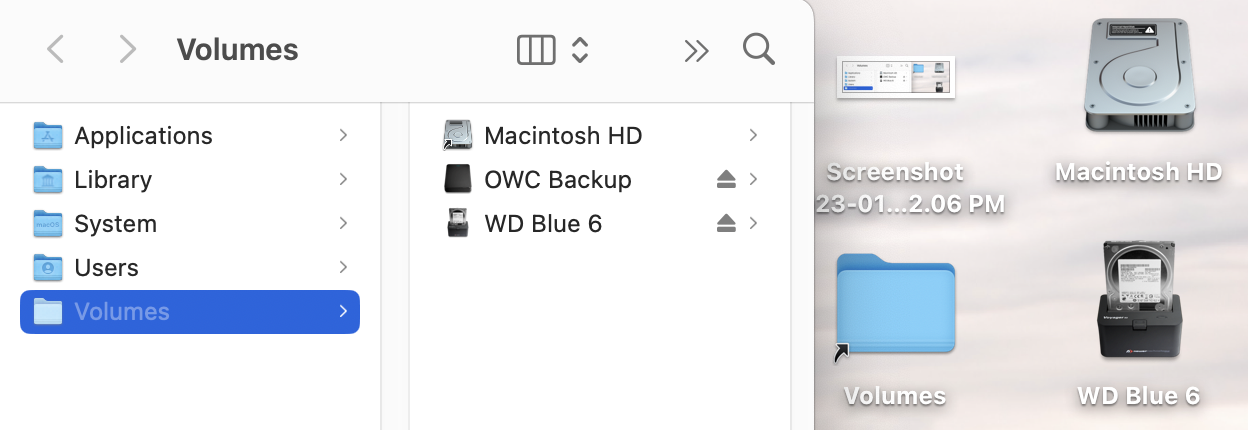
So, for those who can't see the drive in Finder, does it still show up as a mounted /Volume if you Go to that Folder? You can Make an Alias of the /Volumes folder on your Desktop to get to those mounted drives quickly, as a work around.


For example: my OWC Backup is mounted in /Volumes, but I can't see it in any of the usual places the other hard drives show up.


Jan 24, 2023 9:12 AM in response to den.thed

Thanks - appears to be all okay - set to display external drives. Two of the five are displayed properly, but three are not. I also tried different ports on the back of the iMac and it made no difference.

This is a 2017 27" iMac, so I do not know if that makes any difference. My MacBook Pro (2019) seems to be displaying the external disks properly.

Suggestions appreciated.


Feb 2, 2023 9:33 AM in response to Glen Doggett

I have the same exact problem. I didn't notice until just today when I needed to restore a file from my backup that was created in Carbon Copy Cloner. I can access it by going to /Volumes as you suggested or even from CCC's reveal in finder, but no matter what I do, it won't show up in the sidebar or on the desktop. That said, my backups are working flawlessly, and I can copy files from it. I performed a First Aid on the drive and it said no problems. Also went into safeboot. Wouldn't show up there either. Nor did safeboot fix the problem. Is this a bug that should be reported to Apple at www.apple.com/feedback?

I'm not seeing how to create alias for it to place it on my desktop as you suggested either.????

2021 M1 iMac, Ventura 13.2

This thread has been closed by the system or the community team. You may vote for any posts you find helpful, or search the Community for additional answers.

I just upgraded from Ventura 13.1 to 13.2, and now several of my external hard drivers do not appear

Welcome to Apple Support Community
A forum where Apple customers help each other with their products. Get started with your Apple Account.