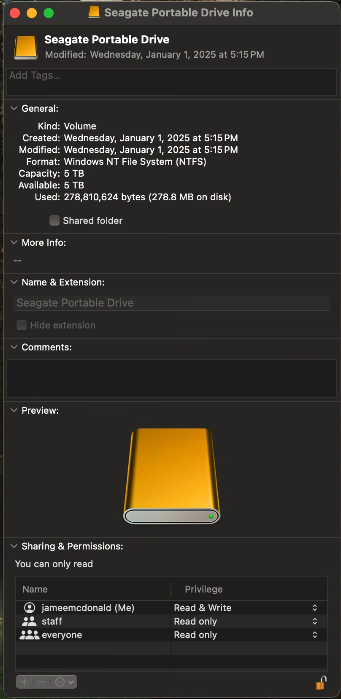
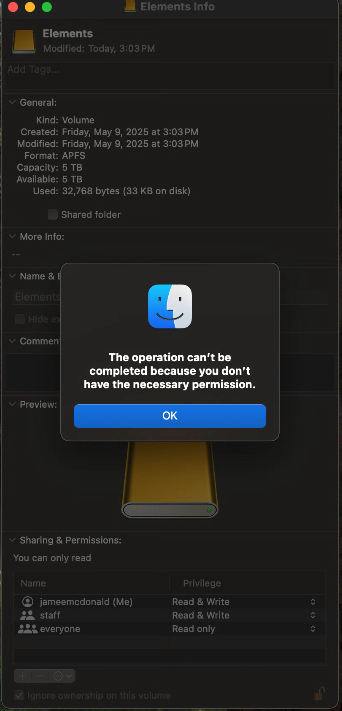
This issue happened to me too. I've had my external drive plugged into my M2 Mac mini for a while now. Two days ago, when copying items to the drive I get an read only message. I remote into the Mac and there's a toast notification at the top that says the drive was not ejected properly. I hadn't remoted into the mini in about six months.
When I look at the Get Info on the drive it now says "You can only read" and I'm unable to create files or folders or copy anything to it. When I try to change permissions on any of the accounts I get a message that the operation failed and that I do not have sufficient privileges. My account is administrator.
I purchased a new drive and formatted it in APFS and it shows the same thing. I know the drives aren't bad because I can format them into NTFS and copy, delete and move files on and off these drives in Windows without an issue.
All of this despite my drives being formatted in APFS. I've never used NTFS or any other format. So now I'm kind of stuck and don't know how to proceed. I've been through every permutation of troubleshooting I can try and nothing works. I've done too much to recount it all but it's been quite frustrating.
The screen captures say the drive was modified January 1 2025 but that's not true. I just reformatted today, May 9th, 2025.